

Foundation Top Bar Navigation Menu
Display a WordPress navigation menu or page list as a responsive Foundation top bar.
Plugin info
Maintenance & Compatibility
Maintenance score
Possibly abandoned • Last updated 3844 days ago • 2 reviews
Is Foundation Top Bar Navigation Menu abandoned?
Possibly abandoned (last update 3844 days ago).
Compatibility
Similar & Alternatives
Explore plugins with similar tags, and compare key metrics like downloads, ratings, updates, support, and WP/PHP compatibility.
Description
The Foundation Top Bar Navigation Menu plugin allows theme developers to display a WordPress menu as a responsive Foundation top bar. The plugin includes the following core functions:
- A walker that applies Foundation top bar classes to a menu or page list
- Registration of a default “Top Bar” menu location
- The ability to include a basic version of Foundation that supports the top bar
Visit Zurb Foundation to learn more about the Foundation top bar and to view an example.
Usage
Download and include the Foundation framework in your theme (or load the basic version included with the plugin — see Notes below.)
Assign a new or existing WordPress menu into the “Top Bar” menu location. (or use ‘wp_list_pages’ to display a list of pages as a top bar — see below.)
Edit your theme’s templates to display the top bar menu where you’d like it to appear. Use WordPress’ ‘wp_nav_menu’ function to display the top bar menu:
 'topbar',
        'container' => false,
        'walker' => new ftb_menu()
    ));
}
?>
A list of pages can be displayed instead of a menu using the ‘wp_list_pages’ function:
 '',
    'walker' => new ftb_pages()
));
?>
Notes
-
The ftb_menu() and ftb_pages() walkers both accept a single ‘no_wrap’ argument. Including this argument will remove the default top bar HTML wrapper and display just the
-
‘wp_nav_menu() -> theme_location’ argument can be set to any registered menu area.
-
This plugin optionally includes a basic version of Foundation 5.5.2 that contains only top bar support. It is recommended that Foundation be included directly in your theme instead of using this basic version. To load the plugin’s basic version in your theme set “Load Foundation Basic in Theme” to “true” in the “Settings -> General” admin screen.
-
Visit Zurb Foundation to download Foundation and to view installation and usage documentation.
-
Default WordPress menu classes are not included in outputted top bar HTML.
Notes
Top bar styling is the default included with the Foundation framework. Some customization is possible using Foundation and/or WordPress methods, but any customizations must be implemented by theme developers.
This plugin is developed using Zurb Foundation version 5.5.2.
Installation
- Download and unzip the plugin file.
- Upload the unzipped ‘foundation-top-bar-menu’ directory to your ‘/wp-content/plugins/’ directory.
- Activate the plugin through the ‘Plugins’ menu in WordPress.
- See “Description” for usage instructions.
Frequently Asked Questions
Review feed
Screenshots
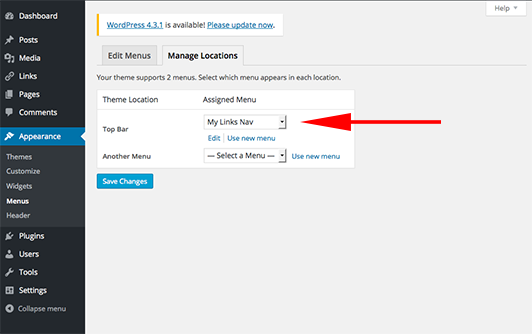
The “Appearance -> Menus -> Manage Locations” admin screen showing the “My Links Nav” menu assigned to the “Top Bar” theme location.

The “Settings - > General” admin page showing the “Load Foundation Basic in Theme” select dropdown.
Changelog
1.0
- Initial release.