

Fr Address Book For Woocommerce
Allow customers to save multiple addresses that they frequently use when placing an order.
Plugin info
Maintenance & Compatibility
Maintenance score
Stale • Last updated 261 days ago • 7 reviews
Is Fr Address Book For Woocommerce abandoned?
Likely maintained (last update 261 days ago).
Compatibility
Developers
Similar & Alternatives
Explore plugins with similar tags, and compare key metrics like downloads, ratings, updates, support, and WP/PHP compatibility.
Description
The address book contains the customer’s default billing and shipping addresses, and any additional addresses that they frequently use when placing an order. This will speed up the checkout process.
Installation
- Upload
fr-address-book-for-woocommercefolder to the/wp-content/plugins/directory - Activate the plugin through the Plugins menu in WordPress
- Go to WooCommerce → Settings → Accounts & Privacy → Address book to configure the plugin.
Note: this plugin does not support Block Editor, you need to use [woocommerce_checkout] shortcode.
- Go to Pages → Checkout
- Open the Block Transform menu
- Choose "Classic Shortcode"
Frequently Asked Questions
Deactivate and delete the plugin through the Plugins menu in WordPress.
No.
Review feed
Does not work at all from my account
Screenshots

Addresses page without addresses yet

Addresses page

Edit address

Checkout page
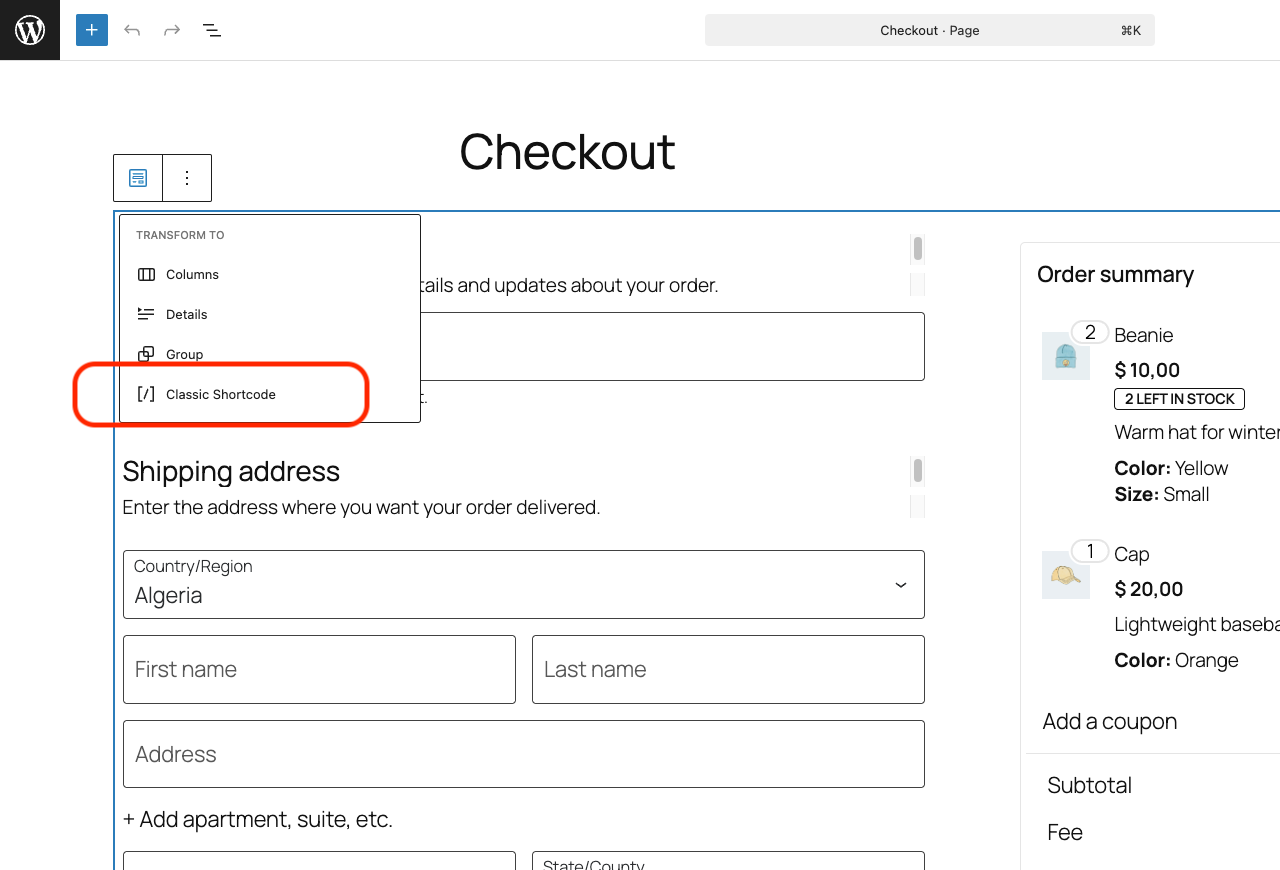
Switching to "Classic Shortcode"
Changelog
1.2.9
- Fix to ensure address fields are properly cleared after deletion.
1.2.8
- Fix address details not populating for old accounts.
1.2.7
- Declare HPOS compatibility.
1.2.6
- Add hooks to the add-address.php template.
1.2.5
- Fix phone data get removed when used as the shipping address.
1.2.4
- Update translation template.
- Fix compatibility issue with
woocommerce-extra-checkout-fields-for-brazilplugin.
1.2.3
- Fix order total not recalculated when post code changed.
- Use WooCommerce address if no addresses have been created yet.
1.2.2
- Fix the select address field is not displayed on Elementor editor.
- Fix address options are encoded with HTML entities on WooCommerce 4.2.2.
1.2.1
- Fix address not saved for new customers who create the account at checkout.
1.2.0
- Add option to give each addresses a name.
1.1.1
- Fix missing endpoints after saving permalink settings.
1.1.0
- Add option to set the maximum number of addresses.
- Add support for Twenty Nineteen theme.
- Fix unselected addresses get deleted after place order on WooCommerce 3.5.0 or newer.
1.0.0
- Released.