

Free Shipping Notice for WooCommerce
Displays the remaining price to receive free shipping on the cart and checkout pages.
Plugin info
Maintenance & Compatibility
Maintenance score
Possibly abandoned • Last updated 2580 days ago • 1 reviews
Is Free Shipping Notice for WooCommerce abandoned?
Possibly abandoned (last update 2580 days ago).
Compatibility
Similar & Alternatives
Explore plugins with similar tags, and compare key metrics like downloads, ratings, updates, support, and WP/PHP compatibility.
Description
Increase average order value by advertising your free shipping. Make sure your customers know about your offer through the Free Shipping Notice plugin.
Free Shipping Notice adds a message in your cart and checkout about the amount remaining until a customer is eligible for free shipping.
Features
* Individualized – updates based on each customer’s cart total to show remaining amount to spend
* Customization – customize colors, free shipping minimum, and applicable countries in the settings tab
* Geolocation – the plugin will detect a customer’s country to see if free shipping applies there (based on settings)
* Mobile-friendly – compatible with mobile devices
Note
To use Free Shipping Notice, you must set up free shipping by adding a “free shipping” shipping method with a minimum order requirement through WooCommerce shipping zones
Installation
- Upload
free-shipping-notice.phpto the/wp-content/plugins/directory - Activate the plugin through the ‘Plugins’ menu in WordPress
- Go to Settings -> Free Shipping Notice to customize the plugin
Frequently Asked Questions
How do I contact support for help or issues with the plugin?
Post in the support forum or email me at caitlinchou at gmail dot com.
Can I suggest a feature?
I would love to hear your input. Email me at caitlinchou at gmail dot com.
Review feed
Screenshots
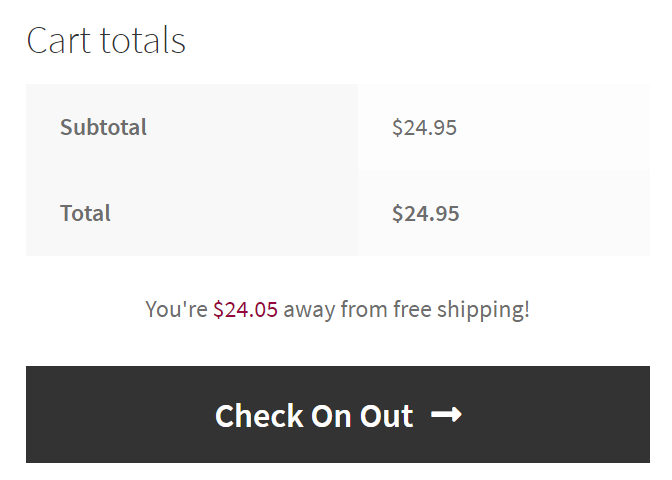
On the cart page, customers will be alerted to see how much more they have to spend to reach free shipping if their current total is under the free shipping amount.

The checkout page also displays the free shipping notice.

In settings, you can change the minimum free shipping requirement, highlight color for the notice, and countries that free shipping applies to.
Changelog
1.1
- currency formatted correctly
- add options in settings to toggle message on cart and checkout
1.0
- Initial Release