

Free SMS for WooCommerce
Free SMS for WooCommerce is a WooCommerce plugin that sends SMS notifications directly from your phone, using dedicated Android app.
Plugin info
Maintenance & Compatibility
Maintenance score
Possibly abandoned • Last updated 579 days ago • 3 reviews
Is Free SMS for WooCommerce abandoned?
Possibly abandoned (last update 579 days ago).
Compatibility
Similar & Alternatives
Explore plugins with similar tags, and compare key metrics like downloads, ratings, updates, support, and WP/PHP compatibility.
Description
Free SMS for WooCommerce is a plugin that sends SMS notifications (when, for example, you change the order status to completed) directly from your phone, using dedicated open-source Android app.
features:
* 30 messages/month for free
* $2 monthly for unlimited messages, or you can spin up your own service and have it for free (see the plugins website for more details).
* No contracts and additional fees
* Send different messages to different countries
* Or just send messages to your country only
* Send messages when order is placed, completed, cancelled, delayed and more
Installation
- Install Free SMS for WooCommerce plugin.
- Open plugin’s website (smsforwoocommerce.gitlab.io ) with your phone and download the Android app. Install the app. (If you’re not sure how to do that, there’s a lot of resources that can help. If you’re not sure if you want to install an app from untrusted source, check the “I’m afraid…” FAQ question.)
- Open the app on your phone and scan QR code in the top corner of your WooCommerce plugin settings page. You’ll see ‘success’ message.
You can close the Android app now. SMS messages will be sent in the background.
Frequently Asked Questions
Simply put, your Free SMS for WooCommerce plugin asks your Android app to send SMS when order status has changed.
Please see install instructions or go to plugins website.
The plugin is free. The Android app is free and open-source too. And you get 30 messages / month for free. If you need more, you can purchase the permium plan for $2/month or spin up your own service that handles requests from the plugin and forward them to Android app using Google’s GCM (check the plugin code for description).
Android app is free and open source. The only thing it does is <technical mumbo-jumbo> waiting for the google cloud message notification and send sms. It keeps your QR as a token to communicate with the messaging server </technical mumbo-jumbo> It asks for camera and SMS permissions at startup. Camera is required to scan QR code. You can download the source code here and compile it on your own if you want.
Make sure you’re using Android 8 (Oreo) or higher.
No, only Android is supported.
Due to new Google Play permissions policy the app that wants to send SMS must be a “Default SMS handler”. This policy prevents malicious apps from accessing SMS functionality, but also prevents Free SMS for WooCommerce from being listed in Google Play store.
Yes. You need to create an http server that does 2 things:
Wait for the POST message from the Android app (when you scan the QR code) and store it somewhere.
params: { qrToken, firebaseToken }
Wait for the POST message from WordPress plugin (when order status changes) and send the Firebase Cloud Message to your phone.
params: { qrToken, phone, message }
Then you just need to replace the SEND_MESSAGE_URL variable in Plugin code, and also replace the service url in Android app source code.
Review feed
Screenshots
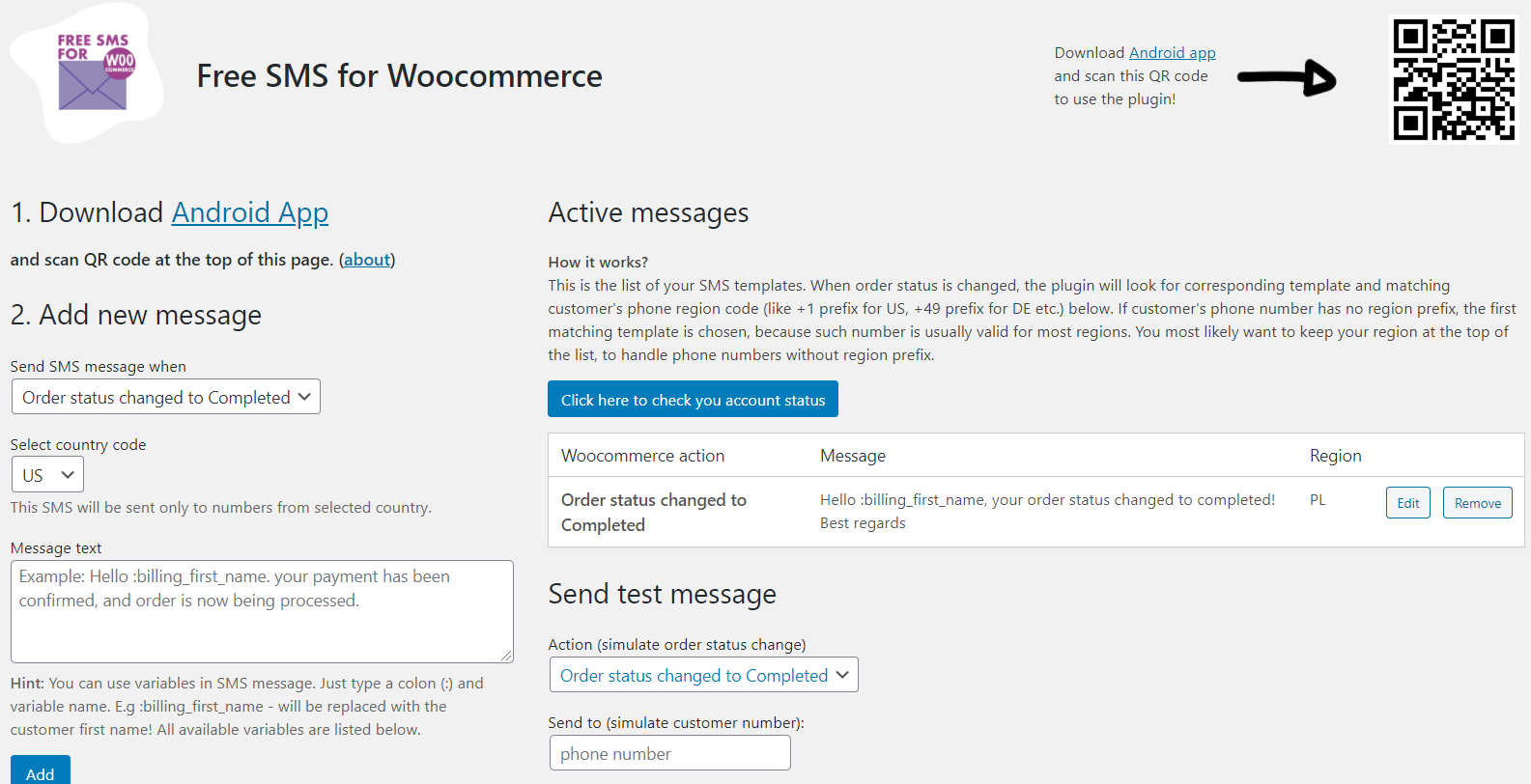
Settings page

Mobile app