

WooCommerce Products to FactuSOL
Export CSV reports with the current WooCommerce Products & Variations to import into FactuSOL. ESPAÑOL Exporta en formato CSV los Productos y Va …
Plugin info
Maintenance & Compatibility
Maintenance score
Possibly abandoned • Last updated 3220 days ago
Is WooCommerce Products to FactuSOL abandoned?
Possibly abandoned (last update 3220 days ago).
Compatibility
Similar & Alternatives
Explore plugins with similar tags, and compare key metrics like downloads, ratings, updates, support, and WP/PHP compatibility.
Description
This plugin allows you to export CSV files (ART, STO and LTA) with all the WooCommerce Products and Variations according to document “Instrucciones para la importación de datos desde OpenOffice.org Calc o Microsoft Office Excel” (included with plugin). This document is propietary of Software DelSOL, and may be different for every version of FactuSOL. FactuSOL is a mini-ERP system for Spanish small companies.
Exported files are UTF-16, comma-separated, and string values are enclosed in double quotes. These files may be edited and saved as .xls or .odt to meet FactuSOL estandards before importing into FactuSOL.
ESPAÑOL
Este plugin exporta en formato CSV (ART, STO y LTA) los Productos y Variaciones de WooCommerce de acuerdo con la estructura descrita en el documento “Instrucciones para la importación de datos desde OpenOffice.org Calc o Microsoft Office Excel” (incluido con el plugin).
Los ficheros son en formato UTF-16; los campos están separados por una coma, y los campos alfanuméricos se encierran con dobles comillas. Estos ficheros pueden ser editados y guardados como .xls o .odt antes de importar a FactuSOL.
Features:
- Generates CSV file reports with the current WooCommerce Products & Variations;
- It’s also possible to see the report as a HTML table directly on the plugin’s admin page;
- WooCommerce 2.* and 3.* compatible;
Installation
- Use the included automatic install feature on your WordPress admin panel and search for “FSx-Connector Exporter”.
- Go to WooCoomerce > FSx-Exporter to generate CSV files.
Frequently Asked Questions
Installation Instructions
- Use the included automatic install feature on your WordPress admin panel and search for “FSx-Connector Exporter”.
- Go to WooCoomerce > FSx-Exporter to generate CSV files.
Which version of FactuSOL do I need?
FSx-Connector Exporter will work with FactuSOL 2017 out of the box. But it is pretty easy to customize for any FactuSOL version.
Can this plugin also…?
Nope! FSx-Connector Exporter is the right tool for a specific task. That’s it.
Review feed
Screenshots
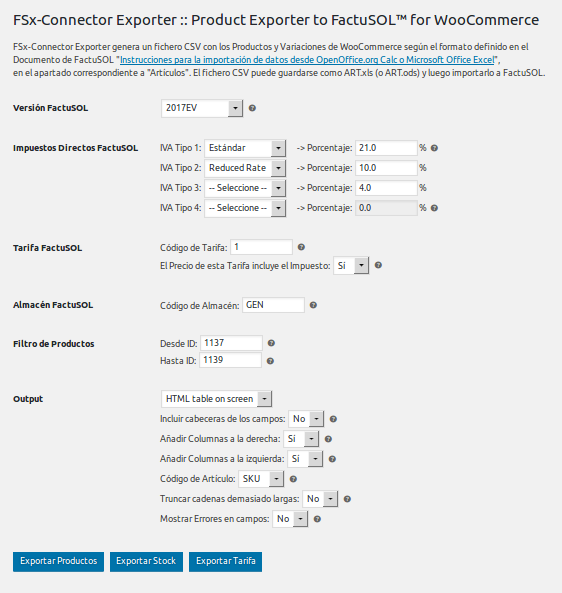
FSx-Connector Exporter: Pantalla principal / Main screen
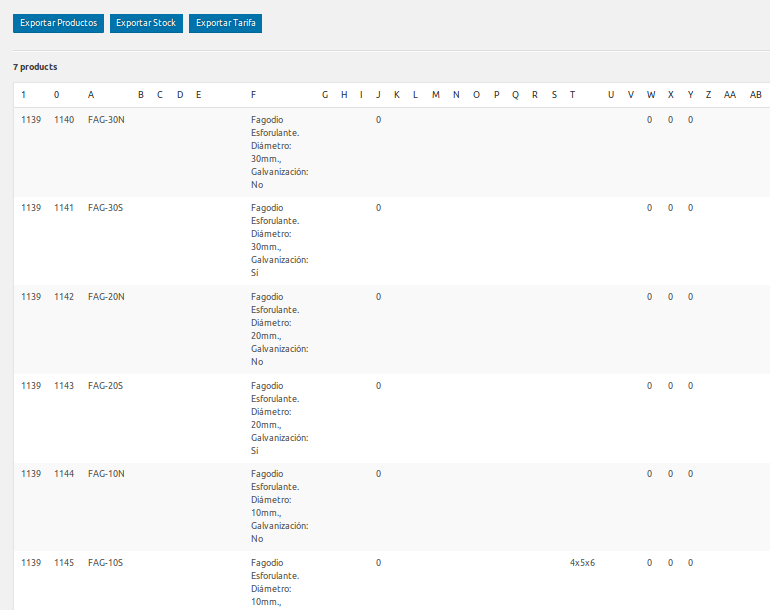
Salida por pantalla de Productos (ART)

Salida por pantalla del Stock (STO)

Salida por pantalla de la Tarifa (LTA)

FactuSOL: Programa de facturación y control de stock para empresas
Changelog
1.5.7
- Release date: 2017-05-12
- Añadido: compatibilidad con el Plugin FSx-Connector
- Some small bug fixes
1.5.6
- Release date: 2017-05-06
- Initial release