

Functionality
Creates a functionality plugin where you can add your functions.php code snippets.
Plugin info
Maintenance & Compatibility
Maintenance score
Possibly abandoned • Last updated 1949 days ago • 12 reviews
Is Functionality abandoned?
Possibly abandoned (last update 1949 days ago).
Compatibility
Developers
Languages
Similar & Alternatives
Explore plugins with similar tags, and compare key metrics like downloads, ratings, updates, support, and WP/PHP compatibility.
Description
A functionality plugin is a way to separate what you might normally place in a theme’s functions.php file, and put it in a plugin instead. It works the same way as a theme functions.php file, but is separate from the theme and so not affected by theme upgrades, or tied to the theme so you loose all of your functions if you choose to switch themes.
This plugin automates the process of creating a functionality plugin. Simply install and activate this plugin, and your very own functionality plugin will be created for you. You can then edit your functionality plugin and add snippets to it using the quick link in the admin menu.
See this WP Daily post for more information on functionality plugins.
This plugin’s code is available on GitHub. Please feel free to fork the repository and send a pull request. If you find a bug in the plugin, open an issue.
Serbian translation provided by Ogi Djuraskovic from FirstSiteGuide.com.
Installation
- Upload the
functionalitydirectory to the/wp-content/plugins/directory - Activate the plugin through the ‘Plugins’ menu in WordPress
- Visit the ‘Plugins > Edit Functions’ menu in WordPress and enter filesystem credentials if necessary
- A functionality plugin will be created for you in
wp-content/plugins/functions/functions.php - Use the built-in WordPress file editor to edit your functionality plugin
Enable Styles Feature
- To enable the optional CSS styles feature, uncomment that line in the functions file, save the changes, and refresh the page
- Visit the new ‘Plugins > Edit Styles’ admin menu and enter filesystem credentials if necessary
- A stylesheet file will be created for you in
wp-content/plugins/functions/style.css. This file will be automatically loaded on the front-end of your site. - Use the built-in WordPress file editor to edit your stylesheet plugin
This plugin may be removed at any time, and your functionality plugin will remain working and intact. You will, however, loose the quick edit links in the admin menu, and automatic styles loading if that feature is enabled.
Frequently Asked Questions
My functionality plugin isn’t working!
First of all, backup all of the code in your functionality plugin. Then deactivate and delete your functionality (it will have the same name as your site). To recreate the functionality plugin, visit the ‘Edit Functions’ link in the WordPress admin menu.
Can I get rid of this plugin once my functionality plugin has been created?
Sure! Once this plugin has been activated and the functionality plugin created, all it does is create a link in the WordPress admin menu for easily editing the functionality plugin, and include your CSS code on the front-end of your site. If you don’t want this, feel free to delete this plugin.
When would I use this plugin over the Code Snippets plugin?
This plugin is more suited to people who only have a few snippets and prefer editing a file to using a graphical interface. If you have more snippets, and like to be organized, you may feel more at home using the Code Snippets plugin, which I also created.
Isn’t this just like the Pluginception plugin?
Yes, in that they are both a plugin for creating plugins. However, this plugin is a bit more easier to use and specific than Pluginception.
Review feed
Simple to use
Very good and super useful!
Nice Idea, but does not seem to work
Screenshots
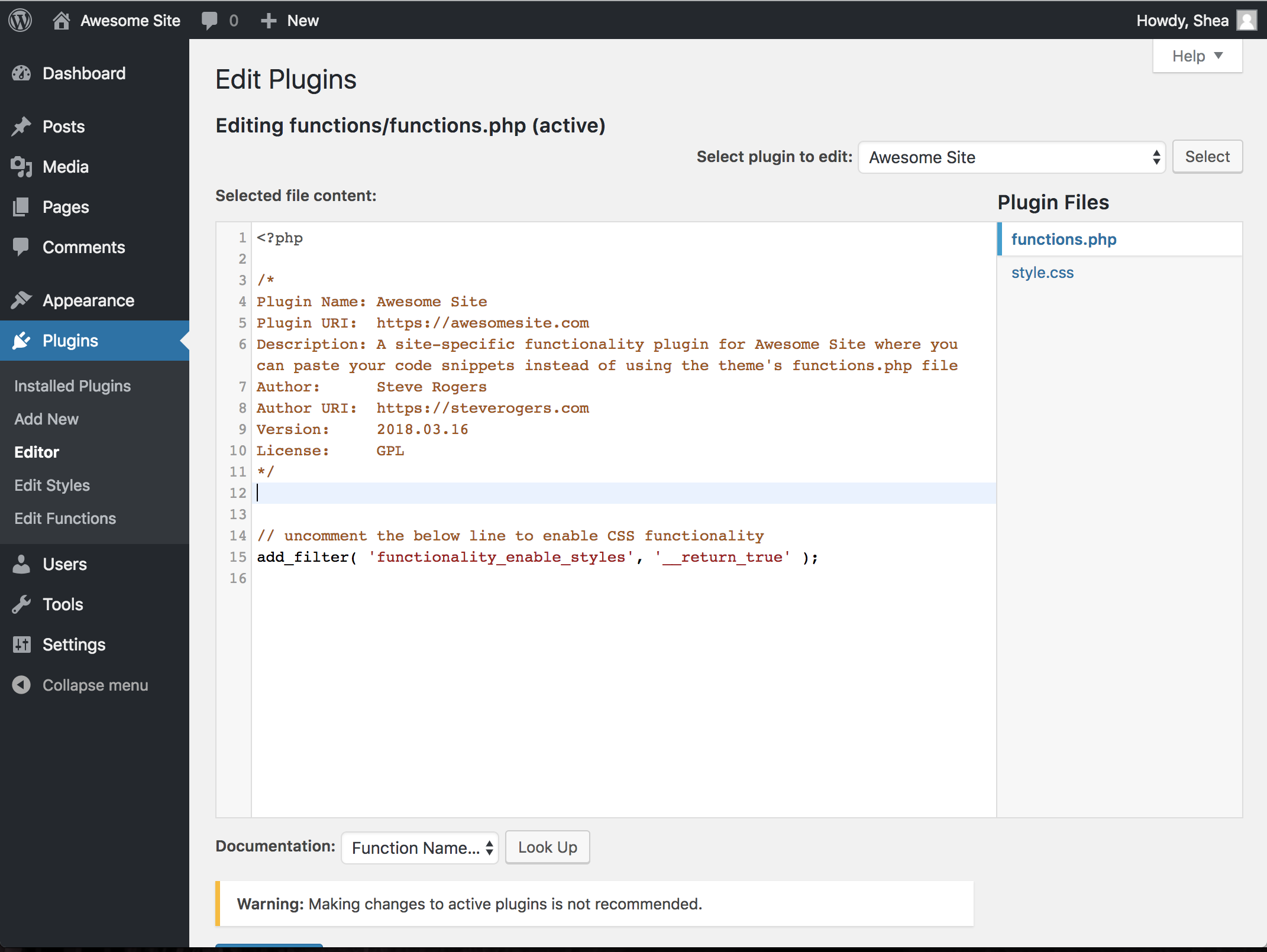
Editing the functionality plugin in the WordPress plugin editor
Changelog
2.0.0
- Reorganised internal structure of plugin
- Improved formatting of default file content
- Moved functionality plugin into its own subdirectory
- Added feature for creating a CSS stylesheet
- Improved integration with the WP Filesystem API
1.2.1
- Fixed bug preventing functionality plugin from being created on plugin activation
1.2.0
- Updated to use
wp_get_current_user()instead ofget_currentuserinfo() - Updated code structure to use a controller class
- Added support for the WP Editor plugin
1.1.1
- Added Serbian translation thanks to Ogi Djuraskovic from FirstSiteGuide.com
1.1
- Fixed a spelling error when initializing the class
- Only initialize the class on plugin activation
- Move class to separate file
- Used a more reliable method of functionality plugin activation
1.0
- Initial release