

Future Dashboard Widget
Display scheduled/future posts list on your WordPress dashboard. Require WP 2.7 or above.
Maintenance 20/1005949d since update
Active installs
10
Downloads
3,050
Reviews
0
Age
16.3y
Plugin info
Total downloads: 3,050
Active installs: 10
Total reviews: 0
Average rating: 0
Support threads opened: 0
Support threads resolved: 0 (0%)
Available in: 1 language(s)
Contributors: 1
Last updated: 12/18/2009 (5949 days ago)
Added to WordPress: 12/18/2009 (16 years old)
Minimum WordPress version: 2.7
Tested up to WordPress version: 2.9.2
Minimum PHP version: f
Maintenance & Compatibility
Maintenance score
Possibly abandoned • Last updated 5949 days ago
20/100
Is Future Dashboard Widget abandoned?
Possibly abandoned (last update 5949 days ago).
Compatibility
Requires WordPress: 2.7
Tested up to: 2.9.2
Requires PHP: f
Similar & Alternatives
Explore plugins with similar tags, and compare key metrics like downloads, ratings, updates, support, and WP/PHP compatibility.
MY Missed Schedule
Rating 5.0/5 (3 reviews) • Active installs 100
Automatic Post Scheduler
Rating 5.0/5 (2 reviews) • Active installs 80
wpFutureCal
Rating 5.0/5 (1 reviews) • Active installs 10
Presswell Publication Schedule
Rating 0.0/5 (0 reviews) • Active installs 10
Future Widget
Rating 0.0/5 (0 reviews) • Active installs 0
Description
Display scheduled/future posts list on your WordPress dashboard. Require WP 2.7 or above.
Installation
- Download the plugin
- Unzip
- Upload the entire future-dashboard-widget folder to your plugins directory
- Go to the Plugins page in your WordPress Administration area and click to ‘Activate’ the Future Dashboard Widget.
Frequently Asked Questions
Any Configuration?
Yes! but on version 0.1 only editing futurewidget.php …
Review feed
No reviews available
Screenshots
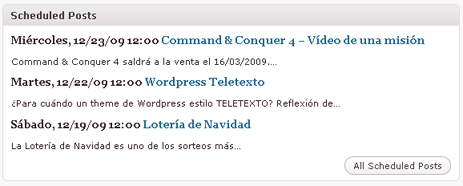
The widgets in action
Changelog
0.1
- First Version by Janmi.com
- Now supports WP 2.7 and above