

Genesis Bootstrap Carousel
This plugin allows you to create a simple responsive image carousel that displays the featured image, along with the title and excerpt from each post.
Plugin info
Maintenance & Compatibility
Maintenance score
Possibly abandoned • Last updated 4745 days ago • 5 reviews
Is Genesis Bootstrap Carousel abandoned?
Possibly abandoned (last update 4745 days ago).
Compatibility
Similar & Alternatives
Explore plugins with similar tags, and compare key metrics like downloads, ratings, updates, support, and WP/PHP compatibility.
Description
Note: This plugin only supports Genesis child themes. If you don’t know what that is, don’t download this plugin.
Genesis Bootstrap Carousel (GBC) allows you to create a simple responsive image carousel that displays the featured image, along with the title and excerpt from each post.
GBC is based off of the Genesis Responsive Slider and uses a lot of the same code. The main difference is that the Genesis Bootstrap Carousel uses the Carousel
jquery plugin created by the open source Twitter Bootstrap Project. The carousel.js in this plugin is roughly 1/4 the size of the jquery flexslider.js used by
the Genesis Responsive Slider. The CSS in this plugin is about half the size of the Genesis Responsive Slider plugin. Genesis Bootstrap Carousel also includes
options to easily disable the CSS and JS of the plugin, allowing you to move scripts or styles into a combined file inside your theme. GBC also uses CSS for the
next/previous arrows, avoiding an HTTP request and allowing easy customization via CSS. You may also choose what specifc post/page IDs the carousel JS and CSS get loaded on.
This way you can avoid loading assets on pages that are not using the Carousel and avoid unnecessarily increasing page load time.
It includes options for the maximum dimensions of your slideshow, allows you to choose to display posts, pages, custom post types, what category to pull from, and even the
specific post IDs of the posts you want to display. It includes next/previous arrows that can be turned on or off. Finally, you can place the carousel into a widget area.
The image carousel is also responsive and will automatically adjust for the screen it is being displayed on.
You can get information on how the carousel.js works by visiting the Carousel Section of the Twitter Bootstrap site.
Live example
Child Theme Integration
To adjust the carousel defaults for a child theme use a filter simiar to the following:
add_filter( 'bootstrap_carousel_settings_defaults', 'my_child_theme_bootstrap_carousel_defaults' );

function my_child_theme_bootstrap_carousel_defaults( $defaults ) {
    $defaults = array(
        'post_type'                      => 'post',
        'posts_term'                     => '',
        'exclude_terms'                  => '',
        'include_exclude'                => '',
        'post_id'                        => '',
        'posts_num'                      => 5,
        'posts_offset'                   => 0,
        'orderby'                        => 'date',
        'carousel_interval'              => 5000,
        'carousel_arrows'                => 1,
        'carousel_no_link'               => 0,
        'carousel_width'                 => '940',
        'carousel_height'                => '380',
        'carousel_excerpt_content'       => 'excerpts',
        'carousel_excerpt_content_limit' => 150,
        'carousel_more_text'             => 'Continue Reading',
        'carousel_excerpt_show'          => 1,
        'carousel_excerpt_width'         => 100,
        'location_vertical'              => 'bottom',
        'location_horizontal'            => 'left',
        'carousel_hide_mobile'           => 1,
        'html5_docytpe'                  => 0,
        'disable_css'                    => 0,
        'disable_js'                     => 0
    );
    return $defaults;
}
Installation
- Upload the entire
genesis-bootstrap-carouselfolder to the/wp-content/plugins/directory - DO NOT change the name of the
genesis-bootstrap-carouselfolder - Activate the plugin through the ‘Plugins’ menu in WordPress
- Navigate to the
Genesis > Carousel Settingsmenu - Configure the carousel
- In the “Widgets” screen, drag the “Genesis Bootstrap Carousel” widget to the widget area of your choice
Frequently Asked Questions
Review feed
Screenshots
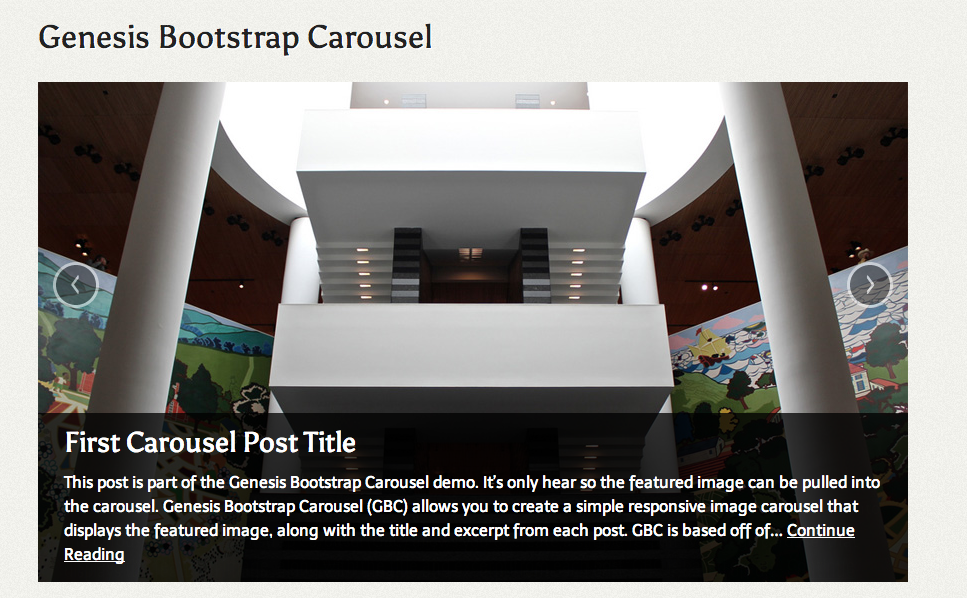
Carousel - Front End Display

Carousel - Shrunk down at smaller screen size

Carousel - Settings Page
Changelog
0.1.2
- Add a prefix to the html5_doctype function
0.1.1
- Add translation support
0.1.0
- Beta Release