

Plugin info
Maintenance & Compatibility
Maintenance score
Maintained • Last updated 119 days ago • 21 reviews
Is Genesis Custom Blocks abandoned?
Likely maintained (last update 119 days ago).
Compatibility
Similar & Alternatives
Explore plugins with similar tags, and compare key metrics like downloads, ratings, updates, support, and WP/PHP compatibility.
Description
Genesis Custom Blocks provides WordPress developers with the tools they need to take control of the block-first reality of modern WordPress.
The WordPress block editor (AKA Gutenberg) opens up a whole new world for the way we build pages, posts, and websites with WordPress. Genesis Custom Blocks makes it easy to harness this and build custom blocks the way you want them to be built. Whether you want to implement a custom design, deliver unique functionality, or even remove your dependence on other plugins, Genesis Custom Blocks equips you with the tools you need to hit “Publish” sooner.
Take control of design – Implement beautiful, custom designs with fine-tuned front-end templating control.
Build unique functionality – Build blocks that function and behave exactly as you need.
Extend & Integrate – Easily extend your custom blocks to integrate with third-party apps and plugins.
Features
A Familiar Experience
Work within the WordPress admin with an interface you already know.
Block Fields
Add from a growing list of available fields to your custom blocks.
Simple Templating
Let the plugin do the heavy lifting so you can use the built-in editor, or familiar WordPress development practices to build block templates.
Developer Friendly Functions
As an alternative to the built-in editor, there are simple functions, ready to render and work with the data stored through your custom block fields.
Currently available block fields
- Inner Blocks Field
- File Field
- Text Field
- Image Field
- URL Field
- Toggle Field
- Textarea Field
- Select Field
- Range Field
- Radio Field
- Number Field
- Multi-select Field
- Email Field
- Color Field
- Checkbox Field
Do more with Genesis Pro
For those wanting to level-up with Genesis Custom Blocks, a Genesis Pro subscription brings some serious power-user features:
Genesis Custom Blocks Pro Features
- Repeater Field
- Taxonomy Field
- Post Field
- User Field
- Rich Text Field
- Classic Text Field
- Block Level Import/Export
- 24/7 Support
Genesis Pro includes even more value for modern WordPress content creators, marketers, and developers. Learn more about Genesis Pro here.
Developer docs you can rely on.
Developer tools are only as good as their docs. That’s why we take them seriously. Here are a few links to get you started:
Links
Installation
This plugin can be installed directly from your site.
1. Log in and navigate to Plugins Add New.
2. Type “Genesis Custom Blocks” into the Search and hit Enter.
3. Locate the Genesis Custom Blocks plugin in the list of search results and click Install Now.
4. Once installed, click the Activate link.
It can also be installed manually.
1. Download the Genesis Custom Blocks plugin from WordPress.org.
2. Unzip the package and move to your plugins directory.
3. Log into WordPress and navigate to the Plugins screen.
4. Locate Genesis Custom Blocks in the list and click the Activate link.
Frequently Asked Questions
No. You can use this plugin completely independently. All you need is to have the block editor enabled on your WordPress site.
No. You can keep using your PHP block templates like block-example.php.
Review feed
Very Helpful
Screenshots
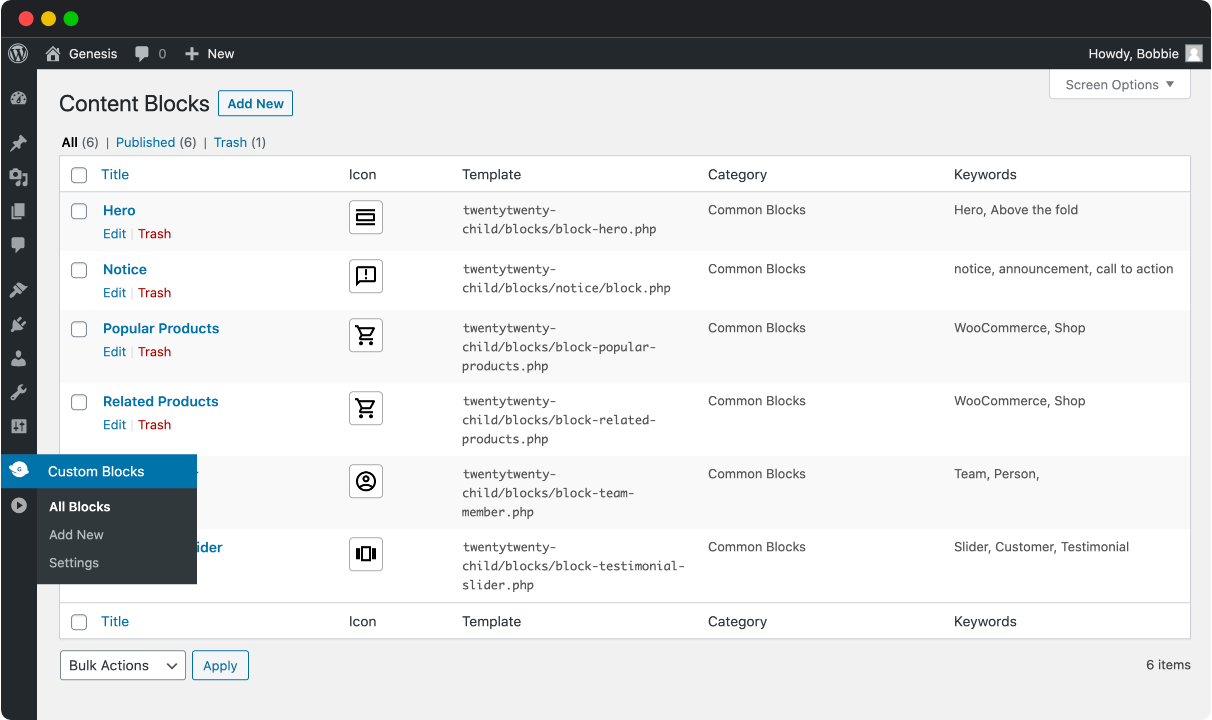
See all of your blocks from Genesis Custom Blocks.

Create your block like you create any other content.

Create the markup for your block in wp-admin, if you'd like.

Your custom block in the block editor.

Create the markup for your block in a PHP template in your editor, if you'd like.
Changelog
See the GitHub Releases page.