

GEO-location and directions
This plugin adds a floating button to your site, seen only by mobile users.
Plugin info
Maintenance & Compatibility
Maintenance score
Possibly abandoned • Last updated 4678 days ago • 3 reviews
Is GEO-location and directions abandoned?
Possibly abandoned (last update 4678 days ago).
Compatibility
Similar & Alternatives
Explore plugins with similar tags, and compare key metrics like downloads, ratings, updates, support, and WP/PHP compatibility.
Description
This plugin adds a floating button to your site, seen only by mobile users.
Pressing on this button shows the user his GEO-location and directions to the owner of the site location.
There is a control panel allowing the owner of the site to insert his location, control the style of how things look and more.
A brief Markdown Example
Ordered list:
- more options to the admin panel for better flexibility
- translation PO&MO files
Here’s a link to WordPress and one to Markdown’s Syntax Documentation.
Titles are optional, naturally.
Markdown uses email style notation for blockquotes and I’ve been told:
Asterisks for emphasis. Double it up for strong.
Installation
- Upload
geo-directions folderto the/wp-content/plugins/directory - Activate the plugin through the ‘Plugins’ menu in WordPress
- now you will see a button in your admin panel :”Geo Directions” where you can define the location of the business and other things.
- that is it ! you can access your site from a mobile device and see how it works
Frequently Asked Questions
how can i change the button text and style things ?
well, it is done from the admin panel.
Review feed
Screenshots
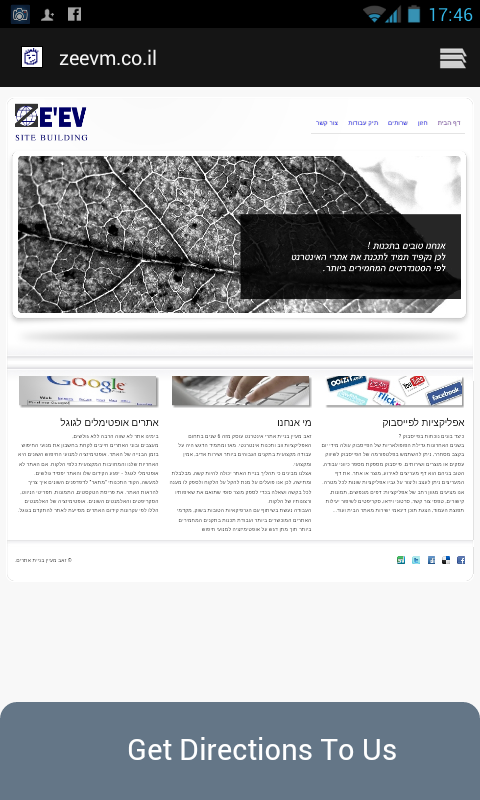
this is how the mobile user see the directions buttons

this is the directions guide from the user location to your location

this is the admin panel
Changelog
1.0
this is the first version