

Gravity Forms Campaign Fields Add-On
Add hidden fields to capture marketing campaign data in Gravity Forms.
Plugin info
Maintenance & Compatibility
Maintenance score
Possibly abandoned • Last updated 2793 days ago • 2 reviews
Is Gravity Forms Campaign Fields Add-On abandoned?
Possibly abandoned (last update 2793 days ago).
Compatibility
Similar & Alternatives
Explore plugins with similar tags, and compare key metrics like downloads, ratings, updates, support, and WP/PHP compatibility.
Description
This plugin adds advanced fields to Gravity Forms that collect campaign and device data and attaches the data to form entries.
The plugin can be configured to track first touch or last touch attribution and the campaign query string parameters are customizable.
The plugin currently supports:
- Google Analytics UTM Parameters
- Google AdWords (GCLID and MatchType)
- Device Information (browser, OS, device type)
- Marin (KWID and Creative ID)
- Google Analytics Client ID
Installation
- Upload the plugin files to the
/wp-content/plugins/gf-campaign-fieldsdirectory, or install the plugin through the WordPress plugins screen directly. - Activate the plugin through the ‘Plugins’ screen in WordPress
- Use the Forms->Settings->Campaign Info screen to configure the plugin
Frequently Asked Questions
Installation Instructions
- Upload the plugin files to the
/wp-content/plugins/gf-campaign-fieldsdirectory, or install the plugin through the WordPress plugins screen directly. - Activate the plugin through the ‘Plugins’ screen in WordPress
- Use the Forms->Settings->Campaign Info screen to configure the plugin
Does this plugin include Gravity Forms?
No, you must purchase your own license of Gravity Forms
Review feed
Screenshots

The settings screen where you define first/last touch attribution and the query string parameters used to define the values
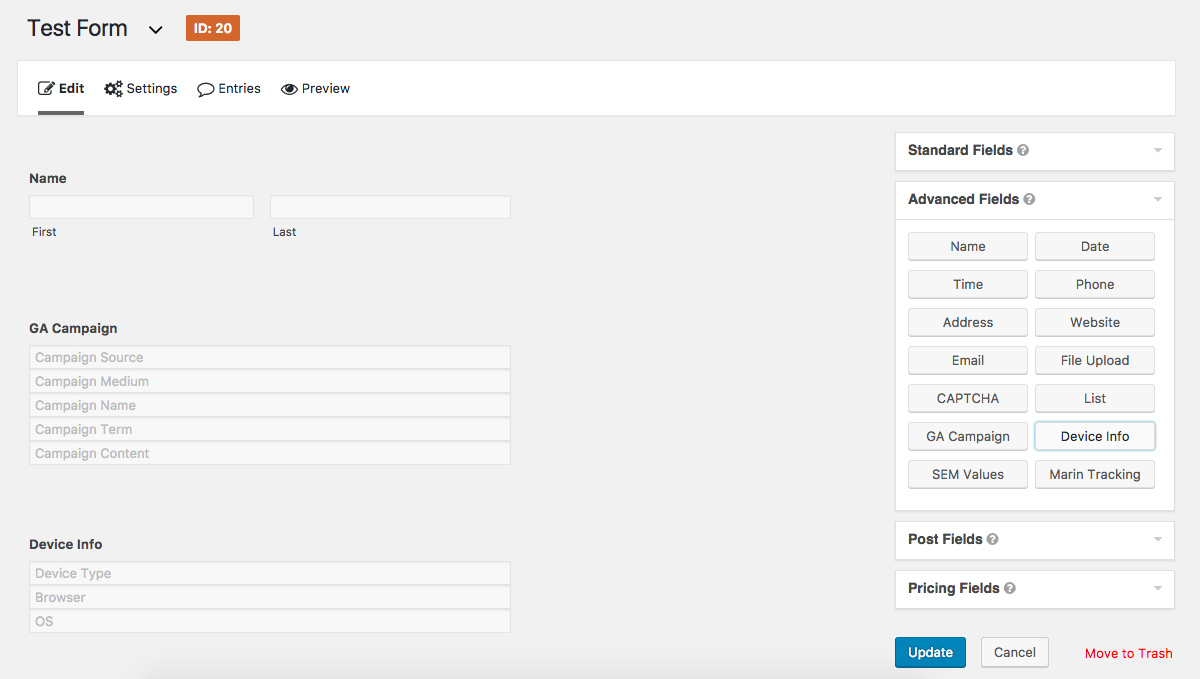
Building a form that contains campaign fields
Changelog
2.4
- Bug related to fields not being hidden
2.3
- Updated JS variable names
- Bug fixes
2.2.1
- closing tag fix
2.2
- Set UTM_SOURCE as required parameter to set data
2.1
- Refactored code to used GF_Field_HiddenGroup class
- Moved dependancies to “lib” folder
- Added Google Analytics Client ID field
2.0
- Added JS-Cookie library
- Refactored Campaign data storage
- Added config for Cookie Lifetime
- Improved first / last touch attribution capabilities
- Fixed WhichBrowser 500 error
- Added Google Tag Manger capabilities
1.1.6
- Configuration Error fix
1.1.5
- Fixed JS errors
1.1
- Fixed readme.txt format issues
- Fixed version inconsistencies
1.0.5
- The initial release.