
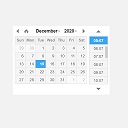
Date Time Field Add-On for Gravity Form
A date-time add-on for Gravity Forms with custom date time format.
Maintenance 40/100360d since update
Active installs
1,000
Downloads
11,576
Reviews
2
Age
5.6y
Plugin info
Total downloads: 11,576
Active installs: 1,000
Total reviews: 2
Average rating: 4.5
Support threads opened: 0
Support threads resolved: 0 (0%)
Available in: 1 language(s)
Contributors: 1
Last updated: 4/7/2025 (360 days ago)
Added to WordPress: 8/19/2020 (5 years old)
Minimum WordPress version: 4.0
Tested up to WordPress version: 6.7.4
Minimum PHP version: 7.4
Maintenance & Compatibility
Maintenance score
Stale • Last updated 360 days ago • 2 reviews
40/100
Is Date Time Field Add-On for Gravity Form abandoned?
Likely maintained (last update 360 days ago).
Compatibility
Requires WordPress: 4.0
Tested up to: 6.7.4
Requires PHP: 7.4
Similar & Alternatives
Explore plugins with similar tags, and compare key metrics like downloads, ratings, updates, support, and WP/PHP compatibility.
Date/Time Fields for Gravity Forms
Rating 0.0/5 (0 reviews) • Active installs 200
insertTime
Rating 5.0/5 (3 reviews) • Active installs 10
Advanced Date Time Field For Contact Form 7, Gravity Forms, WPForms
Rating 5.0/5 (1 reviews) • Active installs 10
Intl DateTime Calendar
Rating 0.0/5 (0 reviews) • Active installs 0
Description
A date-time add-on for Gravity Forms with custom date time format:
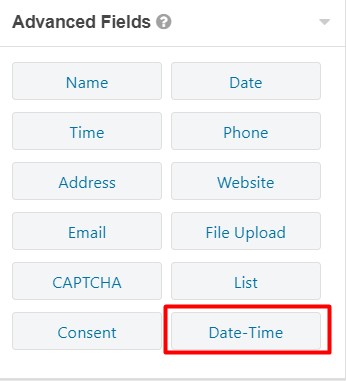
- This plugin will add new type of field under
Advanced FieldsasDate-Time. - Simply drag
Date-Timefield into the form. - You can also add custom date time format under
Generaltab. - The date time format pattern must follow moment.js tokens. Click here to view moment.js date and time tokens.
Translations included
- English
- Français (French)
Installation
- Upload and unzip
gf-datetime-field-add-on.zipto the/wp-content/plugins/directory - Activate the plugin through the ‘Plugins’ menu in WordPress
Frequently Asked Questions
No FAQ available
Review feed
No reviews available
Screenshots


Changelog
1.3.6
- Fix date formatting for non-English locales
1.3.5
- Resolved issue with datetime picker script loading inconsistently across different themes
- Improved jQuery script initialization to ensure compatibility with various WordPress themes
- Fixed potential JavaScript loading conflicts by using Gravity form’s inline script enqueuing method
1.3.2
- Added the filter hook
gf_awp_calendar_restricted_datesto disable specific dates. - Added the filter hook
gf_awp_calendar_restricted_weekdaysto disable specific weekdays each month. - Improved the loading of the date-time picker to ensure proper functionality when multiple forms are on the same page.
- Fixed the scrolling issue.
1.2.8
- Add a filter hook
gf_awp_calendar_week_start_dayto set start day of the week.
1.2.7
- Add a filter hook
gf_awp_calendar_hide_past_datesto hide past date in calendar view.
1.2.6
- Add a filter hook
gf_awp_calendar_time_formatto change the time format for calendar. - Add a filter hook
gf_awp_calendar_allow_timeto allow specific time to select. Must use 24 hour format. - Add a filter hook
gf_awp_calendar_datepickerto show/hide datepicker. - Add a filter hook
gf_awp_calendar_timepickerto show/hide timepicker. - Add locale feature for date time picker. This uses WordPress locale settings.
- Some minor fixes.
1.2.1
- Fix JSON error when adding a shortcode and trying to save a page in the block editor.
1.2.0
- Add a filter hook
gf_awp_datetimepicker_scriptto allow users to override JavaScript/jQuery for date-time picker.
1.0.1
- Fixed date-time picker loading after a Gravity Form is submitted via AJAX
1.0
- Added a Date Time field for Gravity form
- Added an option to add custom date time format