

Gift Card For Woocommerce
Throughout the year, there are multiple occasions on which you have to choose a gift for your near and dear ones because simple wishes are not enough.
Plugin info
Maintenance & Compatibility
Maintenance score
Possibly abandoned • Last updated 1922 days ago • 4 reviews
Is Gift Card For Woocommerce abandoned?
Possibly abandoned (last update 1922 days ago).
Compatibility
Similar & Alternatives
Explore plugins with similar tags, and compare key metrics like downloads, ratings, updates, support, and WP/PHP compatibility.
Description
Throughout the year, there are multiple occasions on which you have to choose a gift for your near and dear ones because simple wishes are not enough. Whether it is a birthday, anniversary or a festival, a gift is an absolute delight. Even on account of festivals or as a token of bonus for your employees, a gift just adds to the celebrations.
But how do you select the best gift as different people have different choices?
Taking a cue from such situations, We have created the best gift option which is loved by all. From family to friends to employers. Whether you wish to give it to someone special on account of a private function or distribute to your employees on the occasion of company’s annual day, it is the best gift which no one can refuse.
It is a GIFT CARD.
A gift card is the best gift because you can send it along with a message conveying your best wishes and the receiver can redeem them on any e-commerce website in exchange for a product of their choice against the value indicated on the card.
FREE VERSION DEMO LINK | FREE VERSION DOCUMENTATION LINK
Take a look at how to set up Gift Card for Woocommerce
Features
- Customer can view there gift card details in the my account page.
- Option to enable / disable the gift card details on the my account page.
- Option to set the coupon expiry month
- Admin can create unlimited Gift Card.
- Option to active or deactive the status of the particular gift card.
- Option to enable / disable the mail sending to the receiver.
- Option to set the expiry date for a gift card.
FREE VERSION DEMO LINK | FREE VERSION DOCUMENTATION LINK
Premium Features:
PREMIUM VERSION LIVE DEMO | PREMIUM VERSION LINK | DOCUMENTATION LINK
- Option to add Custom amount Gift card.
- Option to show / hide the custom amount.
- Option to select the gift card template from the given list.
- You could select the custom price tag also.
- Option to set the custom amount position before or after the prices.
- Option to edit the text in the emails.
- Option to add the company logo in the email.
- Option to enable / disable the coupon apply button on the cart and checkout page.
- Option to write the apply coupon button text.
- Option to write the apply coupon button placeholder text.
- From the frontend the customer can select the gift card template.
- From the frontend the customer can select the custom gift card template. They can choose any other gift card image also
- The customer can send the gift note also.
- The customer can send unlimited gift cards.
PREMIUM VERSION LIVE DEMO | PREMIUM VERSION LINK | DOCUMENTATION LINK
Premium WordPress Themes
Here is our premium wordpress theme
Our Website
Support Email
NOTE
- Our plugin support the Multisite Network.
Installation
- Install WordPress
- Go to your WordPress admin panel, and then to Plugins. Click on “Add New” and then upload the zip file of the plugin using the “Upload Plugin” button you can find on top of the screen.
Frequently Asked Questions
Review feed
Screenshots

It displays the general settings of the plugin.
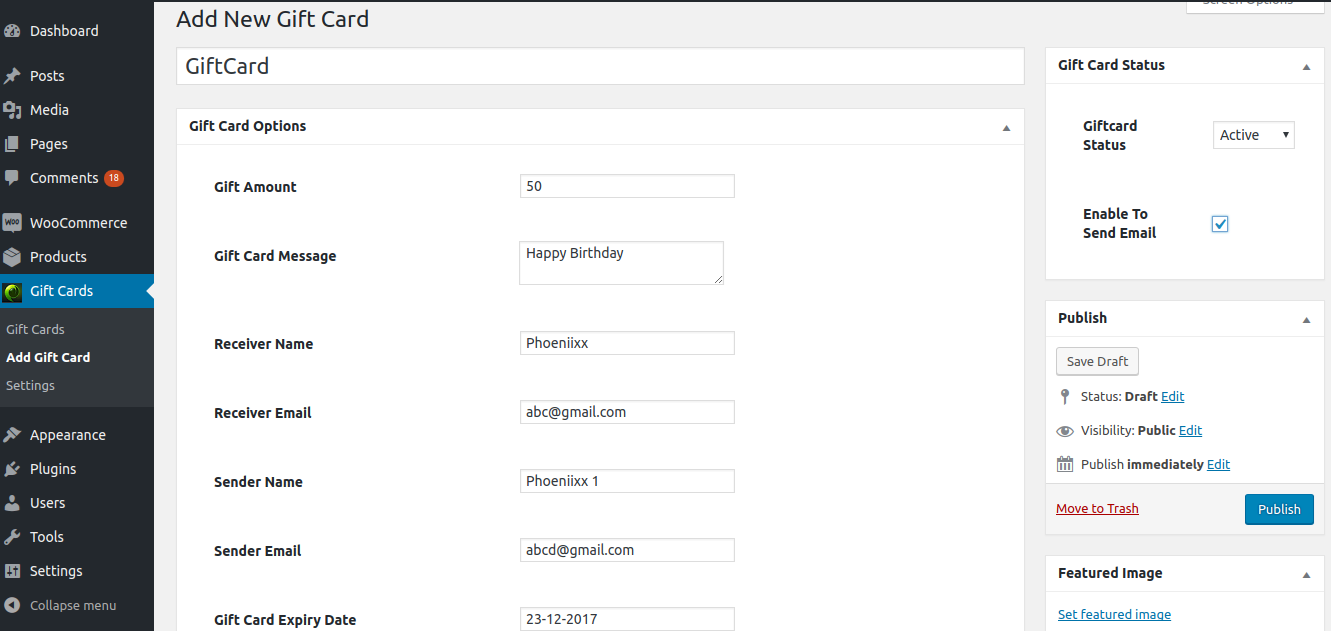
It shows the fields while creating the gift card.

It shows the details of the gift cards.

Can create a product as gift card.

Shows the gift card details in the my account page.

Shows the frontend view.
Changelog
1.2.8 – 19/11/2019
- compatible with the latest version of woocommerce and wordpress
1.2.7 – 13/09/2019
- compatible with the latest version of woocommerce and wordpress
1.2.6 – 27/02/2019
- compatible with the latest version of woocommerce and wordpress
1.2.5 – 29/12/2018
- added live demo url
1.2.4 – 13/12/2018
- compatible with the latest version of woocommerce and wordpress
1.2.3 – 06/11/2018
- compatible with the latest version of woocommerce
1.2.2 – 21/08/2018
- Fixed errors
1.1.1 – 14/03/2018
- Fixed send mail function
1.1.0 – 12/03/2018
- update function
1.0.6 – 10/03/2018
- Fixed product type
1.0.5 – 5/03/2018
- Fixed validate gift card amount
1.0.4 – 5/02/2018
- Fix CSS errors
1.0.3 – 1/02/2018
- Fix errors
1.0.2 – 10/01/2018
- Add premium tab and added premium features
1.0.1 – 05/01/2018
- Css issue fix.
1.0
- Initial release.