

Ginger Payments WooCommerce Extension
This extension installs the following Ginger Payment payment methods: iDEAL, Bank Transfer, Credit Card, SOFORT…
Plugin info
Maintenance & Compatibility
Maintenance score
Possibly abandoned • Last updated 3083 days ago
Is Ginger Payments WooCommerce Extension abandoned?
Possibly abandoned (last update 3083 days ago).
Compatibility
Similar & Alternatives
Explore plugins with similar tags, and compare key metrics like downloads, ratings, updates, support, and WP/PHP compatibility.
Description
Ginger Payments extension for WooCommerce tested with WooCommerce 2.6.x and 3.x
Most importantly, your customers can pay in an easy and trusted manner. With Ginger Payments, your webshop is immediately equipped with iDEAL, Bank Transfer, Bancontact, SOFORT and Visa & Mastercard (on request).
View all incoming orders, completed payments and revenue at a glance on your mobile phone or tablet, with quick access to your funds. These and many other options can be easily configured in your account.
Easily and quickly integrate Ginger Payments in your webshop. Should you have any questions, our support desk is there to help you.
Find out more at Ginger Payments Website
Installation
- Upload
gingerpaymentsdirectory to the/wp-content/plugins/
OR - Install .zip archive from the console
- Activate the plugin through the ‘Plugins’ menu in WordPress
After that configure the Webhook URL in the Ginger Payments Merchant portal. The Webhook URL should be:
https://www.example.com/?wc-api=woocommerce_gingerpayments
If you visit the URL in your browser you should see the following message:
Only work to do if the status changed
For the API key:
The API key can be found in the Ginger Payments merchant portal https://merchant-portal.gingerpayments.com
Setup and configuration:
Go to: WooCommerce > Settings > Checkout > Ginger Payments
- Set API key and parameters.
- Enable available Ginger Payment methods.
Frequently Asked Questions
Installation Instructions
- Upload
gingerpaymentsdirectory to the/wp-content/plugins/
OR - Install .zip archive from the console
- Activate the plugin through the ‘Plugins’ menu in WordPress
After that configure the Webhook URL in the Ginger Payments Merchant portal. The Webhook URL should be:
https://www.example.com/?wc-api=woocommerce_gingerpayments
If you visit the URL in your browser you should see the following message:
Only work to do if the status changed
The API key can be found in the Ginger Payments merchant portal https://merchant-portal.gingerpayments.com
Setup and configuration:Go to: WooCommerce > Settings > Checkout > Ginger Payments
- Set API key and parameters.
- Enable available Ginger Payment methods.
Where do I get Ginger API key?
Go to https://merchant-portal.gingerpayments.com -> Settings -> Websites -> Your Website -> API Key
WooCommerce & qTranslate-X compatibility
In order for webhook URL to be accessible by Ginger API you need to go: Settings -> Languages -> General
And under “URL Modification Mode” check the "Hide URL language information for default language." box.
Review feed
Screenshots

Ginger Payments Plugin Configurations Settings
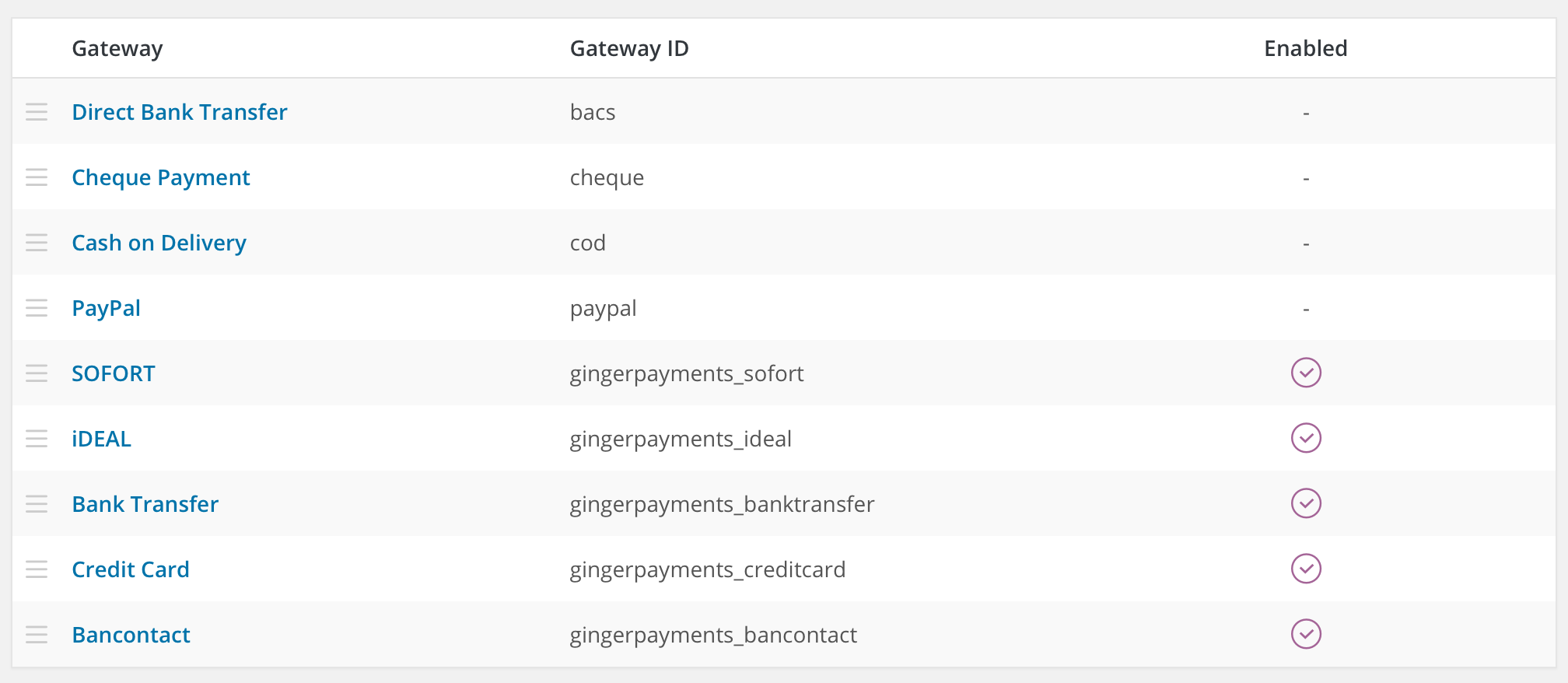
Gateway Display Order Settings

Ginger Payments Checkout Options
Changelog
1.3.2
- Fixed order total rounding issue
1.3.1
- Fixed payment method icon source path
1.3.0
- Major cleanup and refactoring
- Upgraded ginger-php library to version 1.2.5
- Added WooCommerce 3.x support
1.2.1
- Fixed
handle_email_order_metamethod call issue
1.2.0
- Updated ginger-php library to latest version
- Added option to automatically generate webhook url for every order
- Minor fixes and formatting
1.1.2
- Fixed callback method function that gets API key from the session
1.1.1
- Fixed typo in helper method call
1.1
- Added option to select a return page on failed payment
- Added option to use bundled cURL CA file
- Added fix for missing bcmod() function in PHP
- Updated ginger-php library
- Minor fixes and formatting
1.0.4
- Added customer information to the Ginger Order Creation
- Some minor bug fixes
1.0.3
- Added redirect to the checkout page when payment is cancelled or failed
1.0.2
- Added payment method icons
1.0.1
- Fixed issue where stock was reduced incorrectly
1.0
- Initial release