

Glossary ToolTip
This is a simple & powerful glossary tooltip plugin, which highlight terms automatically and show tooltips, also build a glossary list page.
Plugin info
Maintenance & Compatibility
Maintenance score
Possibly abandoned • Last updated 669 days ago • 1 reviews
Is Glossary ToolTip abandoned?
Possibly abandoned (last update 669 days ago).
Compatibility
Similar & Alternatives
Explore plugins with similar tags, and compare key metrics like downloads, ratings, updates, support, and WP/PHP compatibility.
Description
This is a simple & powerful glossary tooltip plugin, which highlight terms automatically and show tooltips, also build a glossary list page with alphabetical order search abilities.
Build a powerful glossary featured site with auto link terms and improve your website SEO rankings and user experience.
The Glossary ToolTip plugin automatically linked glossary terms in post or page content and improve internal linking for better rankins & reading experience.
This plugin structured is very simple and it’s use very small size javascript to show tooltip for better performance.
Glossary ToolTip – Features & Advantages
- Build Glossary ToolTip Featured Site.
- Automatically highlight terms in post or page content.
- Group your terms by category and create vertical archives.
- Show tooltip on hover of highlighted glossary terms links.
- Make glossary page to show all terms alphabetical orders.
- Link terms on different post types of contents.
- Improve SEO and reading experience with auto linking.
- You can inclue or exclude terms from search pages.
Simply install & activate the plugin and read installation guide in plugin support section. Enjoy!
Installation
Installing this plugin – Simple
- In your WordPress admin panel, go to Plugins > New Plugin, search for Glossary ToolTip and click on “Install now“
- Activate it, after activation click on support section in plugin setting and read installation guide.
- Now you need to do some glossary settings and, All Done!.
Need more help?
Feel free to open a support ticket for any kind of help.
Missing something?
If you would like to have an additional feature for this plugin, let me know
Frequently Asked Questions
Yes, you don’t need to do anything, plugin automatically link glossary terms in post or page content.
Yes, plugin have ability to create glossary list page to show all terms alphabetically.
No, you can select any page or post to show glossary list manually or use [glossarylist] shortcode.
Yes, plugin setup guide available on Our Glossary ToolTip Setup Guide page.
Yes, this plugin work very well with every cache plugin.
Review feed
Screenshots
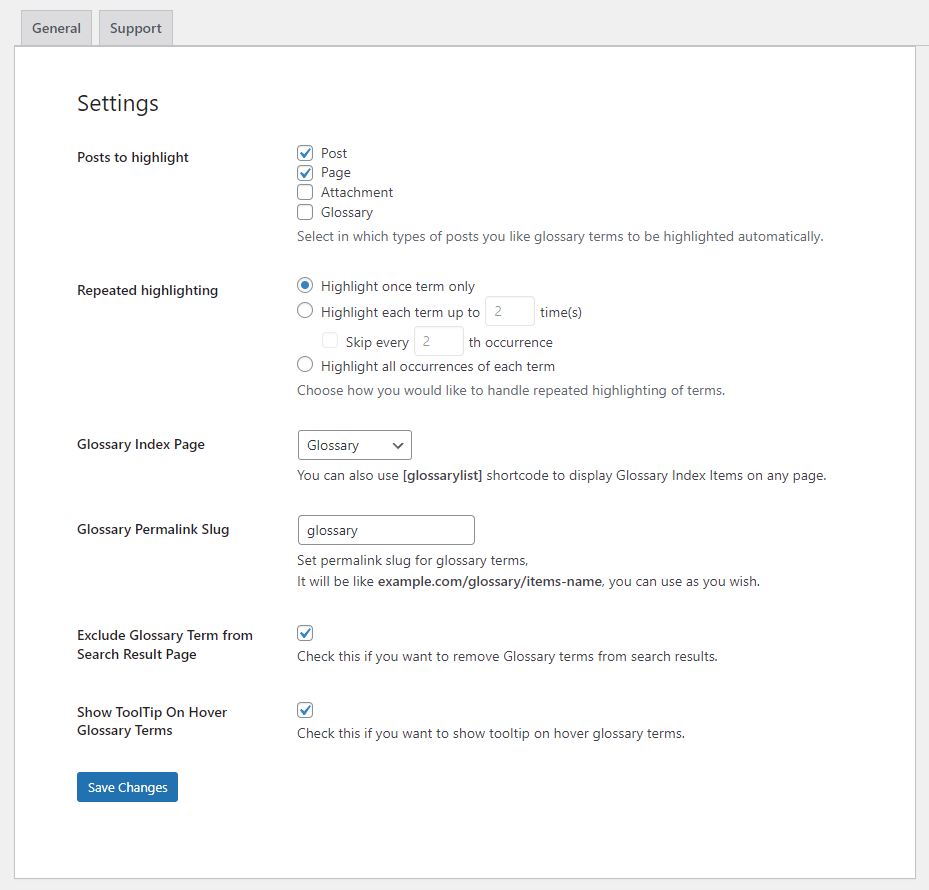
Glossary General Settings

Glossary List Page

Add / Edit Glossary Term

Glossary Installation Guide

Example of tooltip template
Changelog
1.0.1
- add settings
1.0
- First version.