Maintenance 20/1001848d since update
Active installs
10
Downloads
904
Reviews
0
Age
5.1y
Plugin info
Total downloads: 904
Active installs: 10
Total reviews: 0
Average rating: 0
Support threads opened: 0
Support threads resolved: 0 (0%)
Available in: 1 language(s)
Contributors: 1
Last updated: 1/27/2021 (1848 days ago)
Added to WordPress: 1/27/2021 (5 years old)
Minimum WordPress version: 4.6
Tested up to WordPress version: 5.6.16
Minimum PHP version: 7.0
Maintenance & Compatibility
Maintenance score
Possibly abandoned • Last updated 1848 days ago
20/100
Is Glyph Generator abandoned?
Possibly abandoned (last update 1848 days ago).
Compatibility
Requires WordPress: 4.6
Tested up to: 5.6.16
Requires PHP: 7.0
Similar & Alternatives
Explore plugins with similar tags, and compare key metrics like downloads, ratings, updates, support, and WP/PHP compatibility.
No similar plugins found yet.
Description
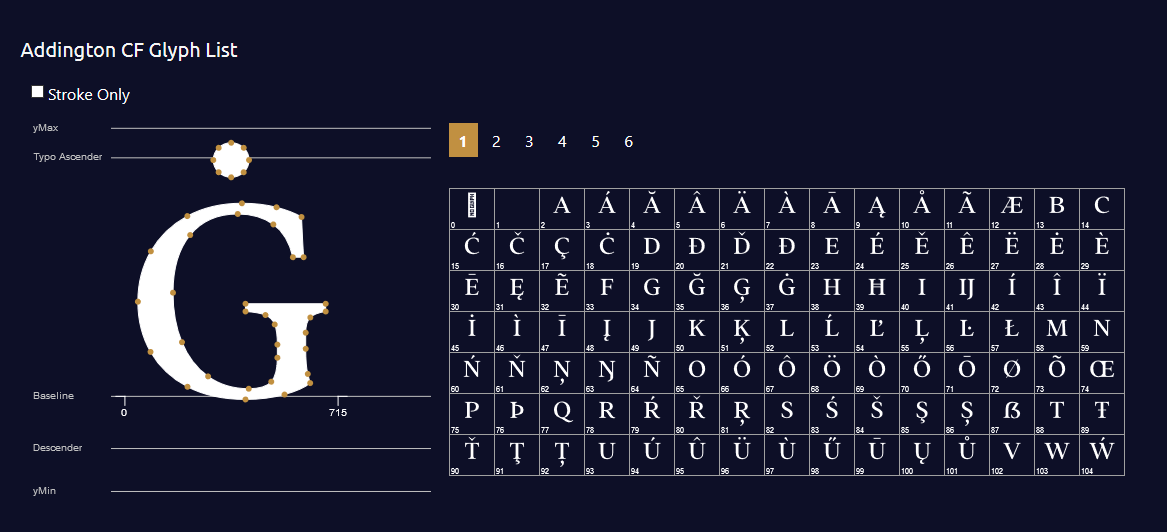
Generate your font glyph in your page with simple shortcode. Showcase your font to your client with hidden glyph
Installation
- Upload
glyph-generator.zipto the/wp-content/plugins/directory - Activate the plugin through the ‘Plugins’ menu in WordPress
- Use [draglyph] shortcode in your page / post / product page.
- Include Options into your shortcode. eg. [draglpyh url=’your-font-url’ glyph=’#000′ stroke=’#red’]
Frequently Asked Questions
- fonturl => Your font url (default : use Roboto-Black)
- fill => Color for glyph and glyph items (default: #000)
- stroke => Color of glyph’s stroke (default: #fff)
- numpage => How many glyph items do you want to show in a page (default : 100)
- upfont => Enable visitor to check their own font (default:1) ~ value: 1 = allow – 0 = false
Just put the shortcode in product description or additional tabs, and it’s ready to action
You can see the plugin in action at https://indras3hat.com/glyph-generator
Yes! you can send your questions to [email protected]
Review feed
No reviews available