

Good Reads
An ordered blogroll widget for your sidebar that displays your favorite blogs, what they're writing, and when.
Plugin info
Maintenance & Compatibility
Maintenance score
Possibly abandoned • Last updated 5508 days ago
Is Good Reads abandoned?
Possibly abandoned (last update 5508 days ago).
Compatibility
Similar & Alternatives
Explore plugins with similar tags, and compare key metrics like downloads, ratings, updates, support, and WP/PHP compatibility.
Description
Google’s Blogger tool has a great blogroll gadget, which I’ve always wanted in WordPress. I tried a few plugins that advertised similar behavior but was never quite satisfied – so I made my own.
This will grab all your links with a category of ‘sidebar’ and show them in a list on your sidebar. Specify each link’s RSS/Atom feed address and it will grab the latest post, a link, and reorder the list based on when these posts were written. It only requires that you have jQuery and PHP and uses the Links and Widget section already included in WordPress.
Installation
- Upload ‘good-reads.php’ to the ‘wp-content/plugins’ directory.
- Activate the plugin through the ‘Plugins’ menu in WordPress.
- Go to the ‘Widgets’ screen in ‘Appearance’ and add ‘Good Reads’ to your Sidebar.
- Go to your WordPress’ ‘Links’ and create a category called ‘Sidebar’.
- Add this category and the feed URL (in the RSS Address field) to each link you want to appear in ‘Good Reads’.
Frequently Asked Questions
Hey! My links wont order themselves by the publish date of their latest article! What gives!?
- Make sure that the feed url is correct in WP.
- Make sure you have the widget set to order them by publish date.
- Make sure you have jQuery linked in your site’s header.
Review feed
Screenshots
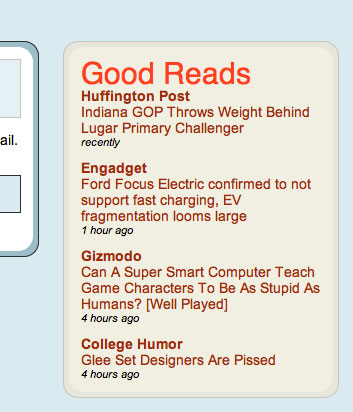
A 'Good Reads' module in my sidebar with four sites in the 'sidebar' category.
Changelog
1.5
- Restructured the way the plugin and widget are built to meet with more recent WordPress standards.
- New widget option: Ordering – Choose to have your links listed by publish date or by site title.
- New widget option: Tabs – Choose if your links open in a new tab or in the same tab.
20110218 (1.0)
- Public release!