

Plugin info
Maintenance & Compatibility
Maintenance score
Possibly abandoned • Last updated 1007 days ago • 16 reviews
Is Google Analytics Opt-Out abandoned?
Possibly abandoned (last update 1007 days ago).
Compatibility
Similar & Alternatives
Explore plugins with similar tags, and compare key metrics like downloads, ratings, updates, support, and WP/PHP compatibility.
Description
This plugin provides opt-out functionality for Google Analytics by setting a cookie that prevents analytics.js or gtag.js from collecting data. The new GDPR rules require an opt-out.
Works perfectly with the [Google Analytics by MonsterInsights Plugin] (https://wordpress.org/plugins/google-analytics-for-wordpress/ “Google Analytics by MonsterInsights Plugin”). However, the plugin is not required to configure the opt-out feature. Just enter your UA or GA code manually. And that’s it!
The free and pro versions have now been merged. So now you can also activate a banner! Have fun with it!
Installation
- Install and activate the plugin via your WordPress Administration panel
- Go the “Settings” -> “Analytics Opt Out” and enter your UA- or GA-code (you don’t need this step if MonsterInsights plugin is active).
- Read the FAQ for more information.
Frequently Asked Questions
Review feed
OK but not multilingual
Good plugin, but be careful about PHP version
Screenshots
The Opt-Out link can be added with the Opt-Out block in WordPress new block editor (that came with version 5.0).

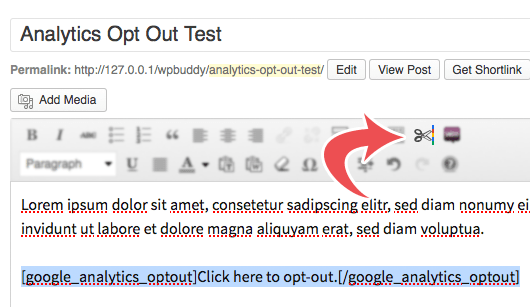
If you're using the classic editor, click this little button to add the shortcode.
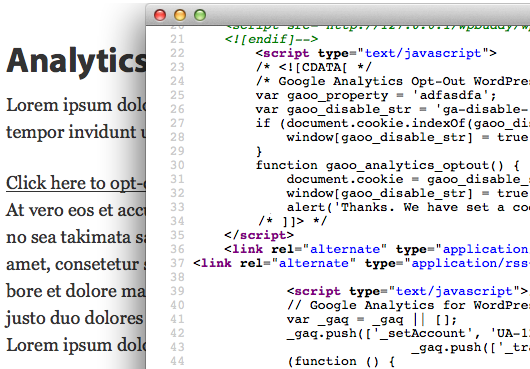
This is how the code looks like

This is the settings page
Changelog
2.3.6
- Compatibility with latest MonsterInsights version
2.3.5
- Fixed a security issue that could lead to a XSS attack. Thanks to patchstack for reporting this issue.
2.3.4
- Fixed: Banner did not stay closed if someone clicked on the info icon and/or the shortcode link.
- Fixed: Browser warnings because of missing SameSite Cookie attributes.
- Fixed: MonsterInsights showed a warning because of multiple occurrences of the UA-Code number.
2.3.3
- Fixed: [google_analytics_optout_close] shortcode did not close the popup
2.3.2
- Fixed: Make sure the JavaScript file is loaded correctly using the
wp_enqueue_scriptsfilter.
2.3.1
- Fixed: removed checkbox in the end of the page
2.3.0
- Using SVG icons instead of images.
- Added new filters:
gaoop_info_icon_htmlandgaoop_close_icon_html. - Removed dependency from jQuery.
- Removed deferred loading of JS file because it makes no sense when script is in the footer.
2.2.6
- Bring back the sub-menu under “Insights” if MonsterInsights is installed.
2.2.5
- Corrected text domain for JS translations
- State that plugin works with gtag.js, too.
2.2.4
- Gutenberg block content was not translated correctly in WordPress 5.0
2.2.3
- Fixed PHP warning: filemtime(): stat failed in line xyz
2.2.2
- New Opt-Out Gutenberg block did not work (due to missing JavaScript file).
2.2.1
- Fixed a PHP fatal error when Gutenberg plugin is active and WordPress < 5.0 is installed.
2.2.0
- Added a block for WordPress’ 5.0 new block editor.
2.1.4
- Added missing return statement to no longer the plugin on older PHP versions
2.1.3
- Fixed issue with old PHP warning that could block site access
- Updated headline on the settings page
- Inserted a paragraph that describes the indention of the plugin and shows the shortcode that can be copy and pasted.
2.1.2
- Fixed an issue where the opt-out code may not be on top of the sourcecode of some websites.
- Opt-Out settings field has been moved up on the settings page.
2.1.1
- Fixed an issue with Monster Insights 7: Submenu item was not visible
2.1.0
- Allow to disable the editor button as some users reported issues with loading the editor properly
2.0.2
- Make plugin compatible with the latest version of MonsterInsights.
- Remove/deprecate all functions that have been used when the old Yoast Analytics plugin was active.
- Remove the ‘gaoop_stop_head’ filter as it’s no longer needed.
- Display the options submenu under “Insights” menu.
2.0.1
- Plugin can now be translated via translate.wordpress.org
2.0.0
- The pro version is now free (this is it!)
- New: allow the complete deactivation of the banner.
0.1.5
- Added Spanish translation
0.1.4
- Solves the issue that the opt-out link does not appear when the UA-Code was entered manually.
- Also fixes an issue that the tracking code could not be found due to some code changes of the Yoast Google Analytics for WordPress Plugin (Yoast_GA_Frontend class no longer extends Yoast_GA_Options)
0.1.3
- Made the plugin compatible with the latest version of the Google Analytics plugin by Yoast
0.1.2
- Works again with the Google Analytics plugin by Yoast
0.1.1
- Fixed the issue that error message still shows shows up
- Added/replaced some translations
- Fixed an issue that Yoasts Analytics for WordPress plugin has changed the option name
0.1
- The first version