

Google+ Page Badge
Show one or multiple Google+ badges for your G+ page in a widget, using a shortcode, or with template tags.
Plugin info
Maintenance & Compatibility
Maintenance score
Possibly abandoned • Last updated 5139 days ago
Is Google+ Page Badge abandoned?
Possibly abandoned (last update 5139 days ago).
Compatibility
Similar & Alternatives
Explore plugins with similar tags, and compare key metrics like downloads, ratings, updates, support, and WP/PHP compatibility.
Description
This plugin allows you to place a widget on your sidebar that displays the official Google+ badge. You can choose to show either the Standard or Small size badge, and you can show as many different badges on a page or post as you choose – each with their own configuration.
You can also show a Google+ badge using template tags in your theme files or in a page or post using the simple shortcode (See FAQs for instructions).
NOTE: Google+ only allows this type of badge for a Google+ page and not a personal Google+ profile, so this plugin will only work for Google+ business pages.
Installation
- Upload the folder
google-plus-page-badgeand its contents to the/wp-content/plugins/directory or use the wordpress plugin installer - Activate the plugin through the ‘Plugins’ menu in WordPress
- A new “Google+ Page Badge” widget will be available under Appearance > Widgets, where you can add it to your sidebar and edit all settings of the plugin.
- To use the template tag or shortcodes, go to Settings > Google+ Page Badge to enter your Google+ Page ID (See FAQs for full instructions)
Frequently Asked Questions
How do I use the shortcode in the post or page editor?
While editing the post or page that you want to add your Pins to, enter the shortcode [gpluspb]. Without any other parameters, the shortcode will default to display the Google+ Page ID that has been saved in the plugin settings page and the Standard badge size. You can add two optional parameters to the shortcode: id=”Google+ Page ID” and size=”smallbadge”. Here’s an example:
[gpluspb id="100677423206997674566" size="smallbadge"]
The above example will link to the bkmacdaddy designs Google+ page and show the smaller badge size.
If you leave out any of the parameters they will revert to the defaults listed below.
How do I use the plugin in my theme?
Anywhere in your theme templates, you can display a Google+ badge by placing the following code where you want it to appear:
<?php gppb($id, $size); ?>
Where:
- id is the 21-digit string at the end of the Google+ Page URL (optional, default is the ID that is saved in the plugin settings page)
- size is the size of the badge to display, either “badge” or “smallbadge” (optional, default = badge)
Example:
<?php gppb('100677423206997674566', 'smallbadge'); ?>
Review feed
Screenshots

The plugin settings page
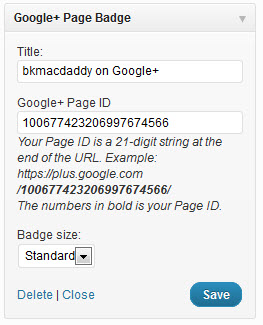
The widget settings

Badge that is displayed when "smallbadge" is the chosen size

Default badge that is displayed when size is not selected
Changelog
1.0
- First version