

Webmaster Spelling Notifications
Plugin allows site visitors to send reports to the webmaster/owner about any spelling or grammatical errors. Spelling checker on your website.
Plugin info
Maintenance & Compatibility
Maintenance score
Possibly abandoned • Last updated 1724 days ago • 3 reviews
Is Webmaster Spelling Notifications abandoned?
Possibly abandoned (last update 1724 days ago).
Compatibility
Similar & Alternatives
Explore plugins with similar tags, and compare key metrics like downloads, ratings, updates, support, and WP/PHP compatibility.
Description
- 100% Free Open Source Plugin on Github.com
- The plugin allows site visitors to send reports to the webmaster / website owner about any spelling or grammatical errors which may be found by readers
- Visitors should select text with a mouse, press Ctrl+Enter, enter comments and the webmaster will be notified about any such errors
- Nice and simple plugin – no external websites needed and fully customizable; change the plugin language !
- If you intend plugin to be used in a language other than English, see the Language Translations page
- It is easy to integrate with any website!
Screenshots and Demo: https://gourl.io/php-spelling-notifications.html
Twitter: https://twitter.com/CryptocoinAPI
Installation
Automatic installation
Automatic installation is the easiest option as WordPress handles the file transfers itself and you don’t need to leave your web browser. To do an automatic install of Webmaster Spelling Notifications, log in to your WordPress dashboard, navigate to the Plugins menu and click Add New.
In the search field type “GoUrl Spelling” and click Search Plugins. Once you’ve found our plugin you can view details about it such as the the rating and description. Most importantly, of course, you can install it by simply clicking Install Now.
Manual Installation
- Go to WordPress Plugins > Add New
- Click Upload Plugin Zip File
- Upload the zipped gourl_wordpress file and click “Upload Now”
- Go to Installed Plugins
- Activate the “Webmaster Spelling Notifications”
Frequently Asked Questions
Review feed
Screenshots
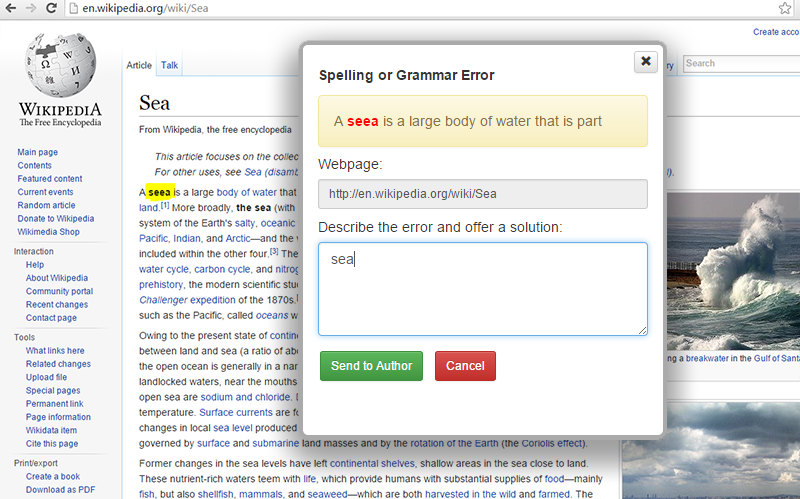
Visitor can press Ctrl+Enter on your website when spelling or grammatical errors seem to need clarification or correction

Message sent successfully to webmaster

Webmaster will receive an email about spelling error

Plugin Settings Page
Changelog
1.1.2
Minor updates
1.1.1
Localisation – You can easy change/localize any text in plugin
1.1.0
Several new enhancements
1.0.0
Initial Release