

GF Windcave Free
Easily create online payment forms with Gravity Forms and Windcave (DPS Payment Express) PxPay
Plugin info
Maintenance & Compatibility
Maintenance score
Maintained • Last updated 159 days ago • Support resolved 100% • 5 reviews
Is GF Windcave Free abandoned?
Likely maintained (last update 159 days ago).
Compatibility
Developers
Similar & Alternatives
Explore plugins with similar tags, and compare key metrics like downloads, ratings, updates, support, and WP/PHP compatibility.
Description
Easily create online payment forms with Gravity Forms and Windcave (DPS Payment Express) PxPay
GF Windcave Free integrates the Windcave hosted payment page (PxPay 2.0) with Gravity Forms advanced form builder.
- build online donation forms
- build online booking forms
- build simple Buy Now forms
NB: this plugin extends Gravity Forms; you still need to install and activate Gravity Forms!
Sponsorships
- creation of this plugin was generously sponsored by IstanbulMMV
Thanks for sponsoring new features on GF Windcave Free!
Requirements
- Install the Gravity Forms plugin
- Create an account with Windcave for the hosted payment page (PxPay 2.0)
Privacy
Information gathered for processing a credit card transaction is transmitted to Windcave for processing, and in turn, Windcave passes that information on to your bank. Please review Windcave’s Privacy Policy for information about how that affects your website’s privacy policy. By using this plugin, you are agreeing to the terms of use for Windcave.
Installation
Frequently Asked Questions
Windcave PxPay 2.0 is a hosted Credit Card payment gateway, accepting payments around the world including New Zealand, Australia, North America, United Kingdom, Ireland, and Singapore.
In 2019, Payment Express (DPS) became Windcave. Read the Windcave rebranding announcement for more information.
No. This plugin adds a Windcave PxPay payment gateway to Gravity Forms so that you can add online payments to your forms. You must purchase and install a copy of the Gravity Forms plugin too.
Any Gravity Forms license will do. You can use this plugin with the Basic, Pro, or Elite licenses.
- add one or more Product fields or a Total field to your form. The plugin will automatically detect the values assigned to these pricing fields
- add customer name and contact information fields to your form. These fields can be mapped when creating a Windcave feed
- add a Windcave feed, mapping your form fields to Windcave transaction fields
GF Windcave Free enables you to store two pairs of User ID and User Key credentials. When you first signup for a PxPay account with Windcave you will likely be issued development or testing credentials. Later, when you want to go live with your site, you will need to request a new User ID and User Key from Windcave. Sandbox mode enables you to switch between your live and test credentials. If you only have testing credentials, both your User ID and Test ID and User Key and Test Key should be identical. In this instance, Sandbox mode can be switched either On or Off.
Sandbox mode enables you to run tests without using real credit cards or bank accounts. You must use special test credit card details when using the test environment.
The Windcave eCommerce test details page has card numbers that can be used when testing.
Standard Gravity Forms submission logic applies. The customer will either be shown your chosen confirmation message, directed to a nominated page on your website, or sent to a custom URL.
Successful transaction details including the Windcave transaction number and bank authcode are shown in the Info box when you view the details of a form entry in the WordPress admin.
Browse to your Gravity Form, select Notifications and use the Insert Merge Tag dropdown (Payment Amount, Transaction Number, Surcharge, and Auth Code will appear under Custom at the very bottom of the dropdown list).
NB: these custom merge tags will only work for notifications triggered by Payment Completed and Payment Failed events.
Use your Gravity Forms Settings page to select the currency type to pass to Windcave. Please ensure your currency type is supported by Windcave.
Windcave PxPay supports two transaction types – Purchase and Auth. The GF Windcave Free plugin calls them Capture and Authorize, terminology used in most other payment integrations.
Capture processes the payment immediately. Authorize holds the amount on the customer’s card for processing later.
Authorize transactions can be completed manually in Payline. Perform a transaction search, and look for its Complete button.
Not yet.
Account2Account debits a bank account directly, and Windcave have told me that they cannot provide a full test environment for me to test in. Merchants have told me that it works, but I have not tested it.
This is a common problem in local testing environments. Read how to fix your website SSL configuration.
The plugin will run in shared hosting environments, but requires the following PHP modules enabled (talk to your host). Both are typically available because they are enabled by default in PHP, but may be disabled on some shared hosts.
- XMLWriter
- SimpleXML
Developers can use these filter hooks to modify some invoice properties. Each filter receives a string for the field value, and the Gravity Forms form array.
gfdpspxpay_invoice_reffor modifying the invoice referencegfdpspxpay_invoice_trans_numberfor modifying the invoice transaction reference; NB: must be unique for PxPay account!gfdpspxpay_invoice_txndata1for setting the TxnData1 fieldgfdpspxpay_invoice_txndata2for setting the TxnData2 fieldgfdpspxpay_invoice_txndata3for setting the TxnData3 field
Developers can run processes on these actions (e.g. load classes required to handle invoice presentation):
gfdpspxpay_process_confirmationgfdpspxpay_process_confirmation_parsedgfdpspxpay_process_approvedgfdpspxpay_process_failed
Review feed
Screenshots
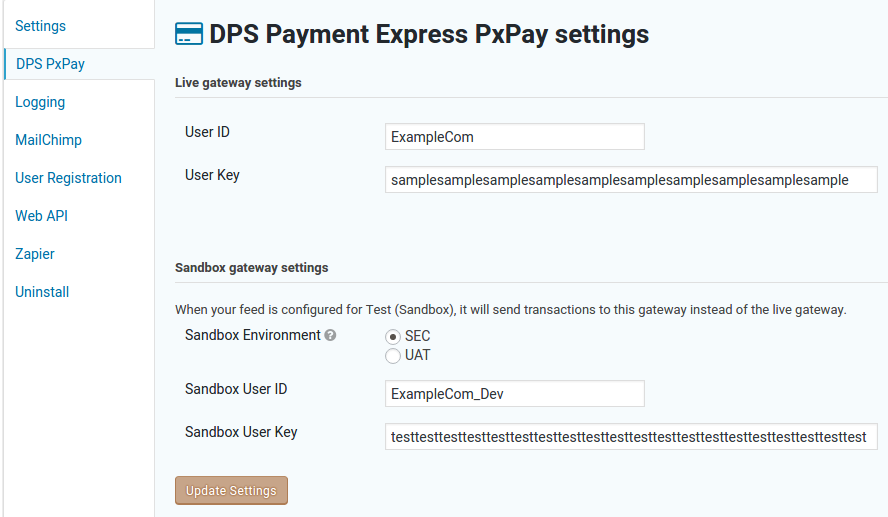
Options screen

A sample donation form

A list of Windcave feeds for a form

A Windcave feed (mapping form fields to Windcave)

The sample donation form as it appears on a page

A successful entry in Gravity Forms admin
Changelog
The full changelog can be found on GitHub. Recent entries:
2.6.1
Released 2025-10-27
- fixed: deferred actions not being deferred in Gravity Forms 2.9.20