

Great Index
This plugin shows a dynamic grid view of categories (costume post types), each category reveals a beautiful show/hide jQuery list of posts underneath.
Plugin info
Maintenance & Compatibility
Maintenance score
Possibly abandoned • Last updated 4299 days ago • 1 reviews
Is Great Index abandoned?
Possibly abandoned (last update 4299 days ago).
Compatibility
Similar & Alternatives
Explore plugins with similar tags, and compare key metrics like downloads, ratings, updates, support, and WP/PHP compatibility.
Description
This plugin shows a dynamic grid view of categories (costume post types), each category reveals a beautiful show/hide jQuery list of posts underneath. Pressing on any of these posts redirects the user into a single page who contains elements like google map, email, phone, image and more.
Very easy to implement using this simple shortcode: [great-index]
Please see installation for more instructions and screenshots.
*this plugin is responsive 🙂
A brief Markdown Example
Ordered list:
- more options to the admin panel for better flexibility
- translation PO&MO files
Here’s a link to WordPress and one to Markdown’s Syntax Documentation.
Titles are optional, naturally.
Markdown uses email style notation for blockquotes and I’ve been told:
Asterisks for emphasis. Double it up for strong.
Installation
- Upload
Great-index folderto the/wp-content/plugins/directory - Activate the plugin through the ‘Plugins’ menu in WordPress
- now you will see a button in your admin panel :”INDEX” where you can open categories.
- add some posts for each categorie and don’t forget to add costume details presented at the bottom of each post (like phone, email etc.)
- create a new page and past the shortcode: [great-index]
- that is it ! you can view that page and see your index.
Frequently Asked Questions
i dont see nothing in the page where the shortcode is in
that is probably because you didn’t added any posts under “index” so the categories are empty.
how do i create this google map above every post ?
under “location” you need to write the address. like: 903 E colorado, urbana, illinois.
can i change colors etc.
that plugin has only one CSS file, just go in and change what you want.
can i see the internal post, i get an 404 page
you need to change the Permalink Settings for your site. go to “settings”—>Permalink Settings–>set it to “Post name”
Review feed
Screenshots
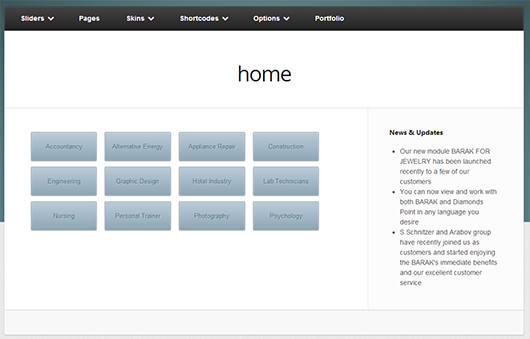
this is how the category view looks like

this is how the category view looks like after you press on one of them (opens in jquery effect)

this is the internal post view
Changelog
1.0
this is the first version