

WP Social Comments
The WP Social (Facebook) Comments lets people comment on content (pages, posts etc) on your site using their Facebook account.
Plugin info
Maintenance & Compatibility
Maintenance score
Possibly abandoned • Last updated 728 days ago • 20 reviews
Is WP Social Comments abandoned?
Possibly abandoned (last update 728 days ago).
Compatibility
Similar & Alternatives
Explore plugins with similar tags, and compare key metrics like downloads, ratings, updates, support, and WP/PHP compatibility.
Description
WP Social (Facebook) Comments
The WP Social (Facebook) Comments lets people comment on content on your site using their Facebook account. People can choose to share their comment activity with their friends (and friends of their friends) on Facebook as well. Also you can moderate the comments by using Facebook tools.
You May Also Like
Disable WP Comments | WP Social Post and Widget | WooSocio | WP Twitter Post (WooTweet)
NEW WP Social Comments Pro version
Just released pro version of WP Social Comments having many exciting new features.
Pro features
- Easy Moderation.
- Moderation with your Facebook Profile.
- Moderation with Facebook App.
- Facebook Comments Widget.
- Localized in 56+ Languages.
- Comments by Shortcode for pages and custom locations.
- Comments for all posts and CPT.
- Fully Responsive.
- Fully customizable.
- And many more to come…
Installation
Here are few steps to follow:
- Upload
gs-facebook-commentsfolder to the/wp-content/plugins/directory - Activate the plugin through the ‘Plugins’ menu in WordPress
- Select Facebook Comments page from wordpress menu for settings.
- Select post types or use shortcode [gs-fb-comments] for pages or manuall comments.
- That’s it. You’re ready to go!
Frequently Asked Questions
Yes you can use shortcode [gs-fb-comments] for pages or anywhere at your site.
Yes you can use it without Facebook App ID. But you won’t be able to do any comments moderation tools.
Review feed
What a nice plugin!
What I can say is Great Support!
Screenshots
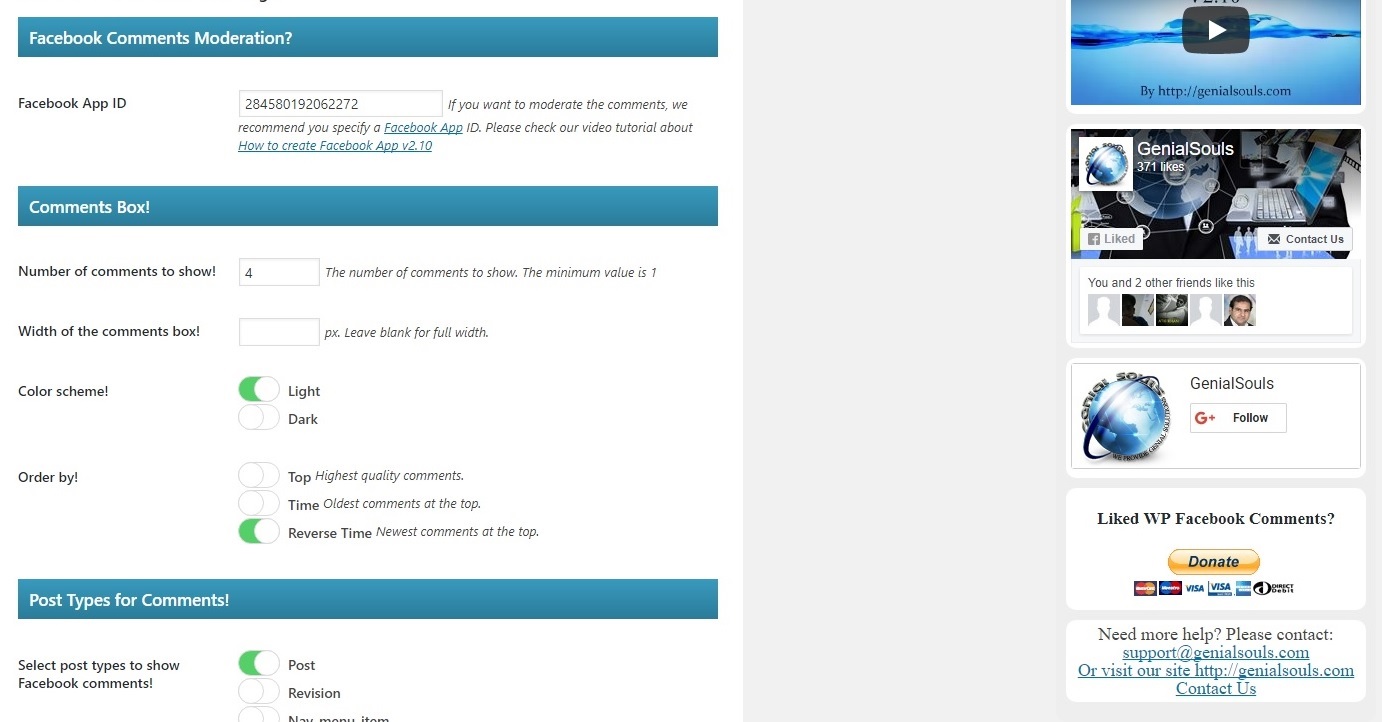
screenshot-1.jpg

screenshot-2.jpg
Changelog
1.7.5 – 04/04/2024
- Fix: Shortcode comments issue fixed.
1.7.4 – 14/03/2024
- Fix: CSRF and broken access control fixed.
- Update: Quality check done.
1.7.3 – 08/02/2023
- Fix: Minor bugs fixed.
- Update: Quality check done.
1.7.2 – 04/04/2022
- Update: EU notice message is now optional.
- Update: FB crawler is now optional.
- Added: Shortcode crawler added. (optional)
1.7.1 – 05/10/2021
- Update: Modified post types support.
- Fix: Warning messages fixed.
- Fix: Notice messages fixed.
1.7 – 28/09/2021
- New: Option to allow comments on each post.
- New: Notice for EU Facebook users.
- New: Comments background color on shortcode.
- Update: Modified post types support.
- Update: Translations updated.
- Update: Latest Facebook API and scripts.
- Fix: Bugs fixed.
1.6 – 18/09/2020
- New: Comments background color option for dark themes.
- Update: Latest Facebook API and scripts.
- Fix: Bugs fixed.
1.5 – 27/11/2019
- New: Option to show comments before SSL.
- New: Translation ready.
- Fix: Minor bugs fixed.
1.4 – 22/08/2019
- New: Completely redesigned.
- New: WordPress standardized.
- New: Security framework.
1.3 – 10/01/2019
- Update: Gutenberg ready.
- New: Pro version launched.
- Modify: Quality standards applied.
- Fix: Comments box size issue when logged in.
1.2 – 26/09/2018
- New: Now available in multi languages.
- Update: Translation updated.
- Modify: Minor changes.
- Fix: Bug fixed when update post.
1.1 – 31/07/2018
- New: shortcode [gs-fb-comments] for pages or anywhere at your site.
- Update: Translation updated.
- Modify: Minor changes.
1.0 – 07/11/2017
- First release.
- Facebook comments