
GutenTOC – Advanced Table of Contents
GutenTOC is an SEO-friendly Table of Contents builder block for the WordPress block editor. It scans headings in your content and automatically gene …
Plugin info
Maintenance & Compatibility
Maintenance score
Stale • Last updated 201 days ago • 12 reviews
Is GutenTOC – Advanced Table of Contents abandoned?
Likely maintained (last update 201 days ago).
Compatibility
Similar & Alternatives
Explore plugins with similar tags, and compare key metrics like downloads, ratings, updates, support, and WP/PHP compatibility.
Description
GutenTOC is an SEO-friendly customizable block for the WordPress block editor (Gutenberg).
It scans headings through your page or post content and creates the table of contents (TOC) automatically.
Supporting Future Development
If you like this plugin, please rate and review it here in the WordPress Plugin Directory.
Thank you for your support!
How to Add a Block
- Go to the block editor.
- Add a block by searching for “TOC” or “Table of Contents”.
Features
- Automatically generate a table of contents with the GutenTOC block.
- Auto-generated anchors (customizable if needed).
- SEO friendly (anchors display nicely in SERPs).
- Option to toggle TOC visibility.
- Counter bullet formats: none, decimal, numeric, icon.
- Smooth scrolling to headings.
- Customizable styles: background color, border color, text color, font settings, etc.
Installation
Automatic Installation
- Requires WordPress 5.0 or higher.
- Go to WordPress admin Plugins Add New.
- Search for “GutenTOC”.
- Install and activate.
- Add the “GutenTOC” block inside the editor.
Frequently Asked Questions
Yes, we reply to every question in the support forum.
No. The plugin has almost no impact on page load for visitors.
Yes, it is completely free.
Review feed
Screenshots

TOC initially hidden

TOC block in editor

TOC aligned right

TOC aligned left/right
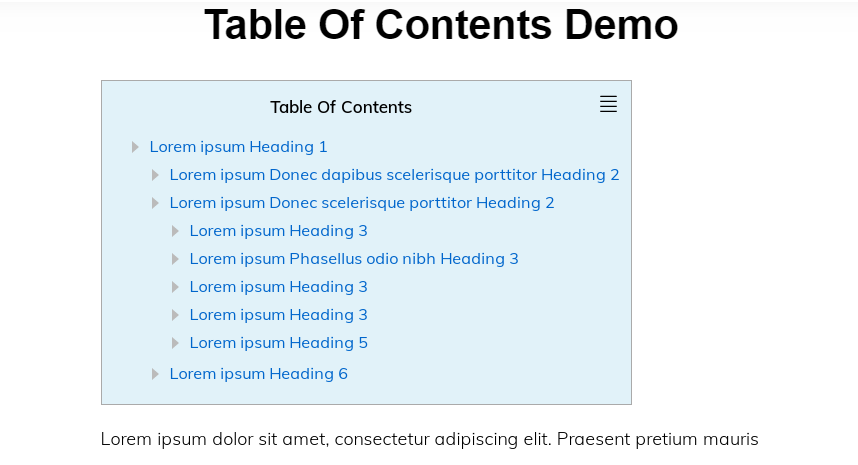
TOC background color option

TOC border color option

TOC text color option

TOC border radius
Changelog
0.0.1
- Initial Release
0.0.2
- Added TOC alignment option
1.0.1
- WordPress 5.5 compatibility
2.0.1
- Fixed extra editor core CSS
2.0.2
- Fixed scrolling issue
2.0.5
- Added options: Font Size, Line Height, Font Weight, Font Family, Letter Spacing, Text Color, Hover Color, Hover Underline