

Hassle-Free Date List
This plugin adds a block, a shortcode, and a contactform 7 form tag that displays a list of dates. Dates that are due will automatically be hidden or …
Plugin info
Maintenance & Compatibility
Maintenance score
Possibly abandoned • Last updated 1363 days ago
Is Hassle-Free Date List abandoned?
Possibly abandoned (last update 1363 days ago).
Compatibility
Similar & Alternatives
Explore plugins with similar tags, and compare key metrics like downloads, ratings, updates, support, and WP/PHP compatibility.
Description
Have you ever posted the dates of seminars, workshops, lessons, etc. on your website or contact form and then forgot to update them or left them posted when they were full?
This plugin solves those problems and makes schedule management easier by providing a block, a shortcode, and a form tags for Contact Form 7.
It only supports displaying dates in a list format, and is intended for people who want a simple date display rather than a complex calendar-type schedule.
The features provided by this plugin are as follows
Schedule management
* Multiple dates can be managed using your own post type.
* Due dates can be specified as relative days or dates.
* Customizable date format
* Customizable day names.
* You can set the content to be displayed when there are no dates to display.
* There are three options for handling dates that are expired.
* Do not display
* Strikethrough
* Labeling
* There are three options for handling dates and times that are full.
* Do not display
* Strikethrough
* Label display
Block/Shortcode
* Customizable color and layout in the sidebar of the block editor
* Customize the text and background color of the date and time.
* Customizable text and color for labels.
* Select multiple layouts for the schedule
* A shortcode can be customized same as a block by setting attribute values.
Form tags for Contact Form 7
* Provides pull-down menu for selecting dates.
* Tags can be inserted with a button from the form editor.
* The pull-down menu will automatically hide expired or full dates.
* The text of the first line of the pull-down menu can be set.
Installation
- Download the plugin and unzip it.
- Upload the
hassle-free-date-listfolder to the/wp-content/plugins/directory of your web site. - Activate the plugin through the ‘Plugins’ menu in WordPress.
- Using the Configuration Panel for the plugin, create date items
To see your date list on foront end,
Block Editor: insert ‘Date List’ block which in widget category and select date list name.
Classic Editor or in the TextWidget : paste the following code
[date_list sid={id}]
id is date list id and it is displayed in date list editor.
To see on contact form,
In form editor, click ‘date list’ button or paste the following code to form editor
[datelist s_id={id}]
id is date list id and it is displayed in date list editor.
Frequently Asked Questions
Review feed
Screenshots
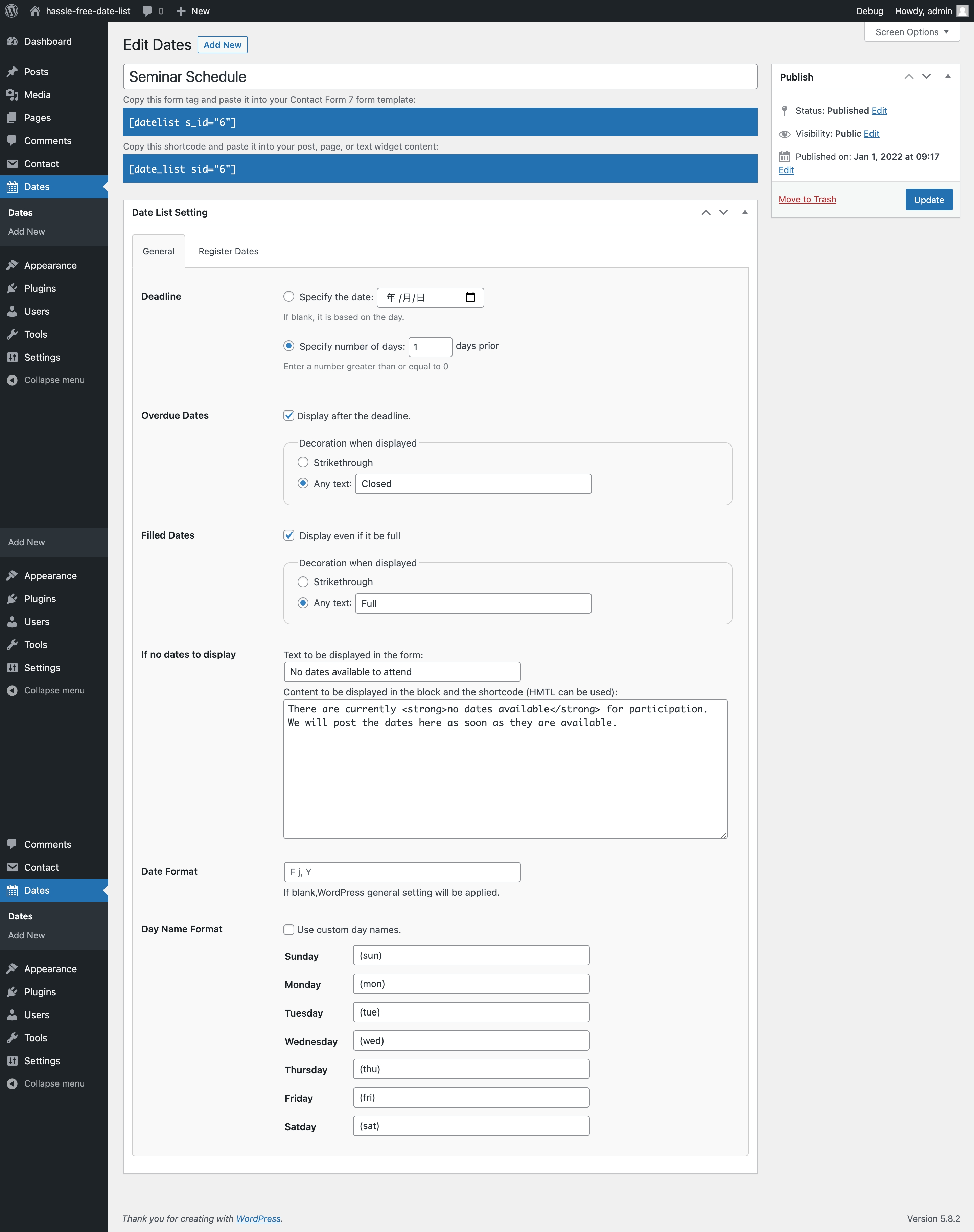
Date List Setting - General

Date List Setting - Register Dates

This plugin add "date list" button to contactform 7 form editor.

You can use Form-tag Generator.

Support for block editor. This date list has "Display after the deadline" and "Display even if it be full option" enabled and used any text.

This date list has "Display even if it be full" enabled and "Strikethrough" selected.

You can change the text color and background color of the date and time.

The contact form will not show dates that are overdue or full.
Changelog
1.0
- First release