

Heroic Table of Contents
Heroic Table of Contents is the easiest way to add a table of contents to your site.
Plugin info
Maintenance & Compatibility
Maintenance score
Maintained • Last updated 136 days ago • Support resolved 0% • 9 reviews
Is Heroic Table of Contents abandoned?
Likely maintained (last update 136 days ago).
Compatibility
Similar & Alternatives
Explore plugins with similar tags, and compare key metrics like downloads, ratings, updates, support, and WP/PHP compatibility.
Description
WordPress Table of Contents Plugin
Heroic Table of Contents is the easiest way to add a Table of Contents to your site.
A contents or index section allows readers to easily navigate pages on your site. The Heroic Table of Contents block automatically detects headings on a page, 4 built-in-styles, options for display and more.
Features:-
- Add a contents section to pages in seconds.
- Choose from 4 pre-made Table of Contents styles.
- Hide and relabel headings without altering the original content.
- Choose which headings to display in the Table of Contents.
- Expand and collapse the content section.
- Place the contents section anywhere.
- Choose bulleted, numbered or plain lists
- Use multiple Table of Contents blocks to break up and sub-index lengthy content.
- Works with templates and individual posts/pages with Template Mode
- Automatic template detection with helpful context-aware guidance
- Mobile friendly
- SEO friendly
About HeroThemes
HeroThemes develop some of the best WordPress plugins, tools and themes, with over 26,000 customers and counting. If you like this plugin and want more news, themes and plugins, you can do the following:
- Get the KnowAll Knowledge Base theme for WordPress, create a WordPress powered knowledge base site in minutes.
- Check out the best WordPress Knowledge Base plugin.
- Answer Frequently Asked Questions with Heroic FAQs plugin for WordPress.
- Follow HeroThemes on Twitter & Facebook.
Installation
INSTALL HEROIC TABLE OF CONTENTS FROM WITHIN WORDPRESS
- Visit the plugins page within your dashboard and select “Add New”
- Search for “Heroic Table of Contents”;
- Activate Heroic Table of Contents from your “Plugins” page;
- Go to “after activation” below.
INSTALL HEROIC TABLE OF CONTENTS MANUALLY
- Upload the unzipped “heroic-toc” folder to your websites /wp-content/plugins/ directory;
- Activate the Heroic Table of Contents plugin through the “Plugins” page in WordPress;
- Go to “after activation” below.
AFTER ACTIVATION
You can now create a table of contents by adding the Heroic Table of Contents block to your content using the + button in the WordPress block editor.
Frequently Asked Questions
This plugin allows you to add a Contents (Table of Contents, index, page navigation or whatever you want to call it) to your WordPress posts, pages and articles.
Heroic Table of Contents is designed to work with any WordPress theme.
Yes, Heroic Table of Contents has full translation and localization support.
Enable “Template Mode (Post Content Scope)” when adding the Table of Contents block to post templates, page templates, or custom post type templates. Leave it disabled when adding the block directly to individual posts or pages. Template Mode tells the block to scan for headings within post-content blocks, which is necessary for template-based usage. The plugin will automatically detect if you’re working in a template and show a helpful warning if Template Mode needs to be enabled.
Feel free to contact us directly via herothemes.com/contact/ for any questions.
If you have trouble with the Heroic Table of Contents WordPress plugin, you can get help on the support forums here at wordpress.org or by checking out or knowledge base at herothemes.com/support/.
Review feed
Great, lightweight plugin
Fresh & Promising Table of Contents Solution
Screenshots
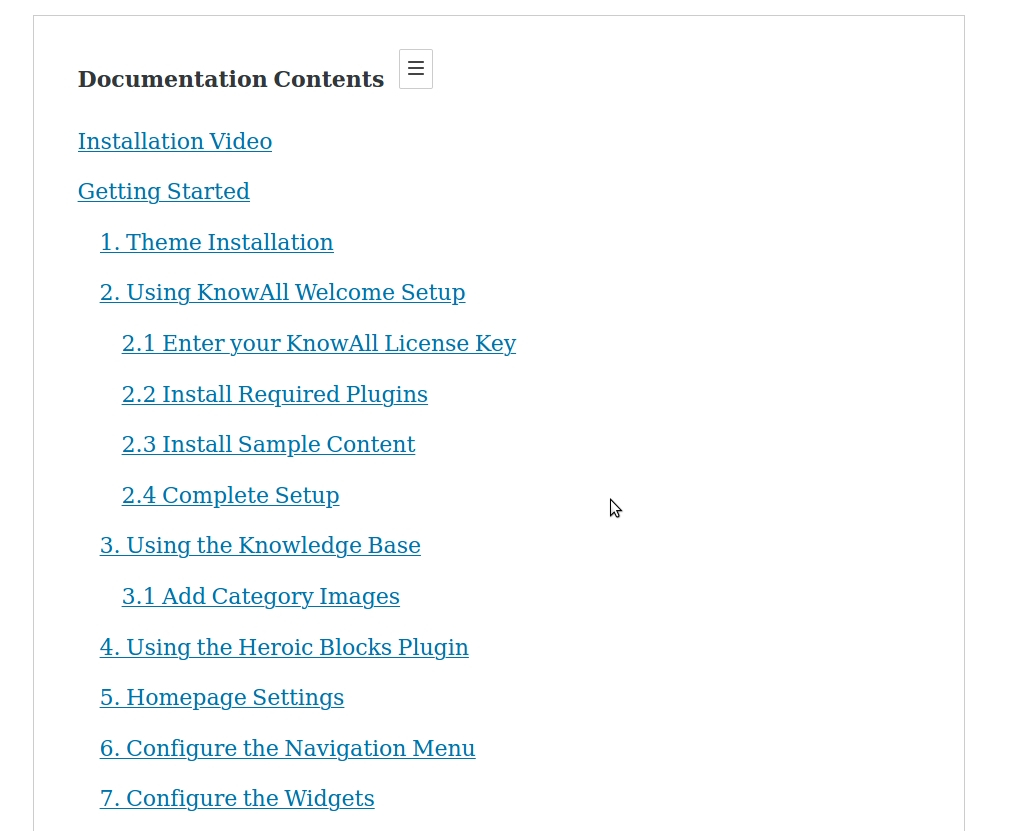
The Heroic Table of Contents Block adds a Table of Contents section to your content

Add the Heroic Table of Contents block using the + symbol and selecting it from the editor

The Table of Contents is automatically generated for headings (H1, H2, H3 etc)

Includes 4 built in styles, collapsible contents listing and select headings to include/exclude

Show/hide and relabel headings by clicking on the icons when the block is selected

Choose contents list style

Add custom links to the Table of Contents (beta feature)
Changelog
1.2.6
(17 Nov 2025)
(Fixed) Table of Contents submenus now automatically collapse and expand based on scroll position in post mode
(Fixed) Scan levels (heading selection H1-H6) now work correctly on the frontend – headings are properly filtered based on selected levels
(Fixed) Editor styles no longer load on frontend – prevents conflicts with other plugins and WordPress components
(Fixed) Block validation errors when opening posts with older TOC blocks – added proper deprecation handling
(Improved) Proper nested list HTML structure for better accessibility and styling
1.2.5
(26 Oct 2025)
(Fixed) Table of Contents now displays correctly on your live site without editor buttons or preview content showing
(Fixed) Text size in the Table of Contents now appears correctly on the frontend
(Fixed) Preview sample content no longer appears on published pages and posts
(Fixed) Block editor validation errors when editing templates
(Improved) Table of Contents now works perfectly on mobile and tablet devices with proper responsive display
(Improved) Renamed Is Single Post to Template Mode (Post Content Scope) with clear descriptive help text
(Improved) Added context-aware guidance to help users know when to enable Template Mode for templates
(Improved) Automatic template detection now shows helpful warning when Template Mode should be enabled
(Improved) Enhanced empty state message with tips for template usage
1.2.4
(16 Oct 2025)
(Fixed) Site editor preview mode now correctly displays sample content for post templates
(Fixed) Console warning about CSS being added to iframe incorrectly
(Improved) Post support with Update Font Size
1.2.3
(5 Jun 2025)
(Improved) Post support with sticky Table of Contents
(Updated) Improvements and testing for WordPress 6.8
1.2.2
(22 May 2024)
(Improved) Tweaks and compatibility checking for WordPress 6.5
1.2.1
(19 May 2022)
(Improved) Tweaks and compatibility checking for WordPress 6.0
(Improved) Removed block from non-editor screens where it is not relevant
(Improved) Now supports Reusable blocks
1.2.0
(14 Jul 2021)
(Updated) Improvements and testing for WordPress 5.8
1.1.2
(8 Feb 2021)
(Fixed) Readme.txt formatting
1.1.1
(29 Jan 2021)
(Fixed) Adding missing script.min.js file
1.1.0
(28 Jan 2021)
(Fixed) Semantic HTML markup of the Table of Contents output
(Improved) Optimized scripts and removed jQuery dependencies
(Improved) Math Rank support, SEO for Table of Contents
(Improved) H1 headings are now ignored
1.0.2
(26 Aug 2020)
(Fixed) React warnings in editor
(Improved) Editor styling
1.0.1
(14 Apr 2020)
(Improved) Styling improvements
1.0
(16 Mar 2020)
(New) Initial release