

Maintenance 40/100279d since update
Active installs
200
Downloads
5,731
Reviews
5
Age
5.7y
Plugin info
Total downloads: 5,731
Active installs: 200
Total reviews: 5
Average rating: 5
Support threads opened: 0
Support threads resolved: 0 (0%)
Available in: 2 language(s)
Contributors: 4
Last updated: 6/27/2025 (279 days ago)
Added to WordPress: 7/23/2020 (5 years old)
Minimum WordPress version: 4.3
Tested up to WordPress version: 6.8.3
Minimum PHP version: 7.2
Maintenance & Compatibility
Maintenance score
Stale • Last updated 279 days ago • 5 reviews
40/100
Is Hey Notify abandoned?
Likely maintained (last update 279 days ago).
Compatibility
Requires WordPress: 4.3
Tested up to: 6.8.3
Requires PHP: 7.2
Languages
Similar & Alternatives
Explore plugins with similar tags, and compare key metrics like downloads, ratings, updates, support, and WP/PHP compatibility.
Send Chat Tools
Rating 4.5/5 (2 reviews) • Active installs 90
Update Notification
Rating 0.0/5 (0 reviews) • Active installs 20
ExpressTechSoftwares Discord Add-on for Paid Memberships Pro
Rating 4.3/5 (20 reviews) • Active installs 800
WP Discord Post
Rating 4.1/5 (15 reviews) • Active installs 800
WP Discord Post Plus – Supports Unlimited Channels
Rating 4.0/5 (11 reviews) • Active installs 800
WP Discord Invite
Rating 4.6/5 (7 reviews) • Active installs 500
Description
Get notified when things happen in WordPress.
Notifications can be sent to:
- Slack
- Discord
Notifications for:
- Posts
- Draft
- Pending
- Scheduled
- Published
- Trashed
- Pages
- Draft
- Pending
- Scheduled
- Published
- Trashed
- Custom Post Types
- Draft
- Pending
- Scheduled
- Published
- Trashed
- Comments
- New Comment
- Users
- New User
- Administrator Login
- Failed Administrator Login
- System Events
- WordPress Updates
- Plugin Updates
- Plugin Activation
- Plugin Deactivation
- Theme Updates
- Theme Change
Hey Notify Pro
Stay in the know with Hey Notify Pro. Premium features to keep you up to date with everything happening on your website.
- Customize notification messages.
- Native integration with Gravity Forms.
- Native integration with Ninja Forms.
- Sales notifications from Easy Digital Downloads.
Installation
- Upload the
hey-notifyfolder to the/wp-content/plugins/directory. - Activate the Hey Notify plugin through the Plugins menu in WordPress.
- Configure the plugin by going to the Hey Notify menu that appears in your WordPress Admin.
Frequently Asked Questions
No FAQ available
Review feed
No reviews available
Screenshots
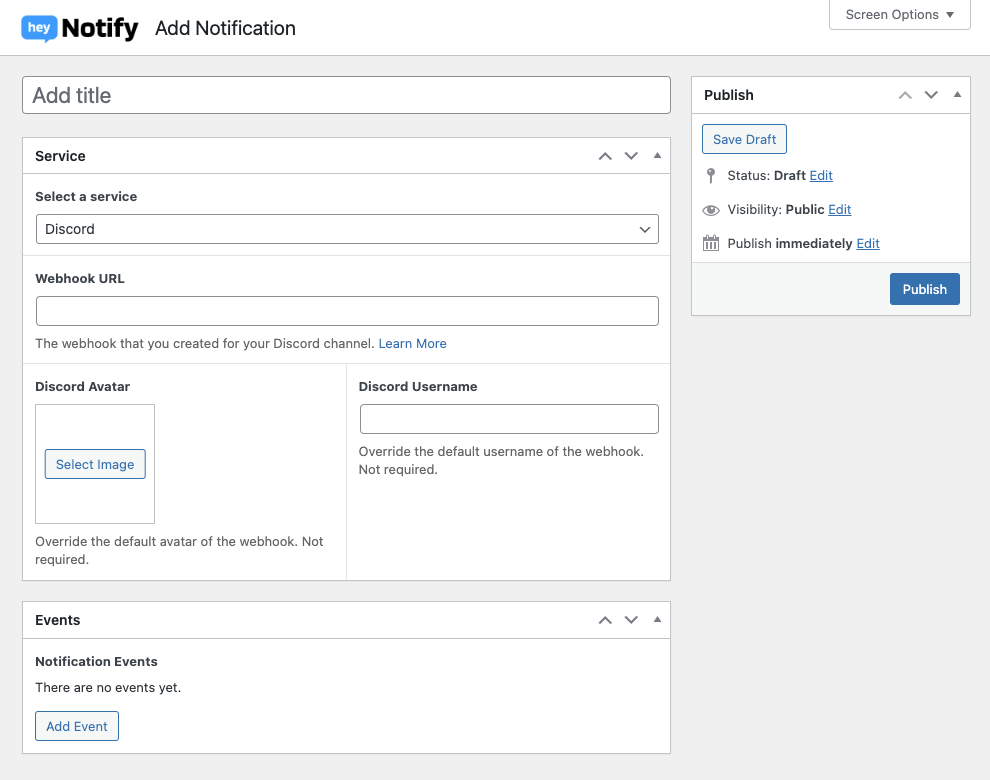
Notification Settings

Hey Notify Settings Page
Changelog
2.1.1
- Fixed an issue that caused Slack notifications to not send.
2.1.0
- Microsoft Teams support has been removed due to changes with Office 365 connectors.
- Changes to improve Hey Notify Pro capabilities.
2.0.3
- Added support for Live Preview in the Plugin Directory.
- Expanded admin header to add and edit notification pages.
- Updated language file for translations.
2.0.2
- Fixed version.
2.0.1
- Changed network requests to use
wp_safe_remote_post.
2.0.0
- BREAKING CHANGES – If you use our Gravity Forms or Ninja Forms add-on, please download our new Pro add-on from your Account as the individual plugins have been discontinued.
- Migrated settings from Carbon Fields to our own custom fields.
- Settings page redesign.
- Notification event tags now show their complete event name.
- Updated Slack settings to reflect their new webhook API.
- New Comment notifications are not sent if comment is marked as spam.