

Hide Anything – Hide Any Element on Any Page Visually
If you don't know coding or want to hide any unnecessary element on your site then this plugin is for you. You can hide any element on any page b …
Plugin info
Maintenance & Compatibility
Maintenance score
Possibly abandoned • Last updated 1155 days ago • 2 reviews
Is Hide Anything – Hide Any Element on Any Page Visually abandoned?
Possibly abandoned (last update 1155 days ago).
Compatibility
Similar & Alternatives
Explore plugins with similar tags, and compare key metrics like downloads, ratings, updates, support, and WP/PHP compatibility.
Description
If you don’t know coding or want to hide any unnecessary element on your site then this plugin is for you.
You can hide any element on any page by visually selection with a simple click without any coding.
The user won’t see the hidden elements when they will browse the site until you make it visible again.
VIDEO OVERVIEW
🔥 FEATURES
Frontend Hiding – Hide any element on the website frontend.
Admin Dashboard Hiding – Hide any element on the admin dashboard.
Visual Element Selection – You can select any element visually by clicking on it to hide.
No Coding – You don’t need to know any coding to hide any element.
Restore the Hidden Element – You can restore the hidden element by clicking on it.
Multiple Display (Desktop, Tablet, Mobile) Options – You can choose the display options (Desktop, Tablet, Mobile) where the element will be hidden.
HOW TO USE?
-
Install and activate the plugin.
-
To hide any element in any page on your site frontend, Go to the page where you want to hide any element as a logged-in user with admin privileges.
-
You will see a “Hide Anything” button in the top admin bar. Click the button to activate the element selection.
-
You can see a blue overlay area of the element while the mouse moving on any element, you have to click the element.
-
Now you can see that a display choose option appeared under the “Hide Anything” button.
-
Then click the save button.
-
To restore the element, you have to click the “Hide Anything” button to activate the element selection.
-
You can see that the hidden element is overlayed with a red color. You have to click the element.
-
Now, you will get an option (Make Visible) under the “Hide Anything” button, you have to check the Make Visible option and save the settings.
🔥 WHAT’S NEXT 🔥
Consider checking out our other plugins:
📁Integrate Google Drive – Browse, Upload, Download, Embed, Play, and Share Your Google Drive Files Into Your WordPress Site.
🌙Dracula Dark Mode – The Revolutionary Dark Mode Plugin For WordPress
📖Reader Mode – Distraction-Free Content Reader for WordPress.
📻Radio Player – Live Shoutcast, Icecast and Audio Stream Player for WordPress.
📻WP Radio – Worldwide Online Radio Stations Directory for WordPress.
🎙Podcast Box – Best Podcasting Plugin for WordPress.
📤Upload Fields for WPForms – Drag and Drop Multiple File Upload, Image Upload, and Google Drive Upload for WPForms.
Installation
Frequently Asked Questions
Review feed
Screenshots
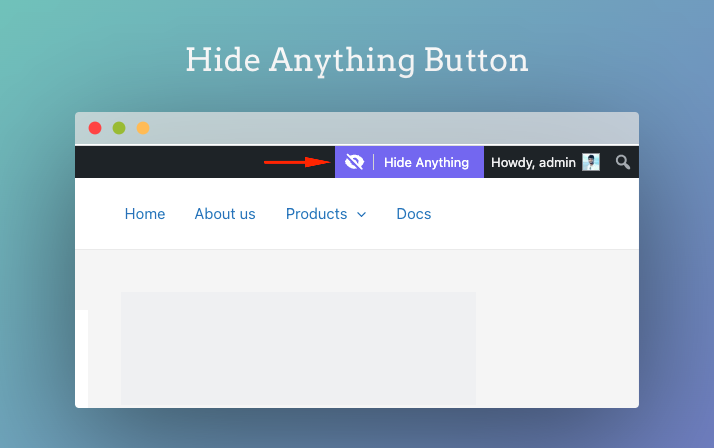
Hide Anything Button

Select Element & Display Settings

Restore Hidden Element
Changelog
1.0.2
- Update: Improved the plugin performance.
1.0.1
- New: Added Admin Dashboard Hiding
- New: Added settings page
- Fix: Fixed WordPress 5.8 compatibility.
1.0.0
- Initial release