

Hide Content by User Role for WPBakery
Hide/show/restrict elements based on user roles like administrator in WPBakery page builder (formerly Visual Composer).
Plugin info
Maintenance & Compatibility
Maintenance score
Possibly abandoned • Last updated 370 days ago • 16 reviews
Is Hide Content by User Role for WPBakery abandoned?
Possibly abandoned (last update 370 days ago).
Compatibility
Languages
Similar & Alternatives
Explore plugins with similar tags, and compare key metrics like downloads, ratings, updates, support, and WP/PHP compatibility.
Description
This plugin adds settings to all elements in WPBakery page builder to hide/show the content elements on your website based on user roles. This way you can easily restrict content in WPBakery pages and posts.
For example you can hide a specific column element on your page or post for all users but editors or only show it to logged-out users.
By default (with no checkboxes checked) the content will be visible for all users.
The hidden content will also be removed from the HTML.
Features
- can hide content in the frontend for specific user roles and logged out users
- works with all WPBakery elements
- removes hidden content from HTML Code
- also works with added custom roles
- no hidden costs, completely free plugin
Issues with specific Themes / Plugin versions
There are alot of themes that are using modified versions of WPBakery Page Builder. Some may not work together well with this plugin.
Uncode Theme
The Uncode WPBakery version did not show the tab Visible for roles at all. We fixed this by changing the hook when to add the our tab.
Salient Theme
The Salient Theme transforms checkboxes to switches and removes the labels. We fixed that in 1.2.1 and put the labels back there.
Installation
- Upload the zip to the
/wp-content/plugins/directory - Activate the plugin through the ‘Plugins’ menu in WordPress
- Set the roles for which to hide the content in the WPBakery rows or columns settings
Frequently Asked Questions
Just go to the support forums and kindly ask for it, then we´ll see what we can do. Thank you!
Review feed
Screenshots

Hide or show rows and columns with these settings in WPBakery
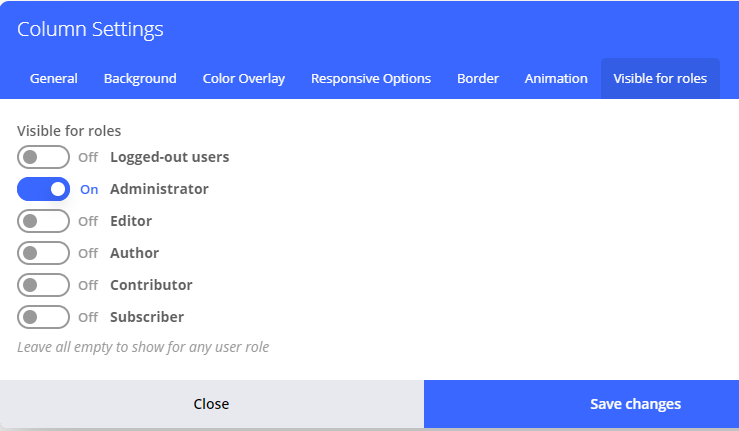
Fixed display of checkbox (which are converted to switches) labels in Salient Theme

Fixed tab in Uncode Theme
Changelog
1.2.3
- remove duplicate action hook
1.2.2
- fix tab in Uncode Theme
1.2.1
- fix issue with Impreza Theme not accepting 4 parameters for the hook ‘vc_shortcode_output’
- fix display of checkbox labels in Salient Theme
1.2
- add settings to all WBBakery elements
1.1
- add option to show content only for guests (not logged in users)
1.0.1
- add setting description
- add assets
1.0.0
- Initial release