

Hikari Krumo
Krumo is a debug tool able of collapsing array and object values so that it takes less space and let us see only what we really need from complex data
Plugin info
Maintenance & Compatibility
Maintenance score
Possibly abandoned • Last updated 5654 days ago
Is Hikari Krumo abandoned?
Possibly abandoned (last update 5654 days ago).
Compatibility
Similar & Alternatives
Explore plugins with similar tags, and compare key metrics like downloads, ratings, updates, support, and WP/PHP compatibility.
Description
Krumo is a debugging tool equivalent to print_r() and var_dump(), with the advantage of collapsing array and object values so that it takes less space and let us see only what we really need from complex data.
Hikari Krumo ports it to a WordPress plugin, so that Krumo becomes easily available in any WordPress page. Original Krumo has a few bugs fixed and has its options available in an admin page instead of requiring krumo.ini file edited directly.
Features
- The simplicity of print_r() with the details of var_dump()
- Show any data, including its data type
- For arrays and objects, internal data are collapsed, so that it takes less space and you can expand to see only those values you really wanna see, spending much less space
- Works anywhere in WordPress, backend and frontend
- Hide it from visitors and only those who really need to see dump be able to see it
- Automatically shows PHP file and line where dump happened, a great tool for debugging
Installation
Hikari Krumo requires at least WordPress 2.8 and PHP5 to work.
You can use the built in installer and upgrader, or you can install the plugin manually.
- Download the zip file, upload it to your server and extract all its content to your
/wp-content/pluginsfolder. Make sure the plugin has its own folder (for exemple/wp-content/plugins/hikari-krumo/). - Activate the plugin through the ‘Plugins’ menu in WordPress admin page.
- Go to Hikari Krumo settings page and set who should see it
- That’s it! Now you can use Krumo anywhere in your site, being it in a WordPress Core file, a plugin or a theme, just by calling
krumo($data)and passing the data you wanna debug to it!
Upgrading
If you have to upgrade manually, simply delete hikari-krumo folder and follow installation steps again.
Uninstalling
If you go to plugins list page and deactivate the plugin, it’s config stored in database will remain stored and won’t be deleted.
If you want to fully uninstall the plugin and clean up database, go to its options page and use its uninstall feature. This feature deletes all stored options, restoring them to default (which can also be used if you want defaults restored back), and then gives you direct link to securely deactive the plugin so that no database data remains stored.
Frequently Asked Questions
What’s the difference of original Krumo to Hikari Krumo?
Full Krumo is included in the plugin, it’s ported to WordPress so that we can use Krumo anywhere inside WordPress without having to bother of including it before the use.
Krumo is also adapted so that it’s configured from a WordPress plugin admin page instead of original krumo.ini, making it much easier to config. You can also configure who should see krumo output, so that you use it in frontend while your visitors see your site without even guessing Krumo is in place there.
Also, a few Krumo bugs I’ve seen were fixed.
I wanna design a new skin, will you help me?
Well I’m not webdesigner, but I can debug it and add to my plugin if you want.
Just provide me the skin files, and make sure to use schablon.com as a basis because it’s the one I’ve tested further. Also make sure to use my plugin’s files as basis, because they have some bug fixes over original ones.
Review feed
Screenshots

Krumo as it's presented when page loads, collapsed and using very little space

Main variable expanded, showing all object's fields
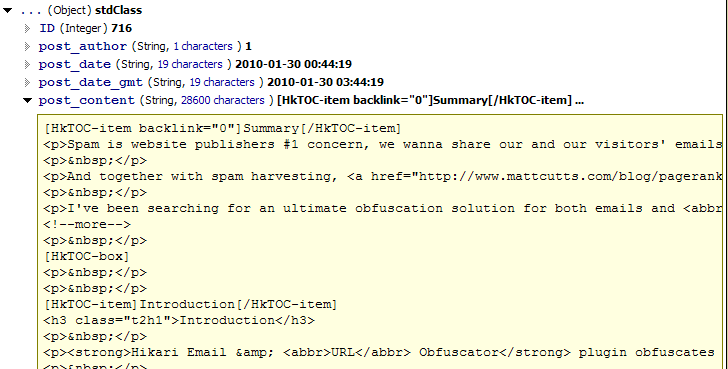
$post->post_contentwas still collapsed because it's a large text, now it was also expanded and you can see how a big string/blob of text is shown
here you see the result of
krumo(debug_backtrace())
Changelog
0.02
- First public release.