

Hizzle CAPTCHA – Protect your forms from spam
Get rid of spammers using this WordPress and WooCommerce CAPTCHA plugin for Google reCAPTCHA, Cloudflare Turnstile, and more.
Plugin info
Maintenance & Compatibility
Maintenance score
Possibly abandoned • Last updated 414 days ago • 2 reviews
Is Hizzle CAPTCHA – Protect your forms from spam abandoned?
Possibly abandoned (last update 414 days ago).
Compatibility
Similar & Alternatives
Explore plugins with similar tags, and compare key metrics like downloads, ratings, updates, support, and WP/PHP compatibility.
Description
This is a lightweight CAPTCHA plugin for WordPress and WooCommerce.
★★★★★
The free version supports the “I\’m not a robot” Checkbox from Google reCAPTCHA.
The premius version supports:-
– Invisible reCAPTCHA V2.
– Score based reCAPTCHA V3.
– Cloudflare Turnstile.
Both versions allow you to protect your:-
- WordPress / WooCommerce login forms.
- WordPress / WooCommerce / BuddyPress registration forms.
- WordPress / WooCommerce lost password forms.
- WordPress / WooCommerce reset password forms.
- WordPress comment forms.
- WooCommerce checkout forms.
- Noptin newsletter subscription form.
- BBPress new topic and reply forms.
- BuddyPress new group forms.
- Contact Form 7 forms.
- Mailchimp 4 WordPress forms.
- WPForms forms.
- WPForo new topic and reply forms.
CAPTCHA can be individually enabled / disabled on each form.
A CAPTCHA test is designed to determine if an online user is really a human and not a bot. CAPTCHA is an acronym that stands for “Completely Automated Public Turing test to tell Computers and Humans Apart.”
Installation
- Go to your WordPress Dashboard.
- Click on Plugins -> Add New
- Search form “Hizzle CAPTCHA“
- Find the plugin and click on the Install Now button
- After installation, click on Activate Plugin link to activate the plugin.
Frequently Asked Questions
No. We only support version 2 keys for the time being.
Use the contact form on our website.
There are a lot of ways to contribute:-
- Suggest a feature via our contact form.
- Give us a 5* rating on WordPress.
Yes, as long as your theme follows the WordPress theme development guidelines.
Review feed
Very good!!!
Screenshots
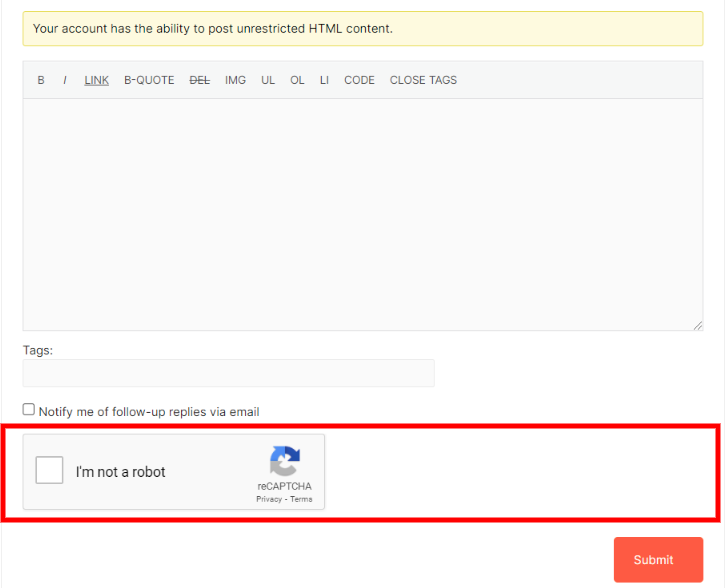
bbPress new reply Google reCAPTCHA.

bbpress new topic Google reCAPTCHA.

BuddPress registration form Google reCAPTCHA.

BuddyPress new group Google reCAPTCHA.

Contact Form 7 Google reCAPTCHA.

Hizzle reCAPTCHA settings page.

Mailchimp for WordPress Google reCAPTCHA.

Noptin newsletter Google reCAPTCHA.

WooCommerce checkout form Google reCAPTCHA.

WooCommerce login form Google reCAPTCHA.

WooCommerce lost password form Google reCAPTCHA.

WooCommerce registration form Google reCAPTCHA.

WooCommerce reset password form Google reCAPTCHA.

WordPress comment form Google reCAPTCHA.

WordPress login form Google reCAPTCHA.

WordPress lost password form Google reCAPTCHA.

WordPress register form Google reCAPTCHA.

WordPress reset password form Google reCAPTCHA.

WPForms Google reCAPTCHA.

WPForo new reply form Google reCAPTCHA.

WPForo new topic form Google reCAPTCHA.
Changelog
2.0.0
- Tested on WordPress 6.7.
1.1.0
- Test on WordPress 6.5.
1.0.3
- Add ability to user alternative script source.
1.0.1
- Compatibility with new Noptin forms editor.
- Bump tested WordPress version
1.0.0
- Initial release.