

Plugin info
Maintenance & Compatibility
Maintenance score
Possibly abandoned • Last updated 3472 days ago
Is Hm Weather Widget abandoned?
Possibly abandoned (last update 3472 days ago).
Compatibility
Similar & Alternatives
Explore plugins with similar tags, and compare key metrics like downloads, ratings, updates, support, and WP/PHP compatibility.
Description
Hm weather widget is a simple and lightweight plugin that will help you to show weather condition on your site . You can Display individual city weather or your own city with geolocation.
option for Display All day Condition and forecast
Also option for Full forecast through api.
All data Display Through Wunderground Api . Wunderground is weather forecast site.
GeoPlugin use for Detect own position , city .
GeoPlugin only work on live server not in localhost.
Installation
- Add plugin to the
/wp-content/plugins/directory - Activate the plugin through the ‘Plugins’ menu in WordPress
- Go to widget secction and add it any sidebar
- Fill the state and city (Required)
- check other option if you want to show other information
JUst too Easy
Frequently Asked Questions
Installation Instructions
- Add plugin to the
/wp-content/plugins/directory - Activate the plugin through the ‘Plugins’ menu in WordPress
- Go to widget secction and add it any sidebar
- Fill the state and city (Required)
- check other option if you want to show other information
JUst too Easy
Review feed
Screenshots
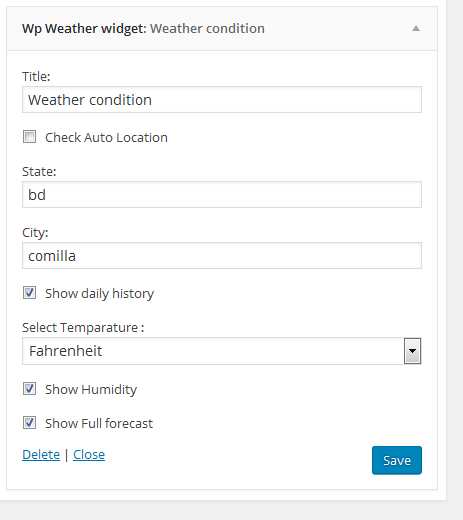
Backend widget screen
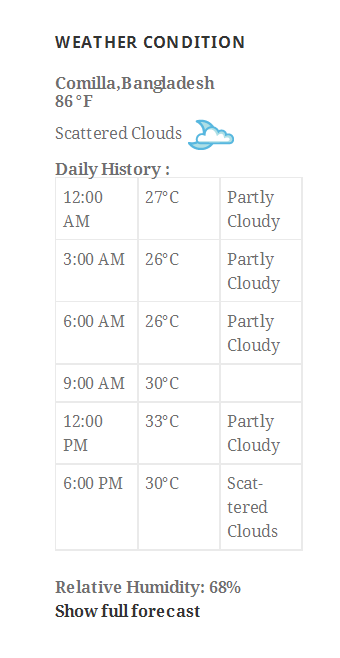
Basic forntend layout