

Holiday Mode for WooCommerce
Set your WooCommerce® shop to holiday/vacation mode. Use date range to schedule closed time.
Maintenance 22/100948d since update
Active installs
700
Downloads
6,431
Reviews
4
Age
4.6y
Plugin info
Total downloads: 6,431
Active installs: 700
Total reviews: 4
Average rating: 4.5
Support threads opened: 0
Support threads resolved: 0 (0%)
Available in: 4 language(s)
Contributors: 1
Last updated: 8/29/2023 (948 days ago)
Added to WordPress: 9/7/2021 (4 years old)
Minimum WordPress version: 5.4
Tested up to WordPress version: 6.3.7
Minimum PHP version: 7.3
Maintenance & Compatibility
Maintenance score
Possibly abandoned • Last updated 948 days ago • 4 reviews
22/100
Is Holiday Mode for WooCommerce abandoned?
Possibly abandoned (last update 948 days ago).
Compatibility
Requires WordPress: 5.4
Tested up to: 6.3.7
Requires PHP: 7.3
Developers
Similar & Alternatives
Explore plugins with similar tags, and compare key metrics like downloads, ratings, updates, support, and WP/PHP compatibility.
Store Vacation for WooCommerce
Rating 4.6/5 (167 reviews) • Active installs 10,000
Multidots Doodle – Automatically update logos for holidays, seasons, or promotions
Rating 0.0/5 (0 reviews) • Active installs 0
Disable Sales for WooCommerce
Rating 0.0/5 (0 reviews) • Active installs 300
Travel Game – Vacation Widget
Rating 0.0/5 (0 reviews) • Active installs 10
Vacation Rentals
Rating 0.0/5 (0 reviews) • Active installs 10
A3H Pono Rez Reservation Interface for WordPress
Rating 0.0/5 (0 reviews) • Active installs 0
Description
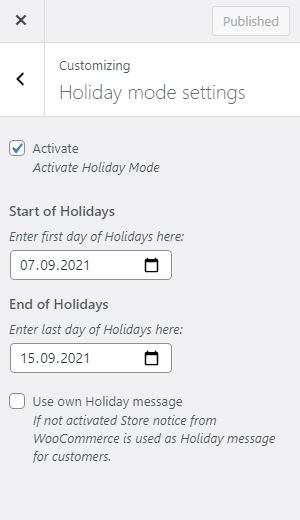
Set your WooCommerce® shop to holiday/vacation mode. Use date range to schedule closed time. You can use WooCommerce® store notice or separate message to display information to your customers.
- Disable Orders (remove add to cart button and display message)
- Disable Cart (items in active carts will be removed when activated holiday mode)
- Disable Checkout
- Display Custom Notification to your clients or use WooCommerce® store notice
- Set up a Start and End date for your holidays
- Automatically disable mode when vacation ends
WooCommerce® is a registered trademark of Automattic Inc.
Privacy Disclosure
This plugin does not store any personal data.
Installation
This section describes how to install the plugin and get it working.
- Upload
folderto the/wp-content/plugins/directory - Activate the plugin through the ‘Plugins’ menu in WordPress
- Open
Appearance -> Customize -> Holiday mode settingsto setup holiday mode
Frequently Asked Questions
No FAQ available
Review feed
No reviews available
Screenshots


Changelog
1.7.1
- Compatibility for WordPress 5.9
1.7
- Add additional message on product page to increase theme compatibility (if woocommerce_before_main_content is not used by active theme)
- Settings are only visible if WooCommerce is activated within WordPress
- HTML is now possible for customer message
- Only provide vacation feature if WooCommerce is available
- Lowest PHP version is now 7.3, because lower versions reached EOL
1.6
- Fixed warning: Timezone is used correctly now
1.5
- Add further translation
1.4
- Fixed default translation language
1.3
- Add german language
1.2
- Fixed defined version, to allow updates
1.1
- Fixed settings: names are now more unique
1.0
- Initial version