

Host Header Injection Fix
Sets custom headers for WP notification emails. Also fixes a security issue with WP versions < 5.5.
Plugin info
Maintenance & Compatibility
Maintenance score
Maintained • Last updated 139 days ago • 6 reviews
Is Host Header Injection Fix abandoned?
Likely maintained (last update 139 days ago).
Compatibility
Similar & Alternatives
Explore plugins with similar tags, and compare key metrics like downloads, ratings, updates, support, and WP/PHP compatibility.
Description
Enables custom headers for WP email notifications
Also “set it and forget it” security fix for WP < 5.5
Important
As of WordPress 5.5, this plugin no longer is necessary to fix the host-header security issue reported in Ticket #25239 finally is fixed, and mentioned in this post WordPress 5.5 Beta 4. Thank You WordPress devs!
Is this plugin still useful?
Yes, it enables you to choose the “From”, “Name”, and “Return-Path” headers for all WP notification emails. And for versions of WordPress less than 5.5, this plugin continues to fix the host-header injection security issue.
Features
This simple plugin does three things:
- Sets custom From, Name, and Return-Path for WP notifications
- Fixes a security vulnerability in WordPress versions < 5.5
- Fixes a bug where invalid email addresses may be generated (in WordPress versions < 5.5)
Choose from the following options:
- Use WordPress defaults (insecure for WP < 5.5)
- Use “Email Address” from WP General Settings
- Use a custom name and address
Plus there is an option to use the specified From address as the Return-Path header.
Why?
The security issue fixed by this plugin has been known about since way back in WordPress version 2.3. There has been some talk about fixing, but nothing has been implemented. While the issue does not affect all sites, it does affect a good percentage of them, including some of my own projects. So, not wanting to get hacked, I decided to write my own solution. Hopefully this issue gets fixed in a future version of WordPress, and this plugin will become unnecessary.
As a bonus, setting an explicit From address resolves a long-standing bug whereby an invalid email address is generated under the following conditions:
- A “From” address is not set,
- And the
$_SERVER['SERVER_NAME']is empty
So by explicitly setting a “From” address, we prevent this bug from happening.
Security Issue
What is the security issue addressed by this plugin? Follows is a quick summary. To learn more in-depth, check out the resources linked in the next section.
- WordPress uses
$_SERVER['SERVER_NAME']to set the “From” header in email notifications - This includes sensitive email notifications like password resets and user registration
- In some cases, an attacker could modify the “From” header and intercept the email
- Using the intercepted email, an attacker could gain access to your site and wreak havoc
More Infos
This security vulnerability is well-known and has been around for a looong time. To learn more, check out these articles:
Privacy
This plugin does not collect or store any user data. It does not set any cookies, and it does not connect to any third-party locations. Thus, this plugin does not affect user privacy in any way.
Host Header Injection Fix is developed and maintained by Jeff Starr, 15-year WordPress developer and book author.
Support development
I develop and maintain this free plugin with love for the WordPress community. To show support, you can make a donation or purchase one of my books:
- The Tao of WordPress
- Digging into WordPress
- .htaccess made easy
- WordPress Themes In Depth
- Wizard’s SQL Recipes for WordPress
And/or purchase one of my premium WordPress plugins:
- BBQ Pro – Blazing fast WordPress firewall
- Blackhole Pro – Automatically block bad bots
- Banhammer Pro – Monitor traffic and ban the bad guys
- GA Google Analytics Pro – Connect WordPress to Google Analytics
- Head Meta Pro – Ultimate Meta Tags for WordPress
- Simple Ajax Chat Pro – Unlimited chat rooms
- USP Pro – Unlimited front-end forms
Links, tweets and likes also appreciated. Thank you! 🙂
Installation
Installing HHIF
- Upload the plugin to your blog and activate
- Visit the plugin settings to configure options
More info on installing WP plugins
Uninstalling
This plugin cleans up after itself. All plugin settings will be removed from the WordPress database when the plugin is uninstalled via the Plugins screen.
Restore Default Options
To restore default options, uninstall the plugin via the WP Plugins screen, and then reinstall.
Like the plugin?
If you like Host Header Injection Fix, please take a moment to give a 5-star rating. It helps to keep development and support going strong. Thank you!
Frequently Asked Questions
As of WordPress 5.5, this plugin no longer is necessary. They finally fixed the bug reported in Ticket #25239, mentioned in this post WordPress 5.5 Beta 4. Thank You WordPress devs!
“So is the plugin still useful?”
Yes, HHIF enables you to choose the “From”, “Name”, and “Return-Path” headers for all WP notification emails. And for versions of WordPress less than 5.5, this plugin continues to fix the host-header injection security issue.
For fixing the host-header injection security issue, this plugin is necessary only for WordPress versions less than 5.5 (they fixed the bug in WP 5.5). So if you are running WP 5.5 or better, then you do not need this plugin. Unless you want to customize the headers used in WP notification emails.
If you are using WordPress less than 5.5, you can find more information on testing here and here.
Yes, if activated on an individual per-site basis. I.e., may not work properly with network-wide activation.
Yes, there are numerous hooks available for advanced customization. Refer to the source code for details.
When the HHIF option, WP Notifications > “Use custom address” is enabled, the plugin toggles open another option called “Email Return Path”. There you can check the box to use the “Email From Address” as the Return Path for all emails sent by WordPress (e.g., new user notifications, new comment notifications, login related notifications, etc.). So check/enable this option only if you want to use the “Email From Address” as the Return Path for all emails sent by WordPress. If in doubt, leave the option unchecked/disabled.
Yes, three of them:
- BBQ Firewall for super-fast firewall security
- Blackhole for Bad Bots to protect your site against bad bots
- Banhammer to monitor and ban any user or IP address
Pro versions with more features available at Plugin Planet.
Yes, works great does not matter which editor (block or classic) is used.
Send any questions or feedback via my contact form
Review feed
Screenshots
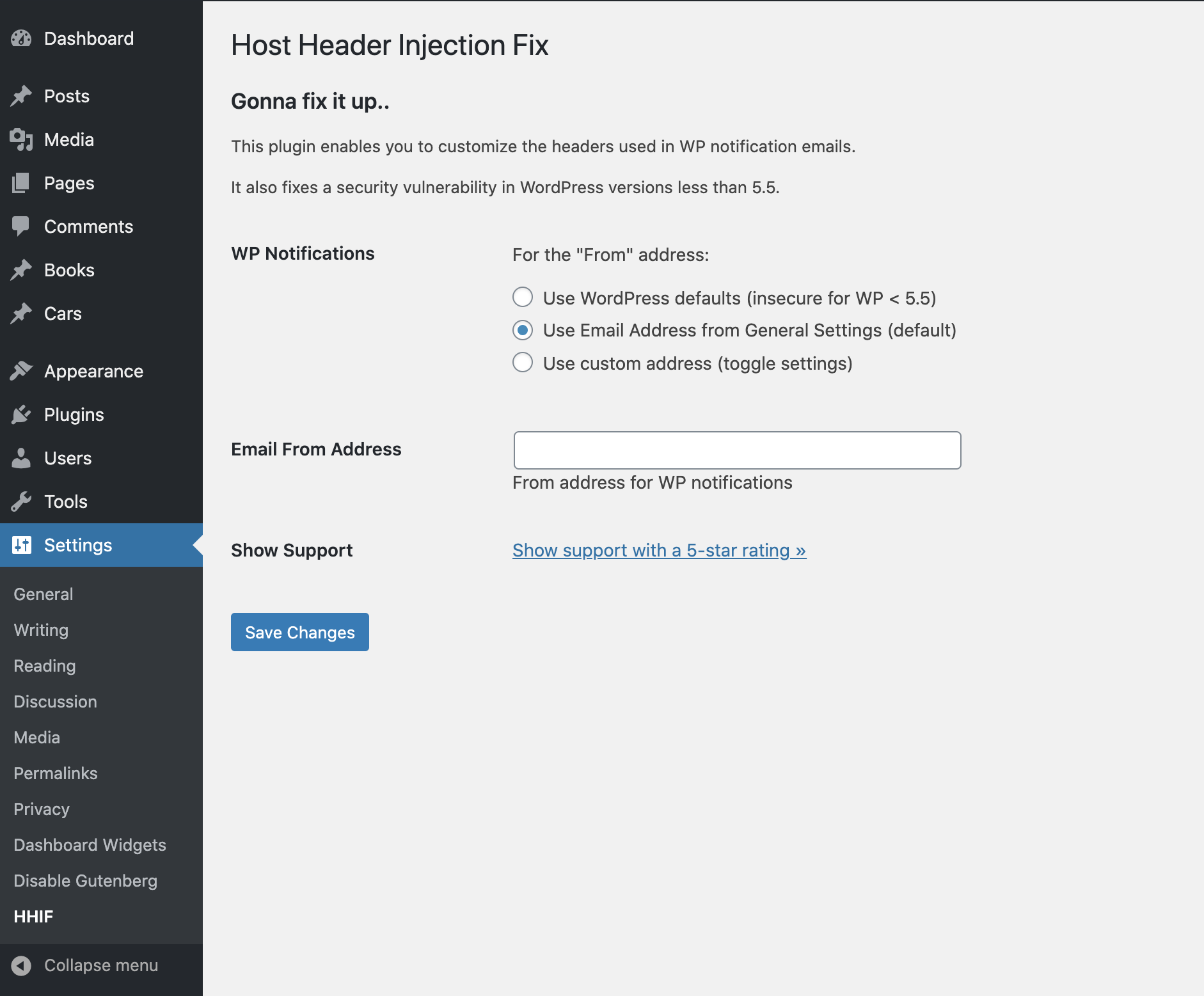
Host Header Injection Fix: Default Plugin Settings
Changelog
If you like Host Header Injection Fix, please take a moment to give a 5-star rating. It helps to keep development and support going strong. Thank you!
3.4 (2025/11/14)
- Restores
load_i18n() - Generates new language template
- Tests on WordPress 6.9 (beta)
Full changelog @ https://plugin-planet.com/wp/changelog/host-header-injection-fix.txt