

HoweScape ScoutBookLabelPrint
This plugin is a utility to take the CSV files which ScoutBook can produce and generate labels using Avery 6570.
Plugin info
Maintenance & Compatibility
Maintenance score
Stale • Last updated 334 days ago
Is HoweScape ScoutBookLabelPrint abandoned?
Likely maintained (last update 334 days ago).
Compatibility
Similar & Alternatives
Explore plugins with similar tags, and compare key metrics like downloads, ratings, updates, support, and WP/PHP compatibility.
Description
This HoweScape ScoutBook Label Print plugin allows labels to be printed for Scout advancement Cards. Currently the tool
being recommended for recording scout advancement is ScoutBook. ScoutBook only has the ability to print full sheets of award cards.
The ScoutBook.com web site provided the ability to print onto a sheet of 8 advancement cards. HoweScape ScoutBook LabelPrint Plugin is
configured to use Avery 6570 labels.
A sheet of labels contains 32 labels. The Plugin provides the ability to skip label positions so that you can print a single label
or a whole sheet, starting at any label on the sheet. After the labels are printed a list is printed. The output from the plugin
is a PDF file which is displayed in a new tab. This tab can be saved or printed using the features of the browser. Some of the
merit Badge names do not fit on the label with the other text. A list of abbreviated for Merit Badges has been included. The information
is loaded from an XML file. There are 3 settings Drawn Border, Presentation Card and Merit Badge / Rank Images. The only active control is
Draw Border. This feature was used to help verify that the information was positioned correctly in the label.
The other fields are for future features. The settings page also displays a table of the original and abbreviated name of merit badges and awards
Installation
- Upload the plugin files to the
/wp-content/plugins/plugin-namedirectory, or install the plugin through the WordPress plugins screen directly. - Activate the plugin through the ‘Plugins’ screen in WordPress
- Use the Settings->”HoweScape ScoutBook LabelPrint” to configure the plugin
- Use the short code “[hs_ScoutBookLabelPrint]” to insert the dialog box into a page.
- Use the short code “[hs_ScoutBookLabelPrint_samplePDF]” to insert a link to a sample CSV input file.
- Use the short code “[hs_ScoutBookLabelPrint_sampleCSV]” to insert a link to a sample PDF output file.
Frequently Asked Questions
A:
- hs_ScoutBookLabelPrint – Short code display form.
- hs_ScoutBookLabelPrint_samplePDF – Short Code to put a link to sample Output file
- hs_ScoutBookLabelPrint_sampleCSV – Short Code to put a link to sample Input file
- hs_ScoutBookLabelPrint_advancement – short code to display form for advancement cards on poster
A: Yes, the first 3 are indended to placed on the same page. These provided a form, and link to sample input and output.
The fourth short code is intended to be a seperate page.
A: The Comma Separated Values (CSV) file produced by ScoutBook.com.
See list below.
A: Yes, Use the short code “hs_ScoutBookLabelPrint_sampleCSV” to create a link to the CSV file.
Download and save the file and use it to run the application.
A:
- “First Name”
- “Last Name”
- “Patrol”
- “Quantity”
- “SKU”
- “Item Type”
- “Price”
- “Item Name”
- “Date Earned”
A: Yes, the plugin assumes that the actual data starts on line 2 of the input file.
A: No, but the are expected to be present.
A:
- Name
- Item Type
- Item Name
- Date Earned
A: Yes, there is a setting which allows a box drawn around the labels.
A: Yes, the list of Councils is stored in a an external file: CouncilList.xml. Please let me know of any errors so
that they can be fixed in a future release.
A: Yes, The file ScoutBook_DropDown.xml contains the values for the:
- Fonts
- Unit Types
- Rank Message
- Merit Badge Message
- Merit Badge Abbreviation List
- Boy Scout Awards
- Output Types
- Advancement Types
- Award Title Line Breaks
A: No, not at this time.
A: Yes, HS-TestMeritBadges.csv
The shortcode “hs_ScoutBookLabelPrint_sampleCSV” will create a link to access the CSV file.
A: Yes, HS-TestMeritBadges.pdf
The shortcode “hs_ScoutBookLabelPrint_samplePDF” will create a link to access the PDF file.
A: Each selection in the form is stored as a cookie in the browser.
The cookies are updated each time the form is processed. This has been updated to use a single cookie which stores a JSON object.
A:
- The rank message is what is printed on the rank advancement card.
- The MeritBadge Message is what is printed on the merit badge card.
- The %n% allows the inseration of a new line character.
- The %rank% is where the rank title will be inserted.
- The %mb_name% is where the merit badge name is inserted.
A: No, not at this time.
Review feed
Screenshots

This screen shot Show the dialog box which is used to generate the output. DialogBox.png

This Screen shot showing the label location dialog expanded. DialogBoxExpanded.png

This screen shot of the Settings page, showing the control for draw box. SettingPart1.png

This screen shot of the list of merit Bages names which have abbreviations. SettingPart2.png

This screen shot is of the output tab showing the merit badges labels. SampleLabels.png
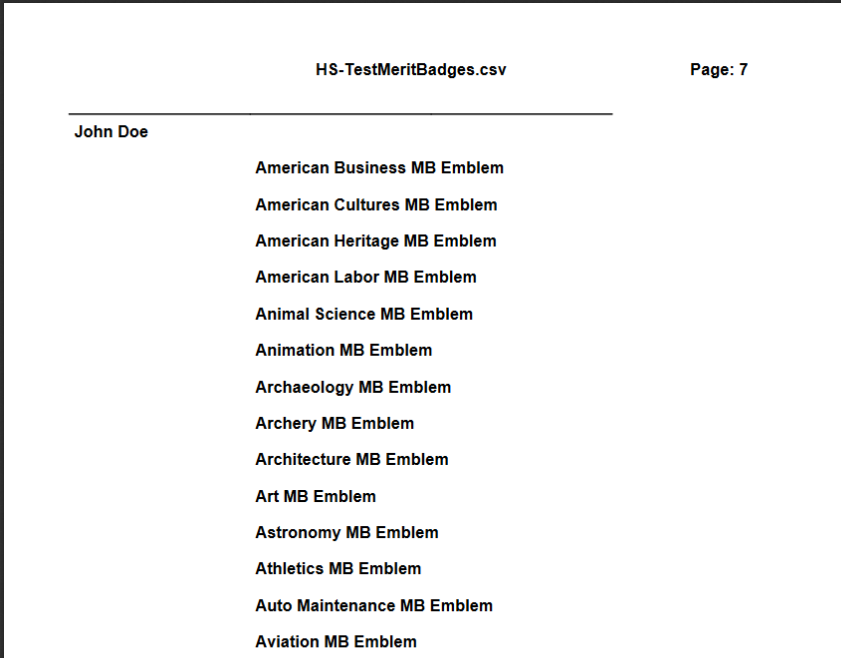
This screen shot is of the output part of the tab showing the list of merit badges SampleList.png

This screen shot is of the links created from the Short Codes. It displays samples input and output file. LinkToSample.PNG
Changelog
1.7.4
- General updates to support language translation
- testing with new version of WordPress
- Update TCPDF library
1.7.0
- Updated messages to remove “+” to ” “
- Clean up code for Total Page to be cleaner
- Updated some code to create functions and reduce code.
1.5.0
- Updated Cookies to use JSON. Missed one case
- added settings at end of poster
1.4.0
- Updated to add print settings at the bottom of the report.
1.0.0
- Updated cookies to use JSON structure to support all needed fields.
- General update to remove old code.
- Added second short code to create poster of advancement cards
- Added sample input files to create Poster(HS-Test_Scout.csv, HS-Test_Advancement.csv)
- Added sample label input file (HS-TestMeritBadges.csv) and output (HS-TestMeritBadges.PDF)
- moved line break information to JSON structure in XML
- Added advancement list to ensure that cards are proper style
- Tested in WordPress 6.0.1
0.4.0
- Updated Readme file
- added count of sheets for each Category
0.2.9
- Update label allignment for form
0.2.8
- Update to parameter processing
0.2.6
- Corrected load / access error XML data file
0.2.5
- General update to improve structure and investigate other possible options
0.2.1
- Changed library which creates the PDF file. From FPDF to TCPDF
- Update process to use more constants
0.1.6
- Updates to add new control, allow generation of labels only, List only, or both. General revision to steps taken to generate the labels. Improvements in processing.
0.0.6
- Updates to make plugin acceptable to WordPress Plugin standard.
0.0.5
- Revised to add “Label Layout” button to dialog box.
0.0.4
- Revised to improve application
0.0.3
- Revised version submitted for approval.
0.0.2
- Initial version of plugin