

HTML Editor Type
Uses the lovely M+ 2m font in the HTML post editor for more beautiful typing.
Plugin info
Maintenance & Compatibility
Maintenance score
Possibly abandoned • Last updated 4493 days ago
Is HTML Editor Type abandoned?
Possibly abandoned (last update 4493 days ago).
Compatibility
Similar & Alternatives
Explore plugins with similar tags, and compare key metrics like downloads, ratings, updates, support, and WP/PHP compatibility.
Description
The HTML editor has not received a lot of love. The type is too small, especially when you see it in the new distraction-free writing mode. This plugin uses the lovely M+ 2m font (the font I use for coding every day) for more beautiful writing.
M+ also has extensive international support. From its site:
All fonts were completed with Basic Latin, Latin-1 Supplement, Latin Extended-A, and IPA Extensions. And most of Greek, Cyrillic, Vietnamese, and extended glyphs and symbols were prepared too. So the fonts are in conformity with ISO-8859-1, 2, 3, 4, 5, 7, 9, 10, 13, 14, 15, 16, Windows-1252, T1, and VISCII encoding.
Installation
-
Upload the
html-editor-typefolder to your/wp-content/plugins/directory -
Activate the “HTML Editor Type” plugin in your WordPress administration interface
-
Create or edit a post using the HTML tab (or just disable visual editing altogether in your user settings page). Marvel at the improvement.
Frequently Asked Questions
Review feed
Screenshots
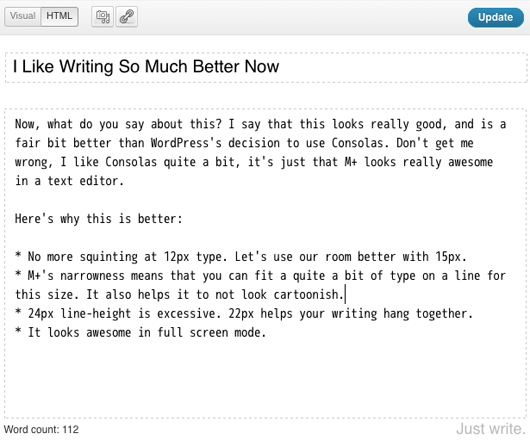
Beautiful HTML fullscreen editing
Changelog
1.0.2
- More specific selector for 3.8
1.0.1
- Sloppiness on initial release fixed up.
1.0
- Initial release