

HTML Page Sitemap
Adds an HTML (Not XML) sitemap of your pages (not posts) by entering the shortcode [html_sitemap], perfect for those who use WordPress as a CMS.
Plugin info
Maintenance & Compatibility
Maintenance score
Stale • Last updated 345 days ago • 22 reviews
Is HTML Page Sitemap abandoned?
Likely maintained (last update 345 days ago).
Compatibility
Similar & Alternatives
Explore plugins with similar tags, and compare key metrics like downloads, ratings, updates, support, and WP/PHP compatibility.
Description
This simple plugin adds an HTML (Not XML) sitemap of your pages (not posts) by entering the shortcode [html_sitemap] in the page content. This simple plugin is configured with the [html_sitemap] shortcode. This plugin can display a sitemap with specific depths, from a specific parent page and include/exclude specific children. Shortcode attributes include sort_column, sort_order, exclude, include, depth, child_of, meta_key, meta_value, authors, number, offset, post_type, and post_status, everything the wp_list_pages function accepts. In addition to the wp_list_pages options you can also set class, id, and ordered_list_type options.
This plugin is perfect for those who use WordPress as a CMS.
Please see documentation for the wp_list_pages for a complete list of options.
The following options may be configured in addition to options documented in wp_list_pages:
The class and id attributes may specified set class or id values for the initial HTML Page Sitemap
The child_of attribute value can be a numeric page ID (integer), or use the custom value CURRENT or PARENT. The value “CURRENT” will use the current page’s ID. The value “PARENT” will uses the curent page’s parent ID.
The ordered_list_type attribute is an HTML Page Sitemap plugin exclusive option for specfiying an ordered list type. Not setting a ordered_list_type will use an unordered list (default).
ordered_list_type="1"– The list items will be numbered with numbersordered_list_type="A"– The list items will be numbered with uppercase lettersordered_list_type="a"– The list items will be numbered with lowercase lettersordered_list_type="I"– The list items will be numbered with uppercase roman numbersordered_list_type="i"– The list items will be numbered with lowercase roman numbers
Note: This plugin only works with Hierarchical Custom Post Types. This plugin will not work if your post type is not heirarchical.
Examples
First example shows how to add a sitemap for the entire site.
[html_sitemap]
Example shortcode will add a sitemap to a page displaying a depth limit of 3 and exclude page ID 708.
[html_sitemap depth=3 exclude=708]
Example shortcode will add a sitemap to a page displaying only children and grandchildren of the current page.
[html_sitemap depth=2 child_of=CURRENT]
Example shortcode will add a sitemap to a page displaying children and grandchildren of the parent page (would include the curent page as well).
[html_sitemap depth=2 child_of=PARENT]
Example shortcode will add a sitemap displaying the page modified date with the pages sorted by the menu order number.
[html_sitemap show_date=modified sort_column=menu_order]
Example shortcode excluding multiple pages with ids 708, 1024 and 42.
[html_sitemap exclude="708,1024,42"]
Example shortcode will add a class attribute to the
[html_sitemap class="custom-class"]
Example shortcode will add an id attribute to the
[html_sitemap id="custom-element-id"]
Example shortcode will display an ordered list using lowercase letters with a depth of 1.
[html_sitemap ordered_list_type="a" depth=1]
For the latest information visit the website.
http://www.pluginspodcast.com/plugins/html-page-sitemap/
ATTENTION: HTML-SITEMAP SHORTCODE HAS CHANGED
Though html-sitemap still works, the new HTML Sitemap shortcode is html_sitemap. The dash/hyphen may not get processed correctly if other plugins use the same prefix such as the Syntax Highlighter plugin. read more, and more
Contributors
Angelo Mandato, Founder and CTO of Painless Analytics – Plugin author
Installation
Automatic Plugin Installation
Install using the built-in plugin installer:
- Go to Plugins > Add New.
- Type in “HTML Page Sitemap” in Search Plugins box.
- Find “HTML Page Sitemap” in the search results.
- Click Install Now to install the WordPress Plugin.
- Click Activate to activate it.
- Add the shortcode [html_sitemap] to the page(s) of your choice.
Manual Plugin Installation
- Download this plugin to your desktop.
- Extract the plugin zip file (or compressed folder) to your desktop.
- With your FTP program, upload the plugin folder to the wp-content/plugins folder in your WordPress directory online.
- Go to Plugins screen and find “HTML Page Sitemap” plugin in the list.
- Click Activate to activate it.
- Add the shortcode [html_sitemap] to the page(s) of your choice.
Frequently Asked Questions
I put together this plugin in less than 2 hours, this readme.txt actually took longer to create. This plugin is meant to be simple and easy to use. To keep it simple, it doesn’t add settings to your database or clutter to your admin screens.
Review feed
Simple
Screenshots
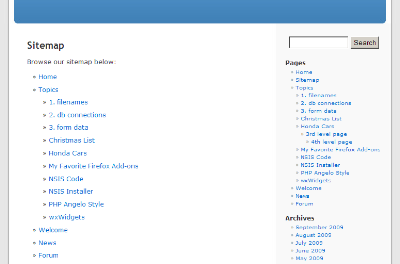
HTML Page Sitemap in the Default WordPress theme.
Changelog
1.3.7
- Released on 2025-04-21
- Tested with WordPress up to version 6.8
- Complete changelog moved to CHANGELOG.md
1.3.6
- Released on 2025-02-09
- Tested with WordPress up to version 6.7.1
- Project now managed on GitHub
1.3.5
- Release skipped
1.3.4
- Released on 2024-08-13
- Tested with WordPress up to version 6.6
- Readme.txt updated to latest requirements (ref: https://developer.wordpress.org/plugins/wordpress-org/how-your-readme-txt-works/)