

HumansNotBots – Easy, Accessible Email Cloaker
"email AT address DOT com" (without quotes) is converted to a clickable version of [email protected] if JavaScript is enabled.
Plugin info
Maintenance & Compatibility
Maintenance score
Possibly abandoned • Last updated 4478 days ago • 2 reviews
Is HumansNotBots – Easy, Accessible Email Cloaker abandoned?
Possibly abandoned (last update 4478 days ago).
Compatibility
Similar & Alternatives
Explore plugins with similar tags, and compare key metrics like downloads, ratings, updates, support, and WP/PHP compatibility.
Description
This email cloaking method:
- is accessible for people browsing with screen readers (e.g., blind people);
- degrades gracefully for browsers without JavaScript;
- works just like a normal, clickable email address for browsers with JavaScript enabled; and
- requires no shortcodes.
Email addresses in the form email AT address DOT com are converted to a clickable version, [email protected], if JavaScript is enabled. If JavaScript is not enabled (such as for screen readers), then the email address in the form email AT address DOT com is still readable to humans.
Installation
Unzip the zip file into the /wp-content/plugins/ directory. Activate the plugin through the ‘Plugins’ menu in WordPress.
Frequently Asked Questions
Won’t email scrapers figure out email addresses in the form `email AT address DOT com`?
In a test comparing the effectiveness of different obfuscation methods in 2008, the obfuscation method “Using ATs and DOTs” received much less spam than “Replacing @ and . with Entities”. Assuming that the 2008 test is an accurate model, this plugin should reduce over 99% of spam without compromising accessibility.
“CSS display: none” should not be used, because screen readers cannot read content styled with display: none either. Reversing email addresses and using ROT-13 encryption are obviously not accessible, either.
Do email addresses that end with “.ca” or “.info” work?
Yes. Any email address with a TLD (top-level domain) of two, three, or four characters would work.
Do email addresses that end with “co.uk” work?
Yes. Email address that end in “co.uk” always worked, but as of version 3.2, you can use the intuitive form: email AT address DOT co.uk.
Something is broken.
Remember that the AT and DOT must be all uppercase (capital letters). You can also try going to Settings and change the replacement method to “Walk the DOM”, which is the new default for version 3.0+.
If you still have problems, you can post your question in the forum and make sure your post has the tag humansnotbots. Another option is to post your question here.
Review feed
Screenshots
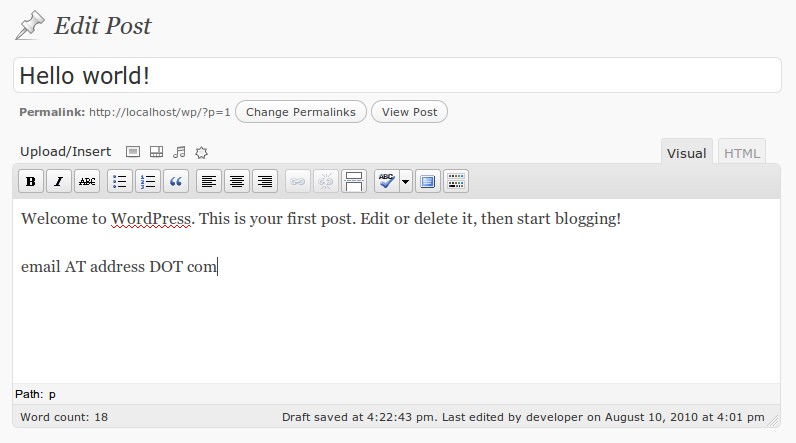
Compose posts with email addresses in the form
email AT address DOT com.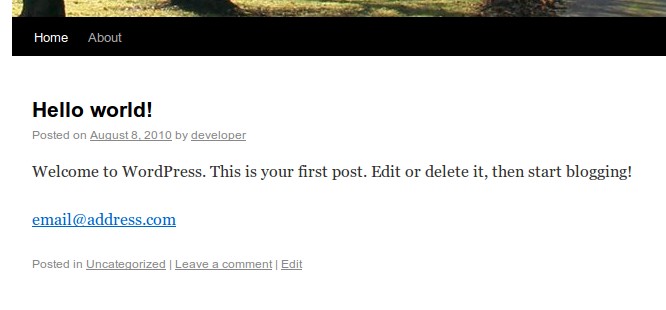
The post should show a clickable email address.

If you view the HTML source, the email scraping bots can only see
email AT address DOT com.
Changelog
3.2
- Updated to allow intuitive form of .co.uk email addresses, i.e., email AT address DOT co.uk.
3.1
- Fixed bug in node replacement logic for Walk the DOM method
3.0
- Added support for internationalization.
- Changed default replacement method to “Walk the DOM”, because “innerHTML” had problems with IE.
2.1
- DOM replacement method should be faster.
- Improved JavaScript code for efficiency and readability.
2.0
- Added option to use another method if the HumansNotBots plugin is incompatible with the WP-Cumulus plugin
1.3
- Moved script from body onload to wp_footer
- Improved humansnotbots.js
1.2
- Fixed error that emptied body class values
- Supports Hybrid theme
- Used wp_enqueue_script to add JS instead of printing to wp_head
1.1
- Fixed error that caused PHP to throw a function.join warning