

Gallery: Hybrid – Advanced Visual Gallery
Photo Gallery. Hybrid Gallery - The 1st WordPress photo gallery plugin with visual shortcode editor, which allows you to create and edit galleries wit …
Plugin info
Maintenance & Compatibility
Maintenance score
Possibly abandoned • Last updated 3216 days ago • 5 reviews
Is Gallery: Hybrid – Advanced Visual Gallery abandoned?
Possibly abandoned (last update 3216 days ago).
Compatibility
Similar & Alternatives
Explore plugins with similar tags, and compare key metrics like downloads, ratings, updates, support, and WP/PHP compatibility.
Description
Hybrid Gallery | Responsive WordPress Visual Gallery Plugin
Hybrid Gallery is the 1st WordPress Gallery Plugin with Visual Shortcode Editor, which allows you to create and edit galleries with just one click. It’s the easiest way to set awesome galleries with different layouts, skins, effect and much more…
Why Hybrid Gallery?
Well, first of all, unlike most gallery plugins, Hybrid Gallery has very simple usage with extremely good usability. There is no admin panel with difficult instructions, hard manuals, all you need to do is just open popup panel (from WordPress editor), add some images and that’s all! This gallery plugin is fully integrated with wordpress TinyMce editor, which means that you can set galleries everywhere editor exists: in posts/pages, custom post types, meta fields…
Hybrid Gallery PRO
This plugin is the lite version of the Hybrid Gallery plugin that comes with all the gallery features: Visual Shortcode Editor, 7 lightboxes, Custom Colors, 6 Month Support, Lifetime Updates and more…
Buy this WordPress Gallery plugin now!
Responsive and Flexible
Our gallery plugin is mega responsive. You can set your own responsive options for custom screen sizes. For example, you can set 3 columns and left alignment for grid layout if screen size is smaller than 820px and 4 columns with right alignment if screen size is smaller than 640px. It’s the most responsive wordpress gallery plugin.
What about flexibility, it is possible to work with any width, use every pixel, increase or decrease the gallery width how much you need. It’s more flexible than ever!!!
Gallery: Features List
Main Features:
- 100% responsive
- 100% fluid
- Custom responsive options
- RTL support
- Retina ready
- SEO optimized
- High speed and performance
- Cross browser
- Translation ready – (Po. Mo. Files Included)
- Visual shortcode editor
- Template creator
- 8 layouts
- Powerful admin panel
- Unlimited colors (PRO)
8 Layouts:
4 Pagination Types:
- Classic – (Older posts and newer posts)
- Classic + AJAX
- Numeric – (With information about current page)
- Numeric + AJAX – (With information about current page)
- Show More – (Manually triggered infinite scroll)
- Infinite Scroll – (Loading more posts when scrolling)
7 Lightboxes:
- Magnific Popup
- Colorbox
- prettyPhoto (PRO)
- Fancybox (PRO)
- iLightbox (PRO)
- lightGallery (PRO)
- Lightcase (PRO)
Other Features:
- Filter gallery images by tags or categories.
- Template Creator: Tired of setting tons of options each time when adding a new gallery? Just create a template and load it every time.
- Item Formats: You can set a custom format (image, video – YouTube, Vimeo…) for each item.
- Image Effects: Added new cool hover effects (zoom-in, zoom-out, zoom-in + rotate, zoom-out + rotate, shine, circle) and image filters (blur, brightness, contrast, grayscale, hue-rotate, invert, opacity, saturate, sepia) for images.
- Up to 6 Columns to switch for grid, metro & masonry layouts.
- RowHeight options allows you to control row height in justified layout.
- 10 HTML5 Preloaders are also included in this wordpress gallery pack.
- CSS3 animations from animate.css will give the gallery an incredible effect.
- Translation Ready: Translate the worpdress plugin in any language you want. It has already translated in several languges: English, Russian, Spanish, Italian, Deutsch & Hindi.
Documentatin
Read the plugin documentation here: https://divengine.ticksy.com/articles/100006387
Translations
- English – default
- Spanish
- Deutsch
- Italiano
- Russian
- Hindi
Installation
- Upload the plugin files to the
/wp-content/plugins/plugin-namedirectory, or install the plugin through the WordPress plugins screen directly. - Activate the plugin through the ‘Plugins’ screen in WordPress
- Add post/page, click on ‘Hybrid Gallery’ button next to ‘Add Media’.
- Add images, select options and save it.
Frequently Asked Questions
Installation Instructions
- Upload the plugin files to the
/wp-content/plugins/plugin-namedirectory, or install the plugin through the WordPress plugins screen directly. - Activate the plugin through the ‘Plugins’ screen in WordPress
- Add post/page, click on ‘Hybrid Gallery’ button next to ‘Add Media’.
- Add images, select options and save it.
What means Visual Gallery?
You can easily edit gallery code visually staying on the same page. Not that it’s the Featured of PRO version.
Review feed
Good plugin
It solved my hands
Screenshots

screenshot-1.jpg

screenshot-2.jpg
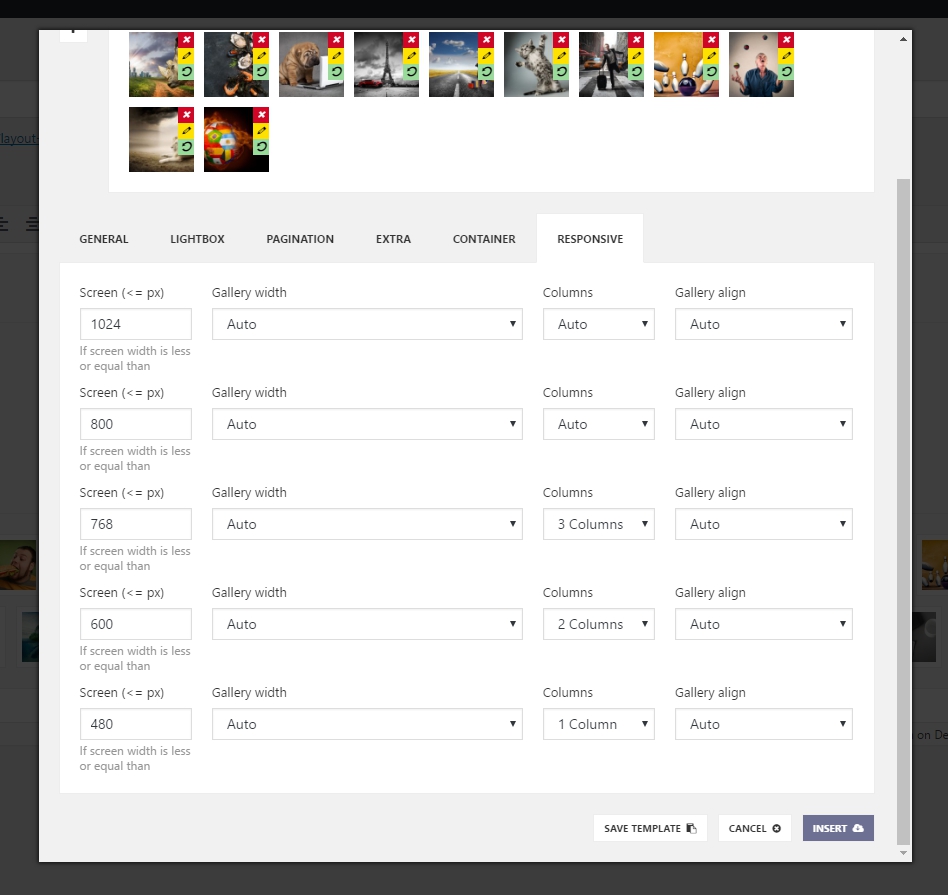
screenshot-3.jpg

screenshot-4.jpg

screenshot-5.jpg

screenshot-6.jpg

screenshot-7.jpg

screenshot-8.jpg
Changelog
1.4
- Added: Loader Delay custom Time
- Fixed: Carousel issue: 1 column (mobile)
1.3
- Fixed: Pagination order issue
1.2
- Fixed: Issue with admin popup panel
1.1
- Fixed: Conflict with other js scripts
1.0
- Initial release