

I am reading (continued)
This is a re-upload of the (again) abandoned plugin "I am reading". Book display with search by ISBN, title and author for all Amazon market …
Plugin info
Maintenance & Compatibility
Maintenance score
Possibly abandoned • Last updated 5278 days ago • 1 reviews
Is I am reading (continued) abandoned?
Possibly abandoned (last update 5278 days ago).
Compatibility
Similar & Alternatives
Explore plugins with similar tags, and compare key metrics like downloads, ratings, updates, support, and WP/PHP compatibility.
Description
Easily configurable book display with sidebar widget and shortcode. Book information is read from Amazon Web Services (AWS) and gets cached in database.
Key features:
- Search for your current read book by title and / or author (new)
- Search for your current read book by ISBN
- Easy setup of fonts and colors with live preview (new)
- Ready for Codestyling Localization plugin
Requirements
- PHP version >= 5.1.2
- free AWS Account
Installation
- Unzip into your
/wp-content/plugins/directory. If you’re uploading it manually make sure to upload
the top-level folder. Don’t just upload all the php files and put them in/wp-content/plugins/. - Activate the plugin through the ‘Plugins’ menu in WordPress
- Type in your Amazon Access Key ID and Secret Access Key or register for free first.
Frequently Asked Questions
What are the Amazon Web Services and do I have to pay for it ?
You need to be a registered member of the Amazon Web Services to send search requests to Amazon. This is a free service providing product information about books and more, which is 100% free. You won’t have to pay for.
Can I use the plugin without a sidebar widget ?
Yes, you can. Just use the shortcode [i-am-reading] or the PHP code <?php iar_print_html(); ?> to display your current read book in posts, pages or wherever you like.
Review feed
Screenshots
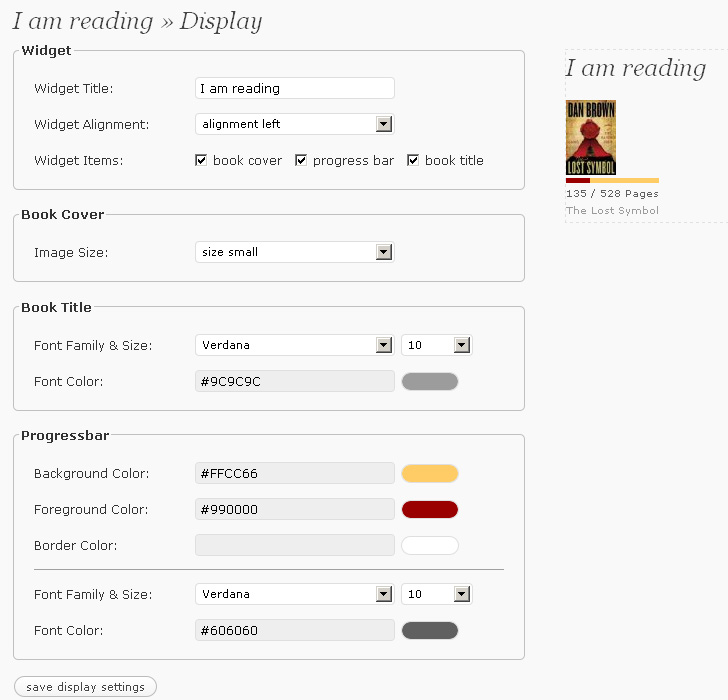
Setup of fonts and colors with live preview

Book search by title and / or author

Demo widget at Ginchen's Blog