

Icon List
Use an icon list for different purposes on your WordPress site using the Icon List plugin.
Plugin info
Maintenance & Compatibility
Maintenance score
Possibly abandoned • Last updated 3126 days ago • 3 reviews
Is Icon List abandoned?
Possibly abandoned (last update 3126 days ago).
Compatibility
Similar & Alternatives
Explore plugins with similar tags, and compare key metrics like downloads, ratings, updates, support, and WP/PHP compatibility.
Description
Icon List WordPress plugin provides a powerful and flexible widget to use standard list with icons. It can be used to display variety of information in an easy way with the cool icons. For Example,
- Address / Contact information can be used professionally.
- Social Media information can be displayed easily.
Supported Fonts
Icon List Plugin supports Font Awesome.
Further Useful Stuff
Icon List plugin is developed by marketplace of Premium WordPress Themes DesignOrbital. You may be interested to test our beautiful Free WordPress Themes.
Installation
- Upload the
icon-listfolder to the/wp-content/plugins/directory - Activate the Icon List plugin through the ‘Plugins’ menu in WordPress
- Configure the plugin by going to the
Settings > Icon List Options - Use the Icon List widget by going to the
Appearance > Widgets
Frequently Asked Questions
Installation Instructions
- Upload the
icon-listfolder to the/wp-content/plugins/directory - Activate the Icon List plugin through the ‘Plugins’ menu in WordPress
- Configure the plugin by going to the
Settings > Icon List Options - Use the Icon List widget by going to the
Appearance > Widgets
Review feed
Screenshots
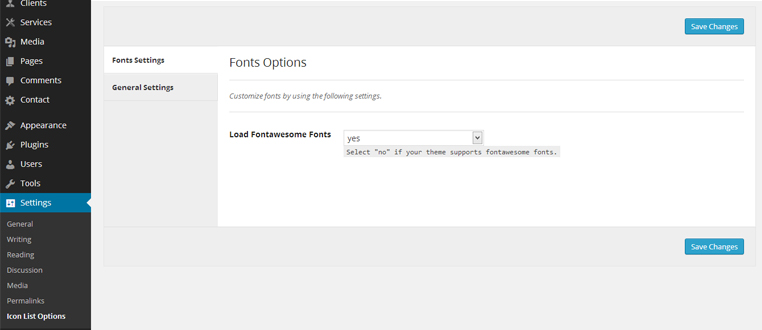
Icon List Plugin Options: You can control the loading of Font Awesome fonts manually. You may disable it, if your theme supports Font Awesome already.

Icon List Plugin Widget: You may use unlimited icon list by placing Icon List widget to the sidebars of your theme.

Icon List Plugin Widget Backend Example: You may use Icon List widget for any purpose according to your need e.g. Contact Information Widget in the sidebar of your theme.

Icon List Plugin Widget Frontend Example: Here is the example of Icon List widget as a Contact Info widget in the sidebar of your theme.
Changelog
0.6 – September 10, 2017
- Enhancement: Settings page improvements.
- Update: POT file updated.
- Update: Readme file updated.
0.5 – September 5, 2017
- Hardening: Code hardening.
0.4 – December 12, 2016
- New: Title can be linked to any desired URL.
- Update: Font Awesome library updated to the latest version 4.7.0.
0.3 – December 18, 2015
- Enhancement: WP_Widget is deprecated and replaced with __construct().
0.2 – November 13, 2014
- Enhancement: Icon List interface updated.
- Update: Font Awesome updated to 4.2.0.
0.1
- Initial release