

Plugin info
Maintenance & Compatibility
Maintenance score
Possibly abandoned • Last updated 6217 days ago
Is ILC Rich Title abandoned?
Possibly abandoned (last update 6217 days ago).
Compatibility
Similar & Alternatives
Explore plugins with similar tags, and compare key metrics like downloads, ratings, updates, support, and WP/PHP compatibility.
Description
This plugin will enable the TinyMCE rich text editor for the title field
when writing a page or post. Requires jQuery to work, but rather than
including it with , the plugin will enqueue the jQuery library
included with WordPress using wp_enqueue_script on the admin area.
There are a couple of style to remove the margin between the title
label and the TinyMCE editor area, and the padding around the title
box and the border.
Beware, for this plugin will paragraphise all your titles, so what
once was a h3 headline in your styles now might be h3 p.
This software is provided without warranty of any kind.
Installation
- Upload
ilc_rich_title.phpto the/wp-content/plugins/directory - Activate the plugin through the ‘Plugins’ menu in WordPress
- Go to a Edit page/post area in your WordPress Admin
Frequently Asked Questions
The styles of my titles in my site have dissapeared!
That’s because of the wpautop running when your content is rendered
to be displayed on the site. If you had “h3” defined in your stylesheet,
you will have to redefine it as “h3 p” and add the desired style.
Review feed
Screenshots
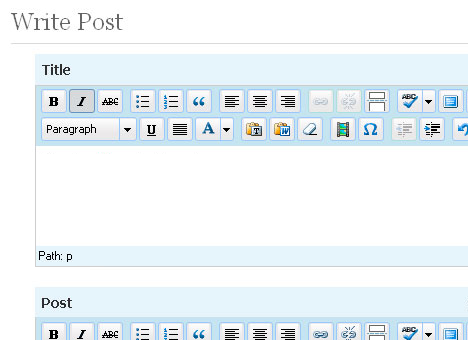
TinyMCE for the title in WP 2.6

TinyMCE for the title in WP 2.7