

Image Ninja – Convert Images to WebP & AVIF on Upload
Automatically convert JPEG and PNG images to WebP and AVIF formats during upload to optimize your WordPress site’s performance.
Plugin info
Maintenance & Compatibility
Maintenance score
Stale • Last updated 315 days ago
Is Image Ninja – Convert Images to WebP & AVIF on Upload abandoned?
Likely maintained (last update 315 days ago).
Compatibility
Similar & Alternatives
Explore plugins with similar tags, and compare key metrics like downloads, ratings, updates, support, and WP/PHP compatibility.
Description
Image Ninja – Convert Images to WebP & AVIF on Upload is a lightweight WordPress plugin that automatically converts JPEG and PNG images to modern WebP and AVIF formats upon upload. The plugin improves website performance by optimizing image file sizes without compromising quality, leading to faster page loading times.
Key Features
- Automatically converts JPEG and PNG images to WebP and AVIF formats during upload.
- Allows configuration of WebP and AVIF image quality in the settings.
- Enhances website performance by reducing image file sizes.
- Simple settings interface under
Settings > Mediafor easy customization. - Lightweight and developer-friendly codebase.
This plugin is ideal for website owners looking to improve load times and optimize image delivery, especially on mobile devices and slow connections.
Why WebP?
WebP is a modern image format developed by Google that provides both lossy and lossless compression for images on the web. Here are some benefits of using WebP:
- Smaller File Size: WebP images can be up to 30% smaller than JPEGs and PNGs with no noticeable loss in quality, resulting in faster page load times.
- Transparency and Animation: WebP supports transparent backgrounds like PNG and animated images like GIF, making it a versatile choice.
- Improved Compression: WebP offers better compression algorithms compared to traditional formats, allowing for high-quality images with lower storage requirements.
Why AVIF?
AVIF (AV1 Image File Format) is a cutting-edge image format derived from the AV1 video codec, offering even better compression than WebP. Here’s why AVIF is beneficial:
- High Compression Efficiency: AVIF can reduce image sizes by up to 50% compared to JPEG, while maintaining similar or even higher visual quality.
- HDR Support: AVIF supports High Dynamic Range (HDR), allowing for more vibrant and detailed images, especially on modern displays.
- Advanced Features: It includes support for transparency, animation, and a wider color gamut, making it suitable for various types of web content.
License
This plugin is licensed under the GPLv2 or later license.
Installation
- Upload the plugin files to the
/wp-content/plugins/image-ninjadirectory, or install the plugin through the WordPress plugins screen directly. - Activate the plugin through the ‘Plugins’ screen in WordPress.
- Navigate to
Settings > Mediato choose the image format and configure the image quality settings for WebP and AVIF formats.
Frequently Asked Questions
WebP and AVIF are modern image formats that offer superior compression compared to traditional JPEG and PNG formats, resulting in smaller file sizes and faster loading times without noticeable quality loss.
No, the original JPEG or PNG images remain in the media library. The plugin creates additional WebP and AVIF versions that can be used by other optimization plugins or custom themes.
Yes, the plugin should work on most shared hosting environments. However, AVIF support requires a server with the appropriate library installed (e.g., libavif). If AVIF conversion is unavailable, the plugin will still convert images to WebP.
Review feed
Screenshots
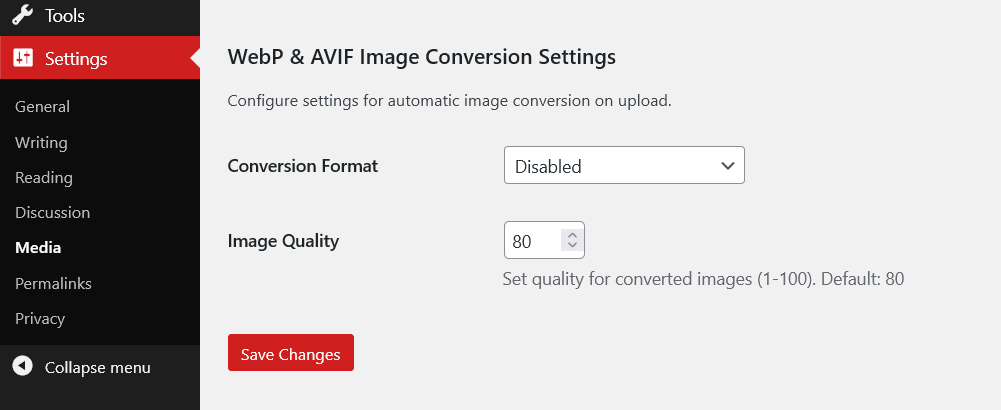
Settings page: Configure the quality settings for WebP and AVIF formats.

Image Upload Example: The original image uploaded, with automatically generated WebP and AVIF versions.
Changelog
1.0.0
- Initial release.
- Convert JPEG and PNG images to WebP and AVIF formats during upload.
- Added settings for adjusting the quality of WebP and AVIF conversions.