
Images with GPS on GoogleMaps
Images with GPS on Google Maps displays your photos on a Google Maps map using GPS or without GPS Geotags.
Plugin info
Maintenance & Compatibility
Maintenance score
Possibly abandoned • Last updated 829 days ago
Is Images with GPS on GoogleMaps abandoned?
Possibly abandoned (last update 829 days ago).
Compatibility
Similar & Alternatives
Explore plugins with similar tags, and compare key metrics like downloads, ratings, updates, support, and WP/PHP compatibility.
Description
Images with GPS on Google Maps displays your photos on a Google Maps map using GPS or without GPS Geotags. Add your own Geo-Tags to your pictures.
To show more about ‘Images with GPS on GoogleMaps’ visit this page at travel-logbuch.com
Feedback
- I am open for your suggestions and feedback – Just send it in
Localization
- English (default) – always included
- German – always included
- .pot file (
gm.pot) for translators is also always included 🙂 - Your translation? – Just send it in
Translations
- English
-
German: Deutsch – Standard
-
Note:* All my plugins are localized/ translateable by default. This is very important for all users worldwide. So please contribute your language to the plugin to make it even more useful. For translating I recommend the awesome “Codestyling Localization” plugin and for validating the “Poedit Editor”.
Additional Documentation
Add image to page/site
To insert images of other pages or sites into the current Geo Image:
1. open a contribution in the backend
2. scroll to the “Images with GPS Data on Maps” section
3. click the Add Files button
4. select an image or add an image
5. click button “Insert into page
6. click the “Refresh” button in the “Images with GPS Data on Maps” section
7. possibly add manual GPS data to the image if none are available (visible with the red ? behind GPS data edit)
8. having fun if it worked.
Installation
- Deactivate plugin if you have the previous version installed.
- Extract “geoImageAndGPX.zip” archive content to the “/wp-content/plugins/geoImageAndGPX” directory.
- Activate “Images with GPS on GoogleMaps” plugin via ‘Plugins’ menu in WordPress admin menu.
- Go to the “Settings”-“Image GPS & GPX in Map” menu item and fill in the Google API Key. Become a Key on: [this page] https://developers.google.com/maps/documentation/javascript/get-api-key? at https://developers.google.com/maps/documentation/javascript/get-api-key
- Load your Images to a page or post
- Include the Shortcode [geoImg] in your content.
Frequently Asked Questions
The Exiftool must be installed by your administrator on the server.
No, first try using the PHP command exif_read_data to extract the geotags. Only if this does not work must the Exiftool be installed in order to extract GeoTags.
Yes, but in the backend the marker has to be dragged and dropped at the desired position on the map.
Review feed
Screenshots
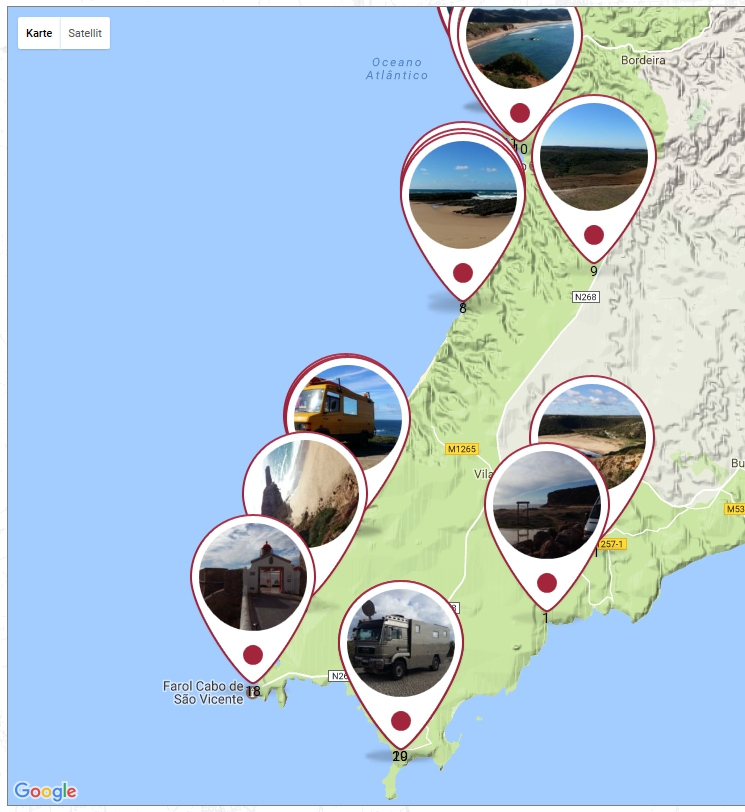

screenshot-0.jpg Frontend GoogleMaps

screenshot-00.jpg Click on marker to show the big image
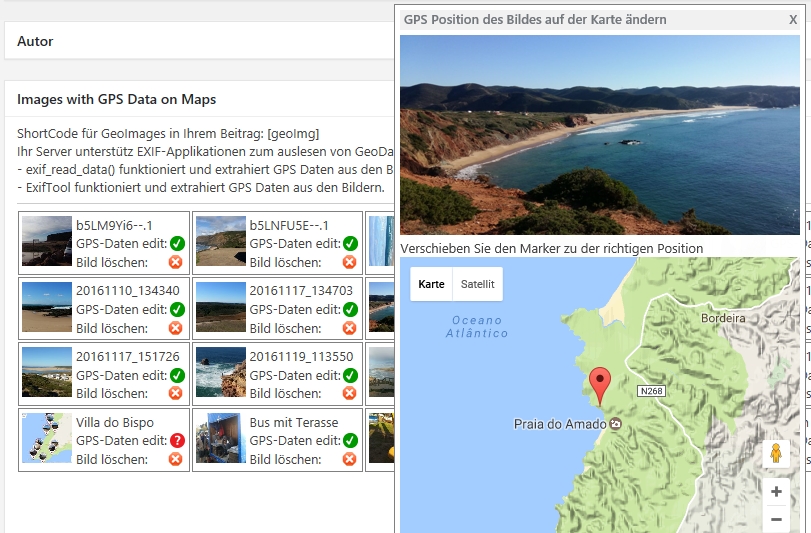
screenshot-1.jpg Add Images to the page or post

screenshot-2.jpg Image overview
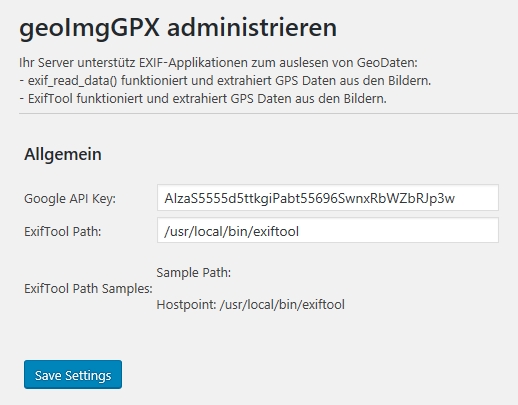
screenshot-3.jpg Drag and drop the marker to the right position on GoogleMaps
Changelog
[0.915] 15.12.2023
- some bugfixes
- Block in Gutenberg fixed and expanded with some new features
- WP 6.4.2 ready
- PHP 8.2 ready
[0.913] 27.02.2022
- some bugfixes
- Access right to administrator, editor or author adjusted
- WP 5.9.1 ready
[0.912] 22.02.2022
- Access right to author adjusted
[0.911] 06.12.2020
- add Gutenberg block
[0.91] 06.12.2020
- bugfix
- Choose get images from post/page or select by yourself from media
- When storing the geodata manually, the last starting point is always stored as a new point
- WP 5.6 ready
[0.901] 14.02.2020
- css bugfix
[0.900] 08.02.2020
- Gutenberg ready
- Select pictures from other site/page
- WordPress 5.3.3 ready
- Backend add refresh Button
- Backend add Media Library open Button
- some Gutenberg bugfix (gridItems[0], grid3d.js)
[0.892] 28.01.2020
- WordPress 5.3.3 ready
[0.891] 22.02.2019
- WordPress 5.1 ready
- Some small bugfixes
[0.89] 14.11.2018
- some bugfixes and added languages de-CH & de-AT
[0.88] 08.11.2018
- some bugfixes and added languages de-DE & en-US
- add banner and icon
[0.80] 14.01.2017
- Alpha Version, it runs on two Pages stable