

Imagus image optimizer
Ultimate plugin to optimize media images and recover original backup feature.
Plugin info
Maintenance & Compatibility
Maintenance score
Possibly abandoned • Last updated 1449 days ago
Is Imagus image optimizer abandoned?
Possibly abandoned (last update 1449 days ago).
Compatibility
Similar & Alternatives
Explore plugins with similar tags, and compare key metrics like downloads, ratings, updates, support, and WP/PHP compatibility.
Description
This plugin connects to imagus API and optimize images in jpeg/png/gif/avif/webp/tiff formats.
In “Settings” => “Imagus” you can customize the plugin. The options are:
- Quality percentage: The % of compression. Imagus uses lossy compression algorithm, so the lower compression, the lower image quality.
You might use a percentage quality that prevents a higher pixelation. 70% should be enough. - Automatic compression: Imagus optimizes all the images you upload automatically.
- Leave original copies in media folder: if you wanna preserve the original image before imagus acts, enable this option.
You can replace the compressed image with the original if you aren’t satisfied with the compression result. - Enable modal customized options window: Activate this option if you wanna change the default settings in the media gallery.
Only available if you have the “Automatic compression” disabled (otherwhise, it has no sense!).
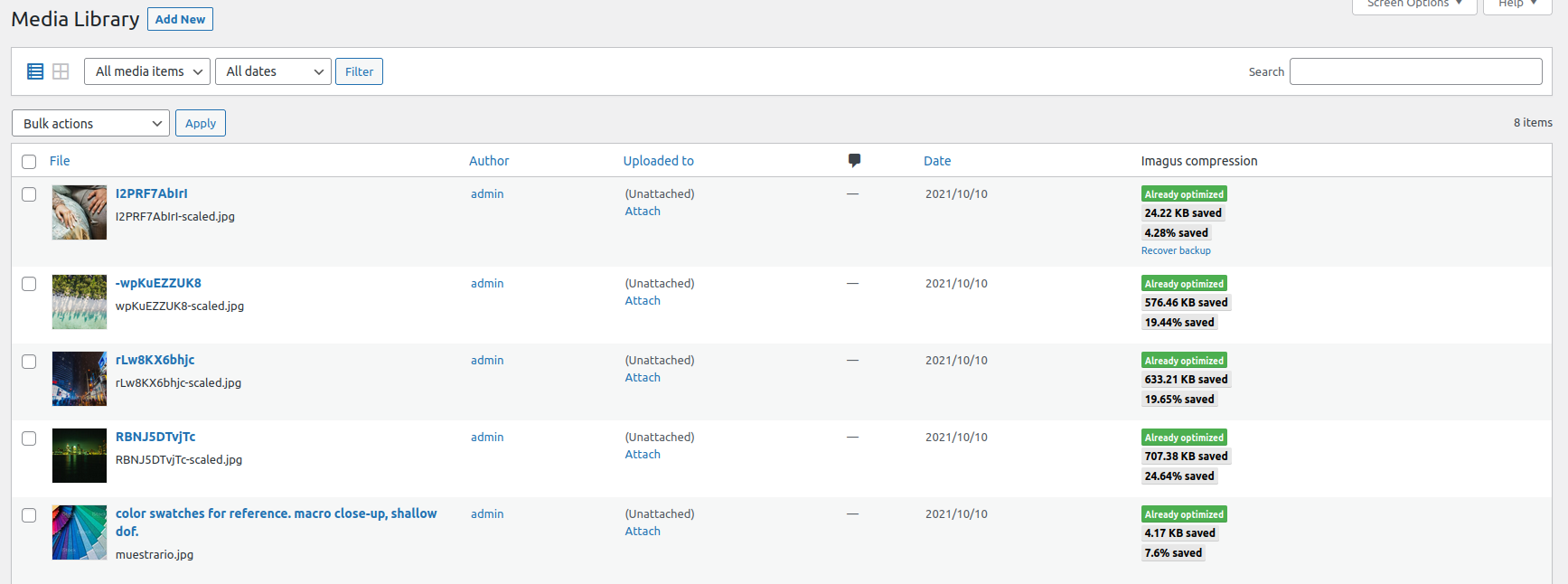
You can compress individually or raw in the media library menu (the “Automatic compression” option must be disabled). Just press
the “Imagus compression” button (the button shows in list mode of the media gallery page) or select that raw action after select a images group on the list.
Installation
- Upload
imagus.phpto the/wp-content/plugins/directory - Activate the plugin through the ‘Plugins’ menu in WordPress
- This is it
Frequently Asked Questions
This plugin sends the images to the imagus API server. The server generates a fast real-time stream that returns you the optimized image.
Imagus is free.
If this happens, try with a lower compression ratio.
Usually, because the image already has a small size by default.
No. The imagus API only collects data for log errors and statistics purposes. That’s all, no image storaging.
Review feed
Screenshots

Changelog
0.8.0
- The first release.
0.8.1
- Avif, webp and tiff formats support.
0.8.2
- FIX: Bulk action optimize now appears only in upload.php page (Media page)
- Update guzzle V7.4.0