

Infusionsoft Web Form JavaScript
Easily add Infusionsoft web forms to your posts and pages. Automatically converts JavaScript to WordPress-friendly shortcodes.
Plugin info
Maintenance & Compatibility
Maintenance score
Possibly abandoned • Last updated 4123 days ago • 4 reviews
Is Infusionsoft Web Form JavaScript abandoned?
Possibly abandoned (last update 4123 days ago).
Compatibility
Languages
Similar & Alternatives
Explore plugins with similar tags, and compare key metrics like downloads, ratings, updates, support, and WP/PHP compatibility.
Description
We make it easy to add Infusionsoft web forms to your blog. You simply copy and paste the web form JavaScript into your post or page, and this plugin will automatically convert it to a WordPress shortcode that won’t be mangled by WordPress.
By default, the plugin lets you use the shortcode javascript. Unlike other plugins, we let you change this shortcode to anything you like, such as webform or infusionsoft.
You can even add custom CSS to your web form. Simply add a CSS attribute to the shortcode, for example:
[javascript css="float: left;" src="https://example.infusionsoft.com/app/form/iframe/5d07ccaa3e9ab94dea1f6982da9fb266"/]
Want to do even more with Infusionsoft? Novak Solutions has expert developers and ready-to-go tools to make your life easier. Visit Novak Solutions now!
Check us out on Facebook! Our latest Infusionsoft tools and plugin updates are always posted on Facebook. Check us out at http://www.facebook.com/novaksolutions/
Installation
Frequently Asked Questions
How do I change the shortcode?
Go to the plugin’s settings page to change the shortcode to anything you’d like. Please be aware that changing the shortcode won’t update your existing posts, so it is best to pick a shortcode before using the plugin and to stick to it.
How do I add custom CSS to my web form?
Add a CSS attribute to your shortcode, for example:
[javascript css="float: left;" src="https://example.infusionsoft.com/app/form/iframe/5d07ccaa3e9ab94dea1f6982da9fb266"/]
How do I keep JavaScript from automatically being converted to shortcodes?
You can easily disable this feature on the plugin’s settings page.
Review feed
Screenshots
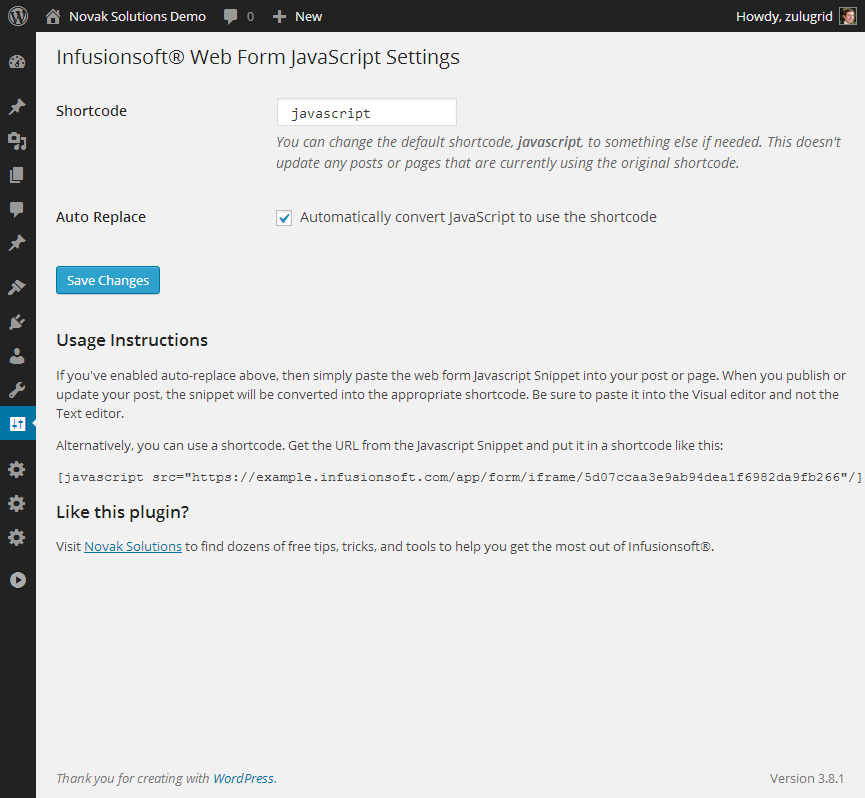
Configuration is optional. By default the shortcode is javascript and auto replace is enabled.

An example of a web form being displayed.
Changelog
1.1.1
- Included better documentation within the plugin
1.1.0
- First release on WordPress.org