

Init Content Protector – Anti-Copy, Anti-Scrape, Encrypt-All
Protect your content from copying, scraping, and inspection using JS blocking, keyword cloaking, noise injection, and optional full encryption.
Plugin info
Maintenance & Compatibility
Maintenance score
Maintained • Last updated 140 days ago
Is Init Content Protector – Anti-Copy, Anti-Scrape, Encrypt-All abandoned?
Likely maintained (last update 140 days ago).
Compatibility
Similar & Alternatives
Explore plugins with similar tags, and compare key metrics like downloads, ratings, updates, support, and WP/PHP compatibility.
Description
Init Content Protector is a powerful yet lightweight plugin that safeguards your post content from unauthorized copying, scraping tools, and inspection via browser developer tools.
This plugin is part of the Init Plugin Suite — a collection of minimalist, fast, and developer-focused tools for WordPress.
GitHub repository: https://github.com/brokensmile2103/init-content-protector
Features:
– JavaScript-based copy protection (blocks selection, right-click, print, DevTools access)
– Full content encryption with client-side decryption using CryptoJS
– Keyword cloaking using CSS pseudo-elements
– Invisible noise injection to confuse crawlers
– Per-post type configuration
– Custom encryption key per site
– Custom content selector support
Use this plugin to harden your site’s content visibility while maintaining a smooth reading experience for real users.
Source Code
This plugin uses CryptoJS for encryption.
– Minified version: assets/js/crypto-js.min.js
– Source version: GitHub Repo
License
This plugin is licensed under the GPLv2 or later.
You are free to use, modify, and distribute it under the same license.
Installation
- Upload the plugin files to the
/wp-content/plugins/init-content-protectordirectory, or install via the WordPress plugin screen. - Activate the plugin through the ‘Plugins’ menu in WordPress.
- Go to Settings Init Content Protector and configure your preferred options.
Frequently Asked Questions
If you enable full content encryption, search engines will not be able to see the content. Only use this option if SEO visibility is not required.
Yes. You can choose which post types are protected in the settings page.
Yes. You can set a custom key per site for added security.
Review feed
Screenshots
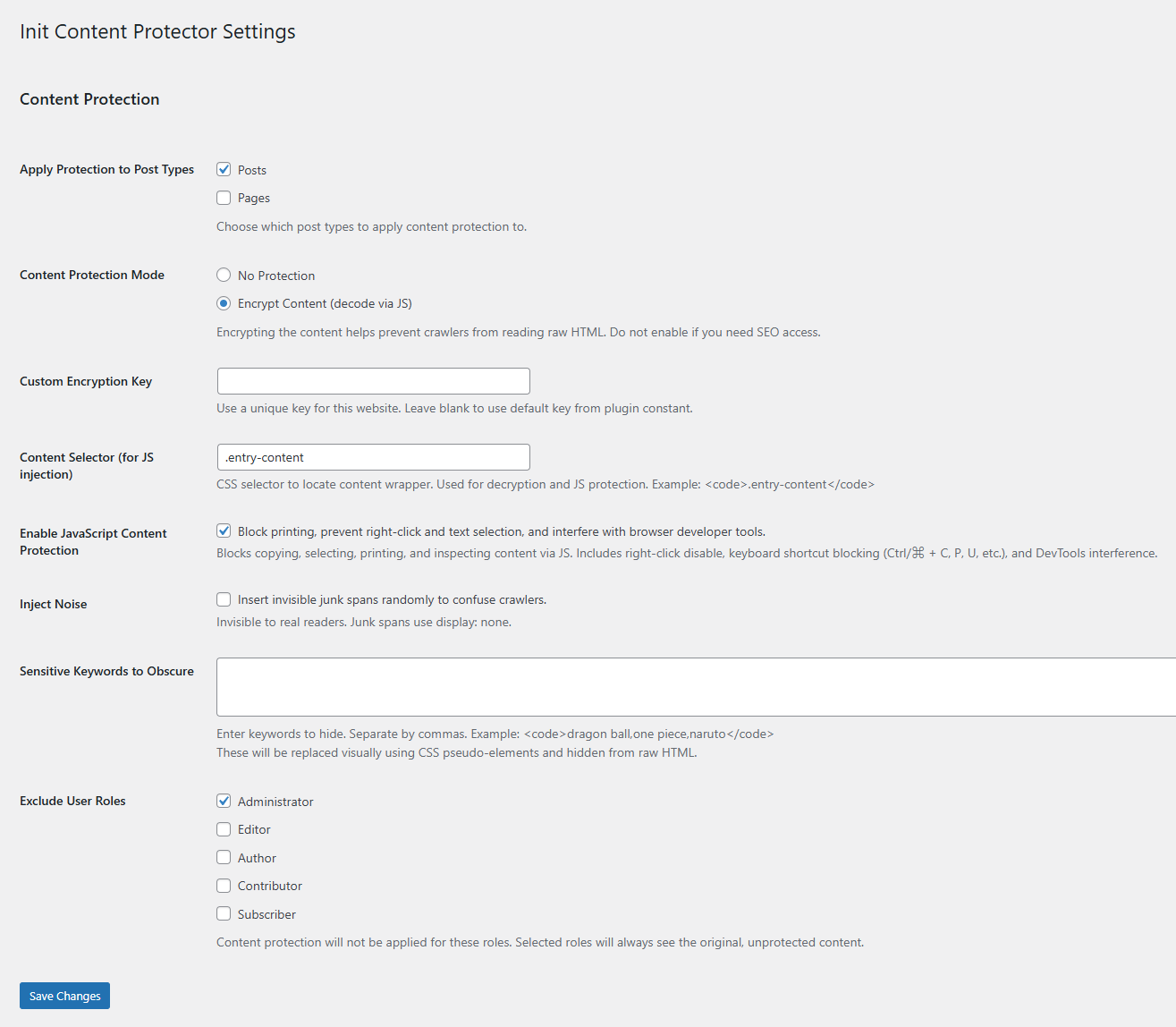
Settings Page – Configure protection methods, encryption, keyword cloaking, and per-post type options.
Changelog
1.3 – November 15, 2025
- Fully decoupled encryption and JS content protection into separate script modules (
decrypt.jsandcontent-protector.js) - Split script loading into two independent wp_enqueue_scripts hooks, eliminating unwanted cross-dependencies
- Renamed localized JS object for encryption to InitContentDecryptData for clearer separation of responsibilities
- Ensured JS protection (block copy, right-click, print, DevTools) works independently even when encryption is disabled
- Improved maintainability by isolating crypto loading (
crypto-js.min.js) strictly to encrypt mode - Refined initialization order to guarantee consistent behavior across all themes and page builders
1.2 – November 14, 2025
- Added option to exclude specific user roles from all protection layers (encryption, JS protection, noise injection, keyword cloaking)
- Implemented role-based bypass at both filter level and asset enqueue level for consistent behavior across frontend
- Refactored protection flow so encryption, JS protection, and noise injection operate independently, preventing unwanted coupling
- Improved script enqueue logic to load CryptoJS only when encryption is enabled
- Optimized hook processing to avoid unnecessary filtering for excluded roles and unsupported post types
- Ensured clean fallback behavior when mixed protection settings are enabled
1.1 – August 16, 2025
- Changed minimum WordPress requirement to 5.7 to leverage wp_get_inline_script_tag for safer inline script output
- Replaced wp_add_inline_script with direct inline injection for guaranteed execution across all single post pages
- Added inline script nonce/type support via wp_get_inline_script_tag for enhanced security
- Ensured encrypted payload is always available early in content, even if certain script handles are missing
- Added CustomEvent trigger (init-content-payload-ready) to allow frontend scripts to react when encrypted content is ready
- Prevented duplicate inline script injection when content filters run multiple times
1.0 – July 23, 2025
- Initial release
- JavaScript-based content protection (block copy, right-click, print, DevTools)
- Full AES-256 content encryption with CryptoJS decryption
- Invisible keyword cloaking via ::before and randomized CSS class
- Random noise injection (hidden spans) to confuse crawlers
- Supports multiple post types (customizable)
- Custom encryption key per site
- Custom content selector for JS targeting
- Fallback styling compatible with light/dark themes
- Modular settings page with sanitize and validation