

Init Pulse For Discord – Webhooks, Roles, Instant
Send WordPress post notifications to Discord using webhooks. Lightweight, fast, role-aware, and built for modern WordPress sites.
Plugin info
Maintenance & Compatibility
Maintenance score
Maintained • Last updated 128 days ago
Is Init Pulse For Discord – Webhooks, Roles, Instant abandoned?
Likely maintained (last update 128 days ago).
Compatibility
Similar & Alternatives
Explore plugins with similar tags, and compare key metrics like downloads, ratings, updates, support, and WP/PHP compatibility.
Description
Init Pulse For Discord sends automatic notifications to your Discord channel whenever a post is published or updated.
This plugin is part of the Init Plugin Suite — a collection of minimalist, fast, and developer-focused tools for WordPress.
GitHub repository: https://github.com/brokensmile2103/init-pulse-for-discord
Perfect for:
- Blog / community announcements
- Internal editorial workflow
- Discord-driven audiences
Straightforward configuration:
- Paste your webhook URL
- (Optional) Configure Discord role IDs inside Categories or Tags
- Done — your server receives updates instantly
Clean, minimal, and built for performance — no bloat, no external SDKs.
Key design goals:
- Minimal setup (Webhook + 1 settings page)
- No database clutter
- No JS/CSS overhead on frontend
- Role-aware mentions through taxonomies
Features
- Auto-send notifications when posts are published
- Optional notifications when posts are updated
- Role tagging based on Categories & Tags
When a post is in that taxonomy, that role is mentioned - Custom message template with placeholders:
{title}— post title{title_url}— markdown title linking to URL{url}— post URL{excerpt}— trimmed excerpt{site_name}— your site’s name
- Optional featured image embed
- Retry logic & timeout controls
- No action removals — plays well with all other plugins
- Compact, modern codebase
Usage
Navigate to:
Settings Init Pulse For Discord
Available fields:
Field
Purpose
Webhook URL
Where notifications are sent
Username
Display name of your bot
Avatar URL
Custom bot avatar (optional)
Include Featured Image
Adds featured image as embed
Timeout / Retries
Reliability controls
Message Template
Markdown-ready content
Role IDs can be configured in:
- Posts Categories Edit
- Posts Tags Edit
Example mention result:
<@&123456789012345678> New post published!
Filters for Developers
init_plugin_suite_pulse_for_discord_payload
Modify the final webhook payload before sending.
Params: array $payload, int $post_id, string $context
Example:
add_filter(‘init_plugin_suite_pulse_for_discord_payload’, function($payload){
$payload[‘content’] .= “\nCustom footer”;
return $payload;
});
License
This plugin is licensed under the GPLv2 or later.
You are free to use, modify, and distribute it under the same license.
Installation
- Upload the plugin folder to
/wp-content/plugins/ - Activate via Plugins Init Pulse For Discord
- Go to Settings Init Pulse For Discord and paste your webhook URL
- Optional: Assign Discord Role IDs to categories & tags
Frequently Asked Questions
Not yet — initial version focuses on standard blog posts.
Indirectly: assign different role IDs to categories/tags to tailor mentions.
Yes — simply leave the Role ID fields empty.
No. It never removes actions or filters.
Everything is additive and safe-by-default.
Review feed
Screenshots
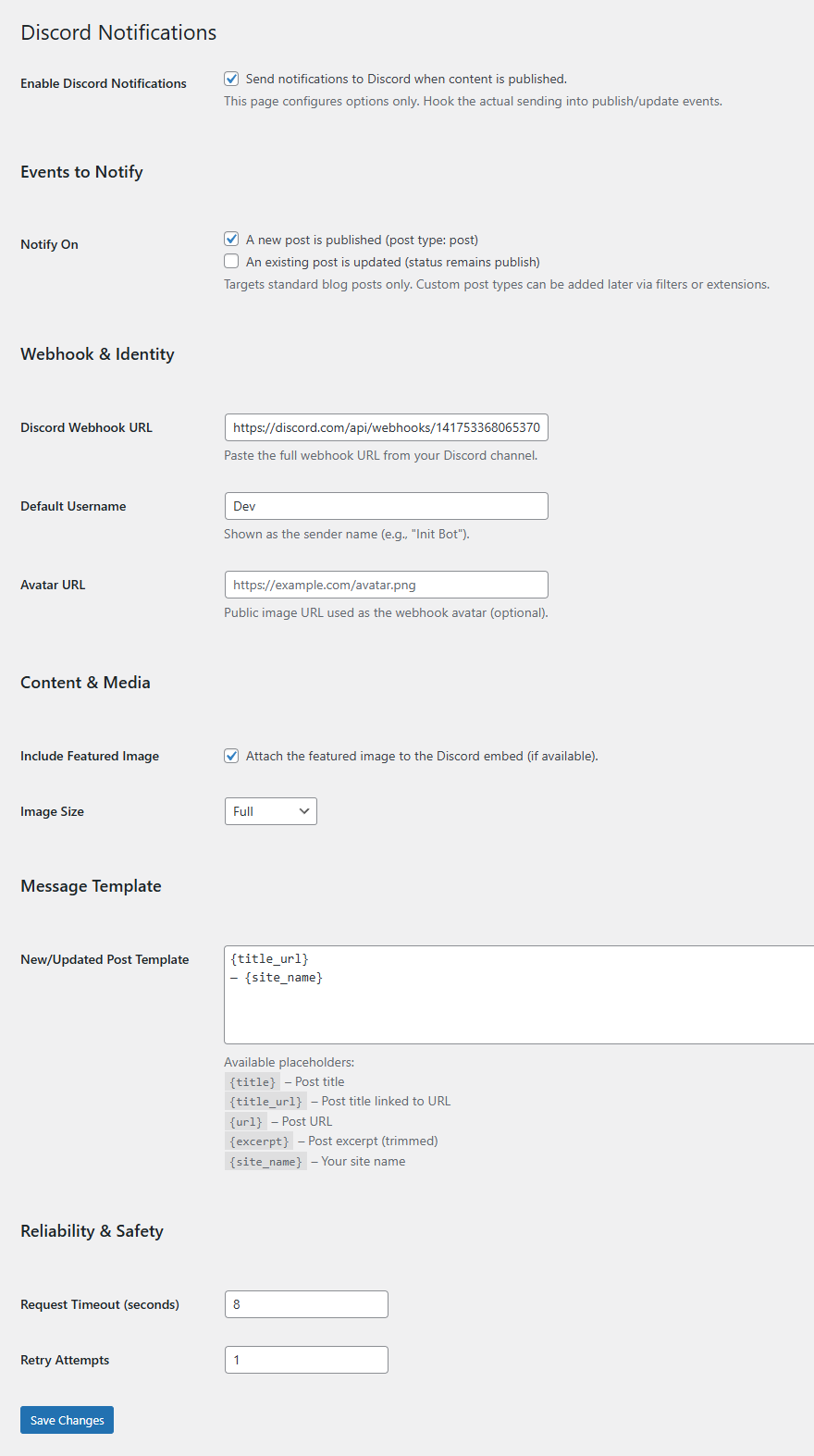
Settings page with webhook + template fields
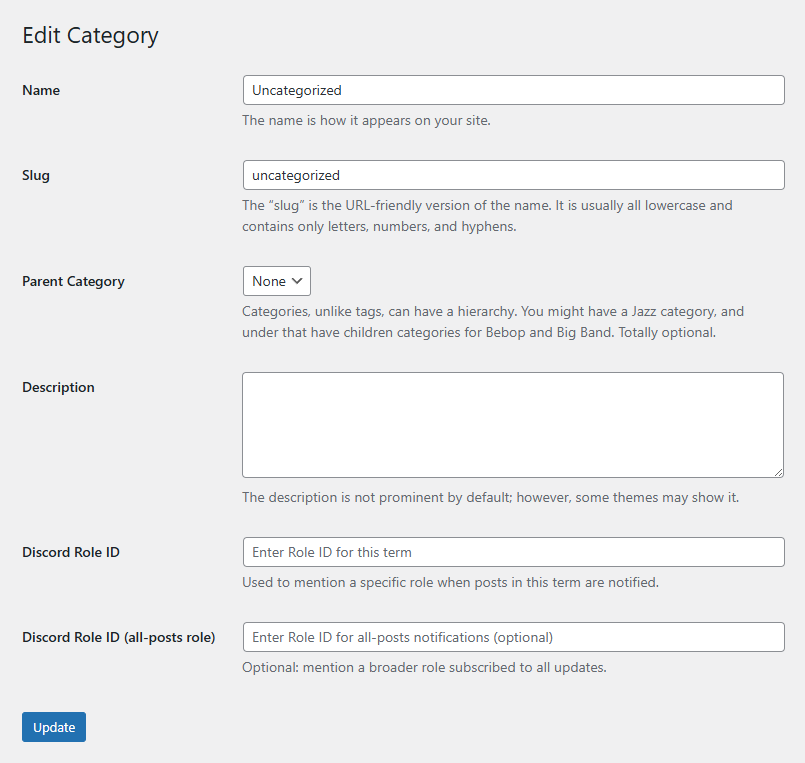
Category/Tag edit screen with Role ID inputs
Changelog
1.0 – November 12, 2025
- Initial release
- Publish/update notifications
- Role-ID fields for categories & tags
- Template placeholders:
{title},{title_url},{url},{excerpt},{site_name} - Featured image embed support
- Timeout + retry logic (includes 429 Retry-After handling)
- Small, efficient, and avoids overriding core/hooks