

Inline Context
Add inline expandable notes or tooltips to provide context, definitions, and references without disrupting the reading flow.
Plugin info
Maintenance & Compatibility
Maintenance score
Maintained • Last updated 123 days ago
Is Inline Context abandoned?
Likely maintained (last update 123 days ago).
Compatibility
Similar & Alternatives
Explore plugins with similar tags, and compare key metrics like downloads, ratings, updates, support, and WP/PHP compatibility.
Description
Inline Context is a powerful Block Editor enhancement that lets you create inline expandable notes or clean tooltip-style popovers anywhere in your content. It is ideal for content-rich websites, including editorial platforms, research sites, online magazines, documentation hubs, and educational blogs that rely on clear explanation without breaking the reader’s focus.
Instead of sending readers to glossary pages or external links, Inline Context allows you to provide definitions, references, clarifications, and annotations in place — keeping readers engaged and your content structured.
Notes can be reusable, categorized, styled, centrally managed, and automatically updated everywhere they appear.
Why this is valuable for content-heavy websites
Websites with substantial text often need:
- definitions and terminology
- source references
- background information
- contextual inline explanations
- mini footnotes without scrolling
- inline callouts, tips, or warnings
Inline Context delivers all of this with a frictionless, accessible user experience. It helps readers stay focused, reduces navigation fatigue, and improves knowledge retention — especially in long articles or research-based content.
How it works
- Highlight text in the Block Editor.
- Click Inline Context.
- Enter your note content (rich text supported).
- Optionally assign a category with custom icon & color.
- Publish — your note appears inline or as a tooltip, depending on settings.
You can also create reusable notes from a dedicated Custom Post Type. Updating a reusable note updates all instances site-wide.
Key Features
Display modes
- Inline expansion (reveals a small content panel)
- Tooltip popovers (floating contextual bubbles)
- Smart tooltip positioning to avoid off-screen display
- Direct anchor links (
#context-note-xxx) for deep linking - Auto-open on page load when accessed via link
Editor productivity
- Reusable notes with global updates
- Notes Library with usage tracking (shows where each note is used)
- Quick Search inside the editor to insert existing notes
- Rich text support via ReactQuill (bold, italic, lists, links)
- Clean, integrated Rich Text toolbar button
Categories & icons
- Create unlimited categories (Definition, Reference, External Article, Tip, Warning, etc.)
- Choose from curated Dashicons or any of 300+ icons
- Separate icons for open and closed states
Styling & customization
Full styling control from Settings Inline Context:
- Link colors, hover, and focus states
- Note padding, spacing, borders, backgrounds, shadows
- Tooltip appearance
- Chevron/indicator styling
- Live interactive preview of all style changes
Accessibility & security
- ARIA support, focus lock, Escape key behavior
- Keyboard-navigable for both link and note
- DOMPurify sanitization of note content
Internationalization
Inline Context is fully translation-ready.
Examples & inspiration
The idea for this plugin originated from a project with Renée Kool — a visual artist working in public art, film, and emerging media. She wanted to create a website where a single link could reveal additional content containing multiple related links. We looked at the Dutch journalism platform De Correspondent, which use subtle inline notes to provide context without interrupting the flow of reading. You can see examples of their inline notes in this article: Hoe Nederland kampioen deeltijdwerken werd
Source code
Inline Context uses @wordpress/scripts with webpack and npm to build assets.
Full source (including uncompiled JS and CSS) is available at:
https://github.com/jooplaan/inline-context
Installation
- Upload the plugin files to
/wp-content/plugins/inline-context, or install via the Plugins screen. - Activate the plugin.
- Configure categories and styling under Settings Inline Context.
- In the Block Editor, select text and click Inline Context.
- Add your note content and choose a category (optional).
Frequently Asked Questions
No. Inline Context is built specifically for the WordPress Block Editor (Gutenberg).
Yes. Extensive visual customization options are available under Settings Inline Context Styling.
No. Create as many categories as your content structure requires.
Yes. You can type any Dashicon class name to use all 300+ icons.
Review feed
Screenshots
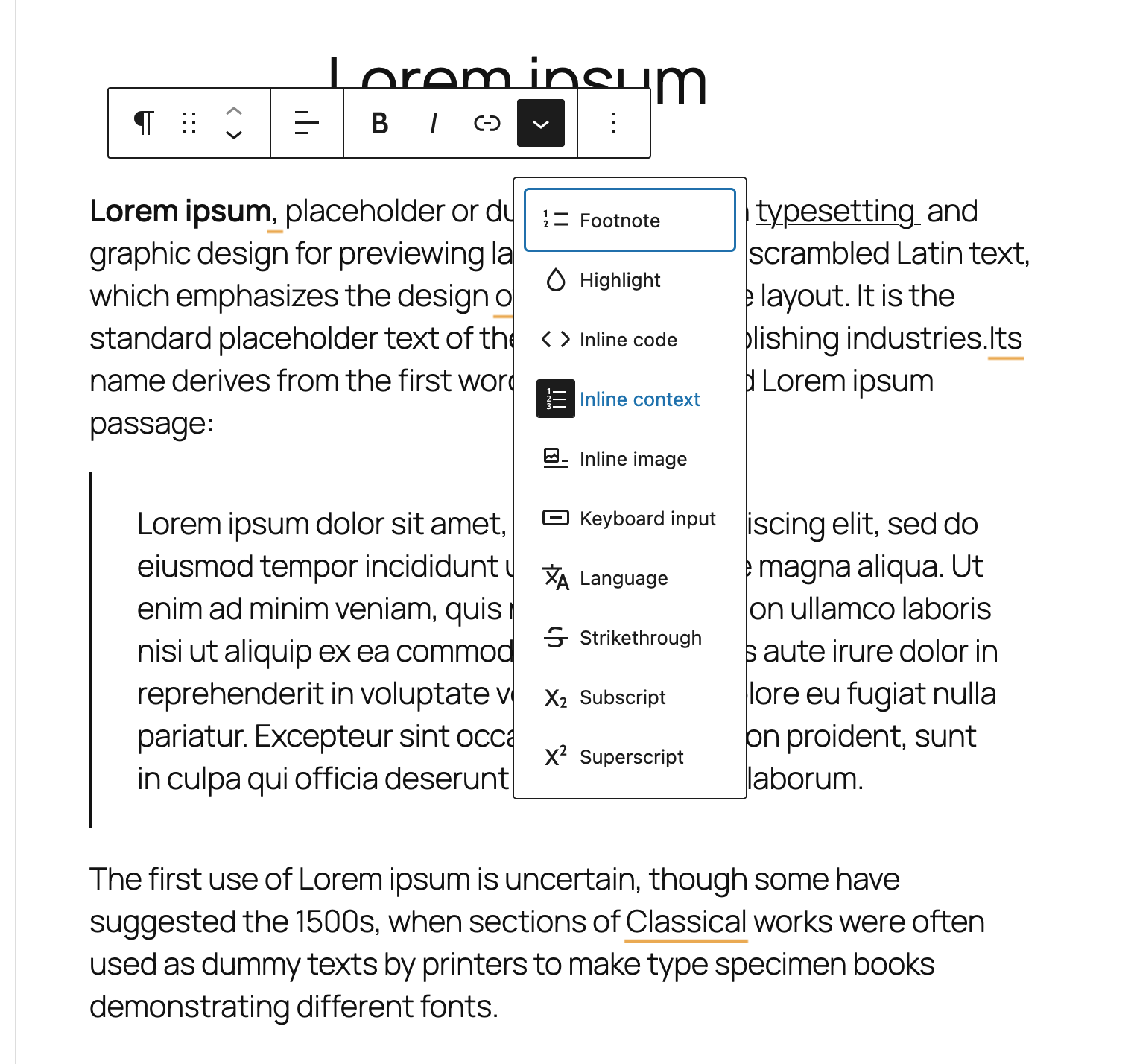
Editor popover for adding inline context with category selection
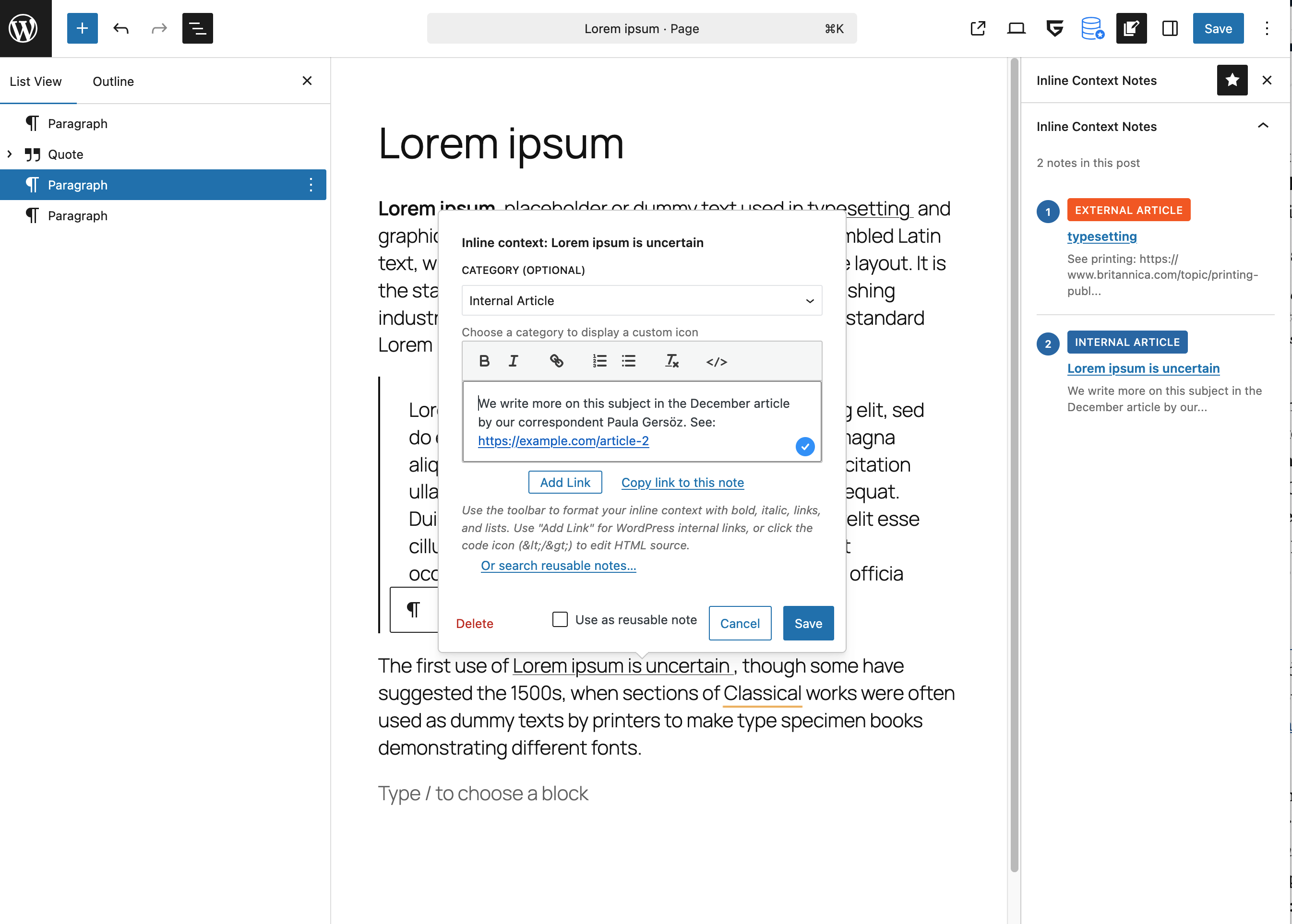
Modal window for writing an inline context note
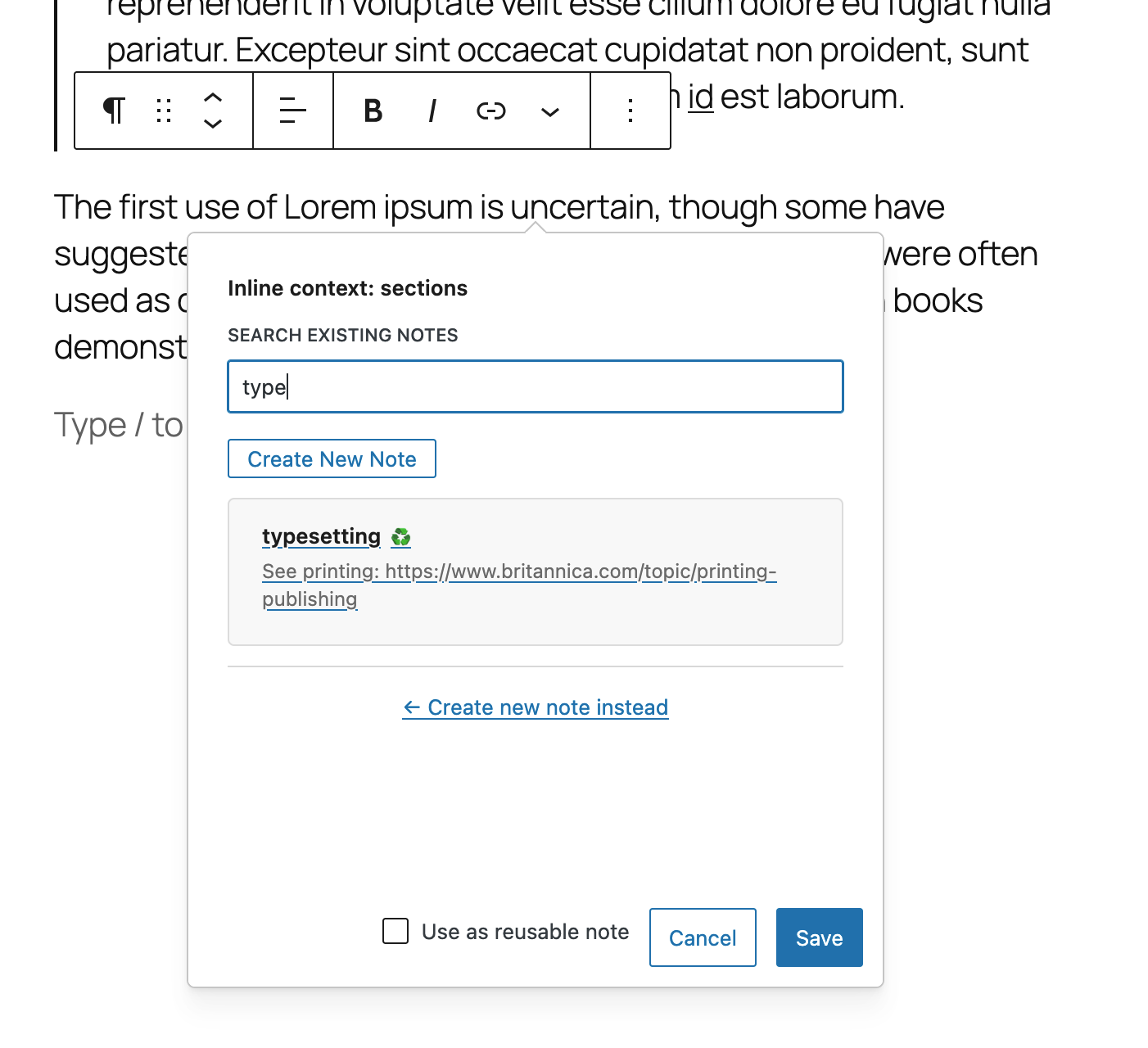
Search interface for inserting reusable notes
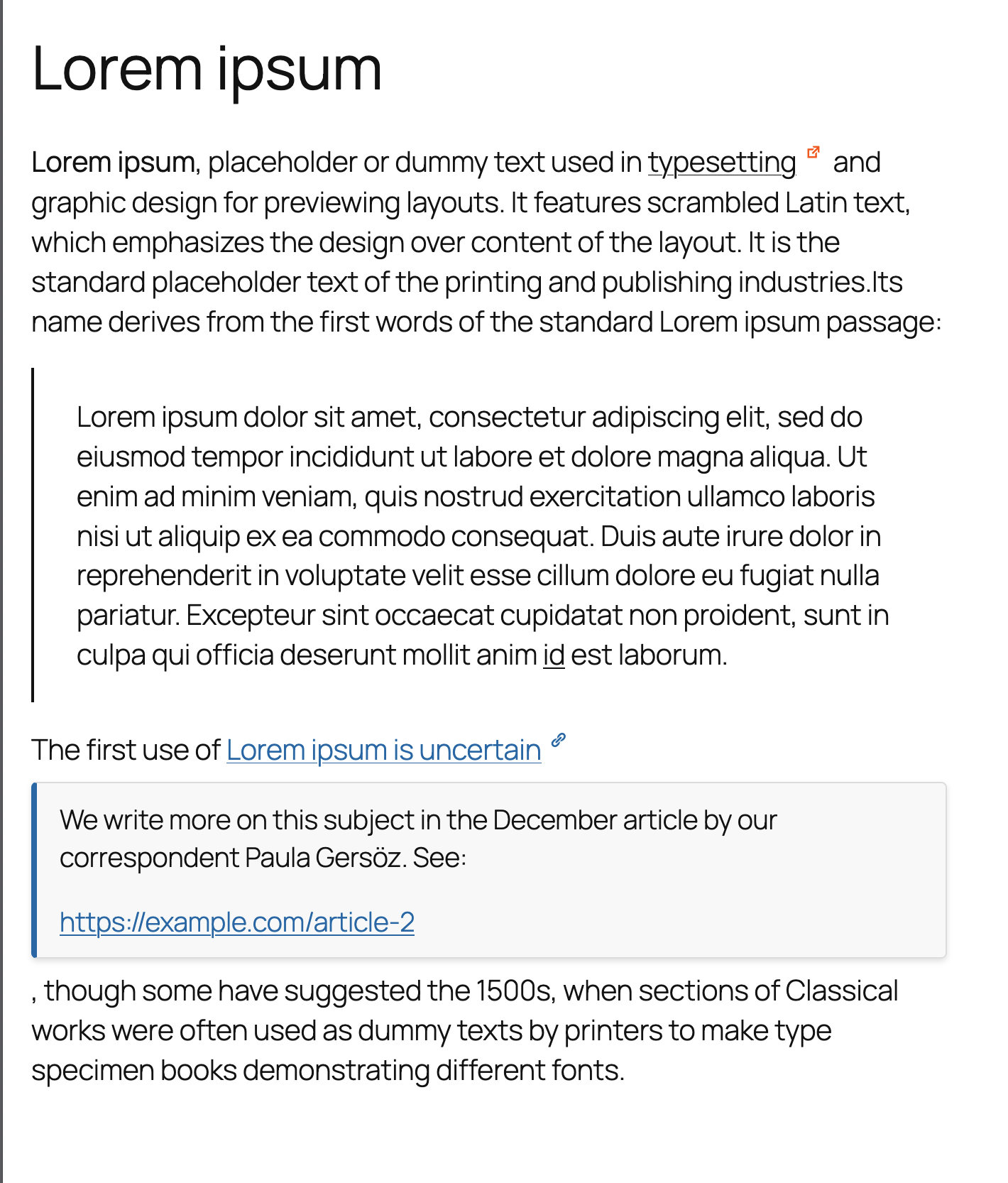
Inline context note on the frontend (default expanded mode)
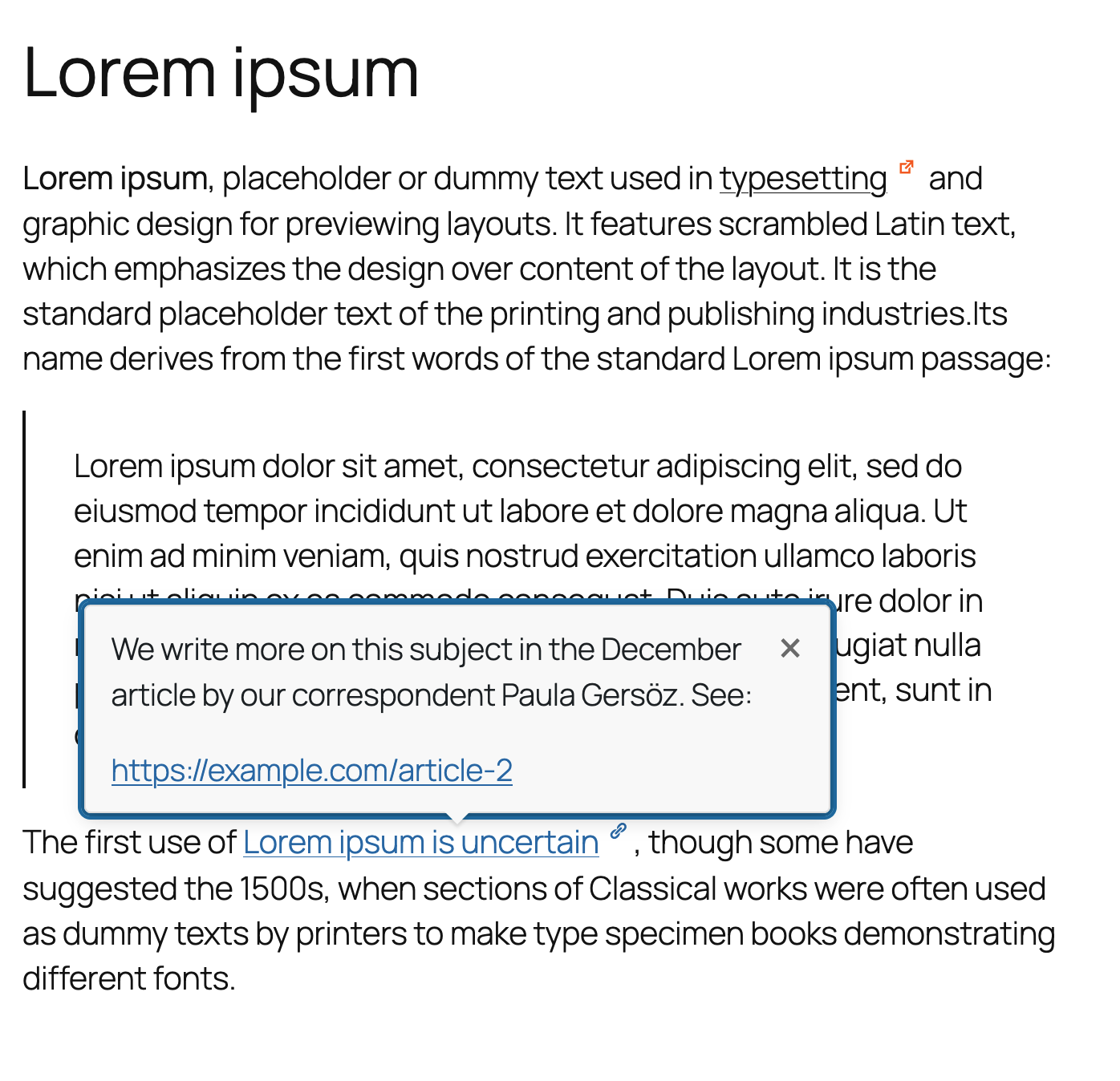
Tooltip version of the inline note on the frontend
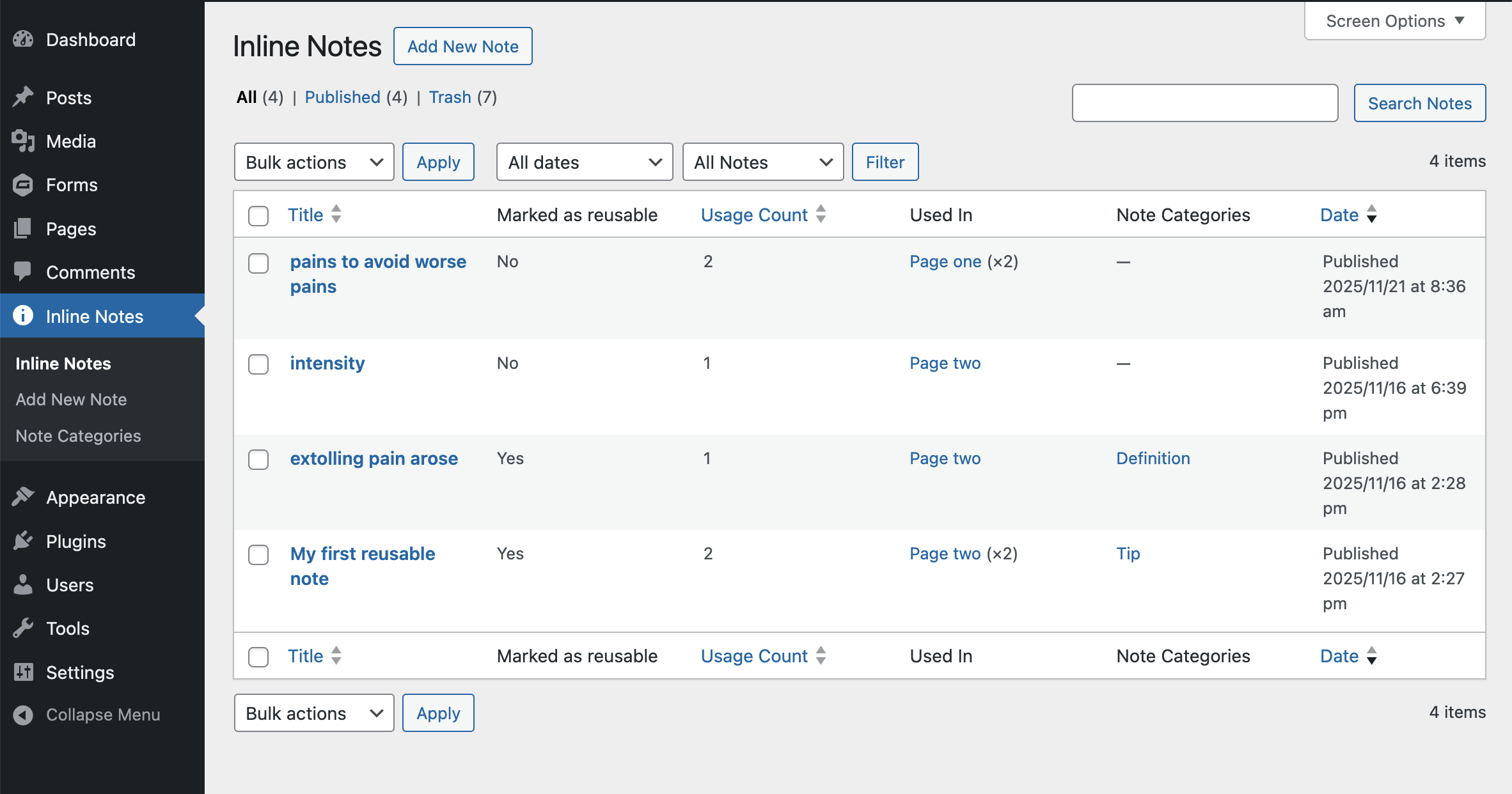
Notes Library in the admin area showing usage count and linked posts
Changelog
2.2.0
Reusable Note Management & Testing Infrastructure
Released: January 2025
✨ Note Management Features
* NEW: Convert reusable notes to non-reusable with automatic synchronization
* NEW: Modal confirmation dialog prevents accidental conversions
* NEW: PopoverActions component with reusable checkbox control
* NEW: Automatic cleanup cron job removes unused non-reusable notes daily
* IMPROVED: Note edit interface with clear reusability status
🧪 Testing & Quality
* NEW: PHPUnit testing infrastructure with WordPress Test Suite integration
* NEW: 18 comprehensive test methods covering CPT, REST API, and sync functionality
* NEW: .env configuration support for secure database credentials
* NEW: Testing documentation (TESTING.md, tests/README.md, TESTING-SETUP.md)
* NEW: Interactive test setup wizard (bin/setup-tests.sh)
* IMPROVED: Code quality checks integrated into release workflow
🎨 Demo & Display
* NEW: Display mode switcher in demo.html for testing inline/tooltip modes
* FIX: Dynamic display mode detection instead of static configuration
* FIX: Tooltip styles properly loaded via build/style-index.css
* IMPROVED: Demo page now fully demonstrates all plugin capabilities
🔧 Developer Experience
* NEW: Consolidated bin/ directory for all scripts (package.sh, test setup)
* IMPROVED: Markdown linting for documentation consistency
* IMPROVED: RELEASE.md documentation with complete release process
* IMPROVED: Better separation of development vs production assets
Migration Notes
* Seamless upgrade from v2.1.0 – no breaking changes
* Existing reusable notes can now be converted to non-reusable when needed
* All tests passing (18 tests, 38 assertions)
2.0.0
Major Release: Modular Architecture & Enhanced Code Quality
Released: November 12, 2025
🏗️ Architecture Overhaul
* REFACTOR: Complete modular restructuring – main file reduced from 2,291 to 391 lines (83% reduction)
* NEW: Six dedicated class-based modules for optimal separation of concerns:
– Inline_Context_CPT (855 lines) – Custom Post Type, metaboxes, admin UI
– Inline_Context_Sync (496 lines) – Usage tracking, reusable content sync, category sync
– Inline_Context_Deletion (198 lines) – Deletion protection, cleanup logic
– Inline_Context_REST_API (340 lines) – REST endpoints for search and tracking
– Inline_Context_Frontend (276 lines) – Noscript generation, KSES filtering, assets
– Inline_Context_Utils (182 lines) – Category management, CSS variables
* NEW: Clean bootstrap pattern with class initialization and dependency injection
* IMPROVED: Function-based admin settings (678 lines) kept for optimal structure
💎 Code Quality & Standards
* IMPROVED: Full WordPress coding standards compliance (JavaScript and PHP)
* IMPROVED: ESLint fixes – resolved 125 formatting issues and React Hooks dependencies
* IMPROVED: PHPCS fixes – proper indentation, translators comments, documented patterns
* IMPROVED: Pre-release quality gates – automatic linting before build/package
* IMPROVED: Comprehensive inline documentation and phpcs:ignore explanations
* FIX: All critical linting errors resolved (0 errors across codebase)
🔧 Developer Experience
* IMPROVED: Testable, maintainable modular architecture
* IMPROVED: Clear separation of concerns for easier debugging
* IMPROVED: Backward compatibility wrappers for legacy function calls
* IMPROVED: Enhanced extensibility through clean class interfaces
* IMPROVED: Optimized class autoloading and initialization
* IMPROVED: Better code organization for future feature additions
📦 Build & Release
* IMPROVED: Streamlined build process with automatic quality checks
* IMPROVED: Pre-packaging linting ensures clean releases
* IMPROVED: Verified clean compilation with webpack 5
* IMPROVED: Production-ready minified assets
🔄 Migration Notes
* Seamless upgrade from v1.5.0 – no data migration required
* Backward compatible – all v1.x functionality preserved
* Zero breaking changes – existing sites upgrade without issues
* Performance neutral – modular code has same runtime performance
Why version 2.0?
This release represents a fundamental architectural improvement that sets the foundation for future development. The modular structure makes the plugin significantly easier to maintain, test, and extend while maintaining full backward compatibility.
1.5.0
- NEW: Custom Post Type for reusable notes – create once, use everywhere
- NEW: Notes Library admin page with enhanced list view and filtering
- NEW: Live search in editor popover to find and insert existing notes
- NEW: Usage tracking – see which posts use each note
- NEW: Custom columns in CPT list (Reusable: Yes/No, Usage Count, Used In)
- NEW: Filter dropdown to show only reusable notes
- NEW: Delete warnings when removing notes that are actively used (3 locations)
- NEW: Comprehensive uninstall system with content cleanup options
- NEW: QuillEditor component for rich text editing with keyboard navigation
- IMPROVED: Editor popover with tabbed interface (Create/Search modes)
- IMPROVED: REST API endpoints for note search and usage tracking
- IMPROVED: Enhanced CPT editor with category taxonomy integration
- IMPROVED: Cached content architecture for optimal frontend performance
- IMPROVED: WordPress coding standards compliance (JavaScript and PHP)
- FIX: All JavaScript linting errors resolved (Prettier, ESLint)
- FIX: All PHP linting errors in new code resolved (PHPCS)
- FIX: DOMNode property snake_case warnings properly handled
1.4.1
- FIX: Restored proper progressive enhancement – inline notes when JavaScript enabled
- FIX: Endnotes section now correctly hidden when JavaScript is available
- IMPROVED: Simplified architecture – removed unnecessary admin settings
- IMPROVED: Better fallback for no-JS environments with footnotes at bottom
1.4.0
- NEW: Full accessibility support with server-side rendered endnotes
- NEW: Progressive enhancement for text-based browsers and RSS feeds
- NEW: Notes work in both JavaScript and no-JavaScript environments
- NEW: Print-friendly note display
- IMPROVED: Better WordPress coding standards compliance
- FIX: Updated composer.json version number to match plugin version
1.3.1
- IMPROVED: Refactored PHP code to split front-end and admin code
- IMPROVED: Refactored CSS code for compatibilitybility with themes
1.3.1
- IMPROVED: Refactored edit.js for better maintainability (919 lines 375 lines, 59% reduction)
- IMPROVED: Extracted utility functions into separate modules (anchor.js, text.js, clipboard.js)
- IMPROVED: Created custom hooks for state management (useInlineContext.js, useQuillKeyboardNav.js)
- IMPROVED: Split UI into reusable components (CategorySelector, QuillEditor, LinkControl, PopoverActions)
- FIX: Eliminated React Hook complexity warnings from ESLint
- IMPROVED: Updated webpack config to suppress bundle size warnings with documentation
- IMPROVED: Better code organization for easier testing and maintenance
1.3.0
- Added: Category management system with custom icons and colors
- Added: Visual icon picker modal with 30 curated Dashicons
- Added: Keyboard-accessible icon picker (Esc to close, Tab navigation, focus trapping)
- Added: Dual icon states (closed/open) with automatic toggling
- Added: Tabbed admin interface (Categories and Styling)
- Added: Comprehensive styling controls with helpful descriptions
- Added: Live preview with interactive note reveal
- Added: Superscript-style icon positioning
- Added: Category selector in editor popover
- Improved: Admin settings organization with clear sections
- Improved: Accessibility with ARIA labels and keyboard support
- Improved: Help text with visual examples and documentation links
- Fixed: Settings page now shows single success message
- Fixed: Preview shows accurate frontend styling with CSS variablesFor complete changelog including all patch versions, see changelog.txt
2.3.0
- NEW: Hover activation option for tooltips with configurable delay
- NEW: Smart hover behavior – tooltip stays open when moving mouse to content
- NEW: Conditional admin UI – hover option only visible in tooltip mode
- IMPROVED: Enhanced tooltip interaction and user experience
2.2.0
- NEW: PHPUnit testing infrastructure with WordPress Test Suite integration
- NEW: Convert reusable to non-reusable notes with automatic synchronization
- NEW: Testing documentation and interactive setup wizard
- IMPROVED: Enhanced PopoverActions component for better reusability control
2.1.0
- NEW: Tooltip display mode as alternative to inline expansion
- NEW: Smart tooltip positioning with viewport boundary detection
- NEW: Full keyboard support and accessibility features
- IMPROVED: Admin settings reorganized into 4 tabs
2.0.0
- NEW: Modular class-based architecture (83% main file reduction)
- NEW: Six dedicated classes for optimal separation of concerns
- IMPROVED: Full WordPress coding standards compliance
- IMPROVED: Enhanced maintainability and testability
1.5.0
- NEW: Custom Post Type for reusable notes
- NEW: Live search to find and insert existing notes
- NEW: Usage tracking and enhanced list view
- NEW: Auto-sync for reusable notes across all posts
1.0.0
- NEW: Initial public release with anchor-first architecture
- NEW: Unique anchor IDs for direct URL linking
- NEW: ReactQuill editor and DOMPurify security
- NEW: Smart link behavior and accessibility features