

Insert Html Snippet
Add HTML, CSS and javascript code to your pages and posts easily using shortcodes.
Plugin info
Maintenance & Compatibility
Maintenance score
Maintained • Last updated 162 days ago • 235 reviews
Is Insert Html Snippet abandoned?
Likely maintained (last update 162 days ago).
Compatibility
Similar & Alternatives
Explore plugins with similar tags, and compare key metrics like downloads, ratings, updates, support, and WP/PHP compatibility.
Description
A quicklook into Insert Html Snippet
★ Convert HTML snippets to shortcodes
★ Convert Javascript codes to shortcodes
★ Convert CSS codes to shortcodes
★ Support for snippet shortcodes in widgets
★ Dropdown menu in TinyMCE editor to pick snippet shortcodes easily
★ Insert adsense or any adcode
★ Insert addthis or any social bookmarking code
★ Insert flash, videos etc. to your posts,pages and widgets
Features in Detail
Insert Html Snippet allows you to create shortcodes corresponding to html snippets. You can create a shortcode corresponding to any random HTML code such as ad codes (adsense or any adserver), javascript codes (addthis), video embedding codes, css codes etc. and use the same in your posts, pages or widgets.
The shortcodes generated using the plugin are easily available as a dropdown in the standard wordpress content editor as well as in widget settings, thereby giving you ease of integrating your HTML snippets with your posts and pages.
About
Insert Html Snippet is developed and maintained by XYZScripts. For any support, you may contact us.
★ Insert HTML Snippet User Guide
★ Insert HTML Snippet FAQ
More Information
★ Insert HTML Snippet User Guide
★ Insert HTML Snippet FAQ
Troubleshooting
Please read the FAQ first if you are having problems.
Requirements
WordPress 5.0+
PHP 7+
Feedback
We would like to receive your feedback and suggestions. You may submit them at our support desk.
Installation
★ Insert HTML Snippet User Guide
★ Insert HTML Snippet FAQ
- Extract
insert-html-snippet.zipto your/wp-content/plugins/directory. - In the admin panel under plugins activate Insert Html Snippet.
If you need any further help, you may contact our support desk.
Frequently Asked Questions
★ Insert HTML Snippet User Guide
★ Insert HTML Snippet FAQ
Please check the wordpress version you are using. Make sure it meets the minimum version recommended by us. Make sure all files of the insert html snippet plugin uploaded to the folder wp-content/plugins/
Yes ofcourse.
Please use a whitespace to separate 2 shortcodes.
More questions ? Drop a mail and we shall get back to you with the answers.
Review feed
Screenshots
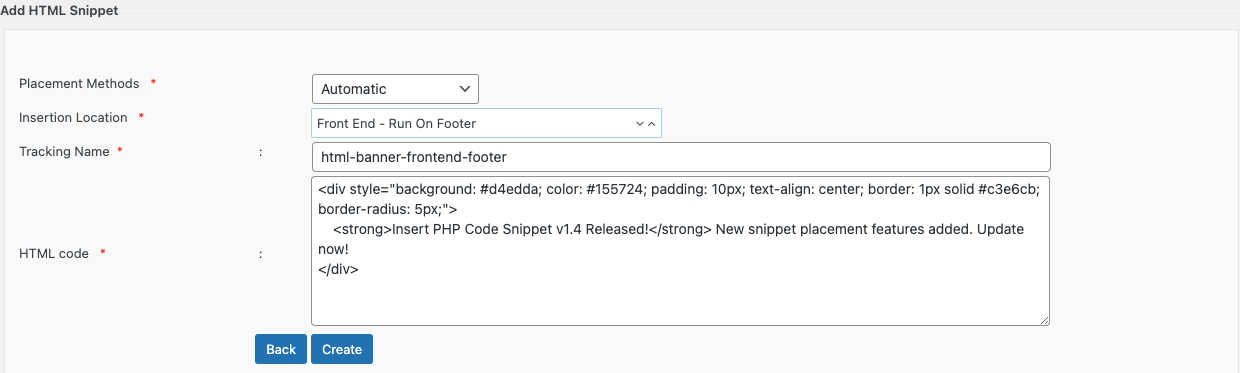
This is the shortcode generator page
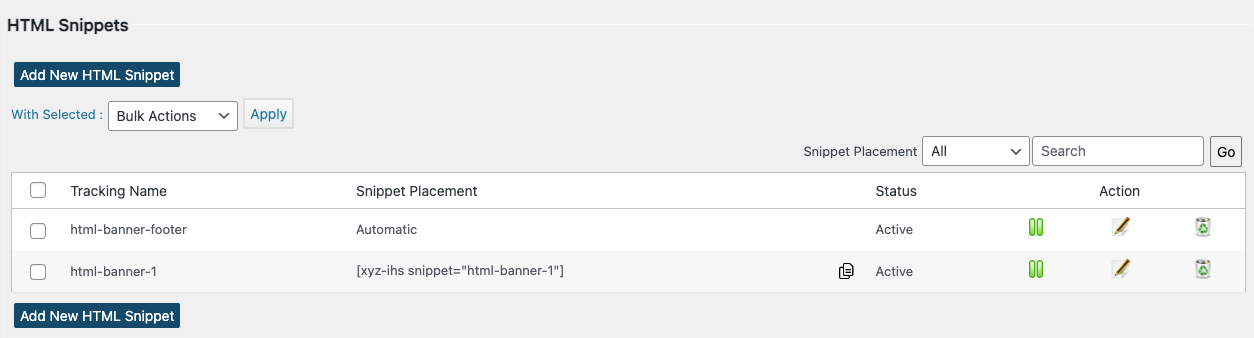
This is page where you can manage all your snippets
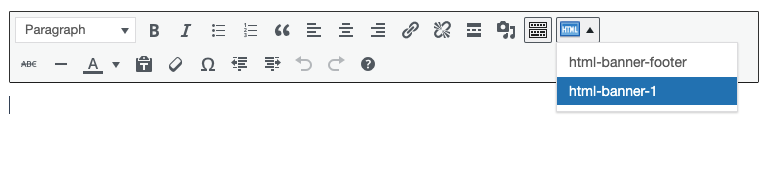
The shortcodes are easily accessible in the content editor
Changelog
1.4.3
- Added snippet description field
- Minor bug fixes and compatibility updates
- CSS & JS files now versioned to fix caching
1.4.2
- Added a warning note that plugin data will be lost if the plugin is deleted
- Updated redirects to use wp_safe_redirect() for improved security
1.4.1
- Added version check to trigger DB updates and clear cache on updates
1.4
- Added new Snippet Placement Methods: Automatic and Shortcode (Manual) for more flexible snippet placement options.
- Added Snippet Placement filter on the Manage Snippets page
- Improved compatibility with the latest WordPress versions
- Fixed minor bugs and optimized performance.
1.3.8
- Added “Execute shortcodes in editors” setting for Elementor and other editor compatibility
- Updated about page with new premium feature details, including automatic placement locations
1.3.7
- Updated nonce verification for bulk actions to prevent CSRF attacks
- Compatibility with WordPress 6.6.1
1.3.6
- Prevented shortcode execution in the admin area
- Renamed menu from XYZ HTML to Insert HTML Snippet
- Minor bugs fixed
1.3.5
- Patch security vulnerability
- Compatibility with latest version of WordPress
1.3.4
- Minor bugs fixed
- Compatibility with latest version of WordPress
1.3.3
- Minor bugs fixed
1.3.2
- Database collation issue fixed
- Minor bugs fixed
1.3.1
- Notice errors fixed
1.3
- Snippet selection support in classic editor block of Gutenberg
- Support for Search Snippet by name
- Navigation Improvements
1.2.5
- Support for Bulk Actions(activate,deactivate,delete)
1.2.4
- Removed deprecated widget initializing function
1.2.3
- Updated nonces and validations
- Premium version details and comparison added
1.2.2
- Unwanted output removed
- Widget class updated
1.2.1
- A few bug fixes
1.2
- Compatibility with wordpress 4.3
- Added options to sort snippets in admin area by id and title
- Removed redirection after snippet edit
1.1.1
- Compatibility with wordpress 3.9
1.1
- Support for shortcodes in html content
- Snippet chooser TinyMCE plugin modified
- A few bug fixes
1.0.1
- Support for network installation
- Pagination bug fix
1.0
- First official launch.